
Onion Browser Button од Benthum
Easily browse the internet using TOR proxy with just one click!
838 корисника838 корисника
Метаподаци додатка
Снимци екрана

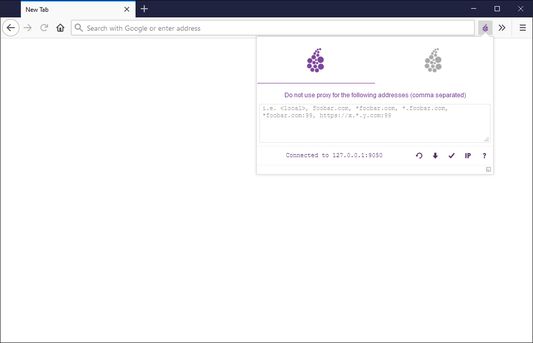
О овом додатку
Onion Browser Button is a lite add-on that let you easily connect to TOR network in your browser (browse under TOR proxy).
Important note: this addon does NOT belong or relate to Tor® project and has NO affiliations with Tor® anonymity software or website at all. It is basically an unofficial extension that is developed and maintained independently by its author.
Note: in the Firefox browser, you need to enable "Run in Private Windows" for this addon (via addon's tab). Otherwise, the proxy setting will not be activated in the browser.
Before using the addon please make sure your computer (PC or MAC) is connected to TOR. If you do NOT know how to connect your PC or MAC to the TOR network please read the following. A separate patch is prepared, to help users easily connect to the TOR network. In order to get the patch please visit this GitHub repo and download (mac.zip) or (win.zip) files.
After downloading the patch to your computer, please follow the below steps to connect your machine to TOR network.
1. If you have Windows machine, please download and unzip "win.zip" file to your computer, and if you have Mac download and unzip "mac.zip".
2. For windows machine, please open downloaded "win" folder and run "run.bat" file within the folder. For Mac please open "win" folder and run "run.sh" file.
3. You will see the screen with 6 options. In order to start TOR connection on your computer, please press 1 on your keyboard, once "Tor is connected successfully!" message is displayed, you can use Tor Browser Button add-on to connect your browser to the TOR network. To stop TOR connection please press 2. In order to get a new TOR identity, please press 5 and to restart TOR connection, please press 6 on your keyboard.
Note: to report bugs, please visit addon's homepage and fill the bug report form.
Important note: this addon does NOT belong or relate to Tor® project and has NO affiliations with Tor® anonymity software or website at all. It is basically an unofficial extension that is developed and maintained independently by its author.
Note: in the Firefox browser, you need to enable "Run in Private Windows" for this addon (via addon's tab). Otherwise, the proxy setting will not be activated in the browser.
Before using the addon please make sure your computer (PC or MAC) is connected to TOR. If you do NOT know how to connect your PC or MAC to the TOR network please read the following. A separate patch is prepared, to help users easily connect to the TOR network. In order to get the patch please visit this GitHub repo and download (mac.zip) or (win.zip) files.
After downloading the patch to your computer, please follow the below steps to connect your machine to TOR network.
1. If you have Windows machine, please download and unzip "win.zip" file to your computer, and if you have Mac download and unzip "mac.zip".
2. For windows machine, please open downloaded "win" folder and run "run.bat" file within the folder. For Mac please open "win" folder and run "run.sh" file.
3. You will see the screen with 6 options. In order to start TOR connection on your computer, please press 1 on your keyboard, once "Tor is connected successfully!" message is displayed, you can use Tor Browser Button add-on to connect your browser to the TOR network. To stop TOR connection please press 2. In order to get a new TOR identity, please press 5 and to restart TOR connection, please press 6 on your keyboard.
Note: to report bugs, please visit addon's homepage and fill the bug report form.
Оцењено са 3,6 од стране 33 рецензената
Овлашћења и подаци
Потребна овлашћења:
- Покажите обавештења
- Управљајте поставкама посредника прегледача
Необавезна овлашћења:
- Приступ вашим подацима за check.torproject.org
Више информација
- Издање
- 0.2.6
- Величина
- 110,65 KB
- Последњи пут ажурирано
- pre jedne godine (23. jul 2025.)
- Повезане категорије
- Дозвола
- Јавна дозвола Mozilla 2.0
- Политика приватности
- Прочитајте политику приватности за овај додатак
- Историјат издања
- Додај у збирку
Програмер овог додатка вас моли да помогнете у подршци за његов даљи развој тако што ћете дати мали допринос.