Hide Subscribed Listing nga Asjad
Hide YouTube subscribed videos by clicking on thumbnail of videos on subscription page.
Tejtëdhëna Zgjerimi
Foto ekrani
Rreth këtij zgjerimi
Hide subscribed Listing
Hide YouTube subscribed videos by clicking on thumbnail of videos on subscription page.
How to use
Hide YouTube subscribed videos by clicking on thumbnail of videos on subscription page.
How to use
- Download and Install Extension
- Go to subscription page of YouTube web app
- Wait for the page to load
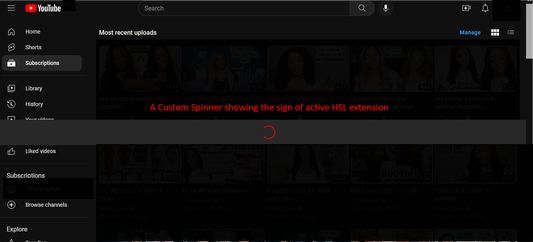
- A custom spinner will appear that will do some page modification
- Wait for the spinner to disappear
- Click on a video's thumbnail
- That video will be hidden from the subscription page
- Enjoy :)
Vlerësuar me 3 nga 1 shqyrtues
Leje dhe të dhëna
Leje të domosdoshme:
- Të shfaqë njoftime për ju
- Të hyjë në skeda të shfletuesit
- Të hyjë në të dhënat tuaja për www.youtube.com
Më tepër të dhëna
- Version
- 1.32
- Madhësi
- 108,76 KB
- Përditësuar së fundi më
- 2 vite më parë (31 Kor 2023)
- Kategori të Afërta
- Licencë
- Tërë të Drejtat të Rezervuara
- Historik Versionesh
- Shtojeni në koleksion