LeechBlock NG от James Anderson
LeechBlock NG is a simple productivity tool designed to block those time-wasting sites that can suck the life out of your working day. All you need to do is specify which sites to block and when to block them.
Метаданные расширения
LeechBlock NG (Next Generation) is a simple free productivity tool designed to block those time-wasting sites that can suck the life out of your working day. (You know: the ones that rhyme with 'Blue Cube', 'Space Hook', 'Sticky Media', 'Quitter', and the like.) All you need to do is specify which sites to block and when to block them.
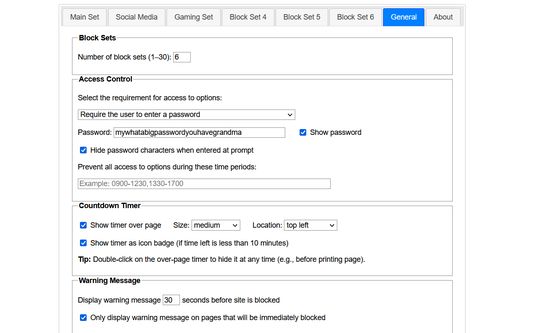
You can specify up to 30 sets of sites to block, with different times and days for each set. You can block sites within fixed time periods (e.g., between 9am and 5pm), after a time limit (e.g., allow up to 10 minutes in every hour), or with a combination of time periods and time limit (e.g., allow up to 10 minutes in every hour between 9am and 5pm).
Additional features:
Version history: https://www.proginosko.com/leechblock/version-history/
Usage examples: https://www.proginosko.com/leechblock/examples/
Permissions explained: https://www.proginosko.com/leechblock/faq/permissions/
Frequently asked questions: https://www.proginosko.com/leechblock/faq/
Community support: https://www.tapatalk.com/groups/leechblock/
You can specify up to 30 sets of sites to block, with different times and days for each set. You can block sites within fixed time periods (e.g., between 9am and 5pm), after a time limit (e.g., allow up to 10 minutes in every hour), or with a combination of time periods and time limit (e.g., allow up to 10 minutes in every hour between 9am and 5pm).
Additional features:
- Lockdown: Block sites immediately for a specified duration.
- Access control: Set a password or random access code for the options page, to slow you down in moments of weakness!
- Delaying: Set a countdown to delay access to sites instead of completely blocking them.
- Wildcards: Block a range of sites (e.g., *.somesite.com).
- Exceptions: Whitelist sites you don't want to be blocked (e.g., +allowedsite.com).
Version history: https://www.proginosko.com/leechblock/version-history/
Usage examples: https://www.proginosko.com/leechblock/examples/
Permissions explained: https://www.proginosko.com/leechblock/faq/permissions/
Frequently asked questions: https://www.proginosko.com/leechblock/faq/
Community support: https://www.tapatalk.com/groups/leechblock/
Please check the FAQ page, examples page, and community support forum before emailing support queries to the developer. Thanks!
Сообщить о нарушении правил этим дополнением
Если вы считаете, что это дополнение нарушает политики Mozilla в отношении дополнений, или имеет проблемы с безопасностью или приватностью, сообщите об этих проблемах в Mozilla, используя эту форму.
Не используйте эту форму, чтобы сообщать об ошибках или запрашивать новые функции в дополнении; это сообщение будет отправлено в Mozilla, а не разработчику дополнения.
Разработчик этого расширения просит вас помочь поддержать его дальнейшее развитие, внеся небольшое пожертвование.
Этому дополнению нужно:
- Загружать файлы, а также читать и изменять историю загрузок браузера
- Получать доступ ко вкладкам браузера
- Получать доступ к активности браузера при навигации
- Получать доступ к вашим данных на всех сайтах
Это дополнение может также запрашивать:
- Получать доступ к вашим данных на всех сайтах
- Ссылки дополнения
- Версия
- 1.0.6.2
- Размер
- 369,75 КБ
- Последнее обновление
- 24 дня назад (31 авг. 2020 г.)
- Лицензия
- Mozilla Public License, version 2.0
- История версий
Version 1.0.6.2 (31 Aug 2020)
- Fixed bug affecting time limit blocking.
- Оценок пока нет
- Оценок пока нет
- Оценок пока нет
- Оценок пока нет
- Оценок пока нет
- Оценок пока нет