
Cap от Sasa Cocic
Stop yourself from spending too much time on websites your know you shouldn't be. Set limits, automatically track your time, and block websites after reaching your limit.
2 пользователя2 пользователя
Метаданные расширения
Скриншоты


Об этом расширении
Disappointment. And a bit of Guilt. Two feelings I experience after spending mindless hours on the internet. It's a common story for me, and maybe for you. The story goes something like this for me: I get on youtube and tell myself "I'll just watch a few videos" or "I'll just watch one", but it's not long before I've spent a few hours and I'm watching "Seal farts after looking directly at me" and "Trump mistakenly calls Lil Pump "Little Pimp" at last rally". This happens all over the internet for me, but especially on popular websites: Facebook, Twitter, Reddit, etc. It happens because these websites are all built to keep me on them, and I think I have the self control to stop anytime, which obviously isn't the case, because I'm endlessly browsing.
After my last binge-spree I got sick of feeling disappointed in myself and spending hours of my life on mindless entertainment. That's why I made Cap, to stop the endless browsing.
Cap stops you from spending too much time in places you know you shouldn't. Here's what it can do for you:
Stop endless browsing get Cap now!
After my last binge-spree I got sick of feeling disappointed in myself and spending hours of my life on mindless entertainment. That's why I made Cap, to stop the endless browsing.
Cap stops you from spending too much time in places you know you shouldn't. Here's what it can do for you:
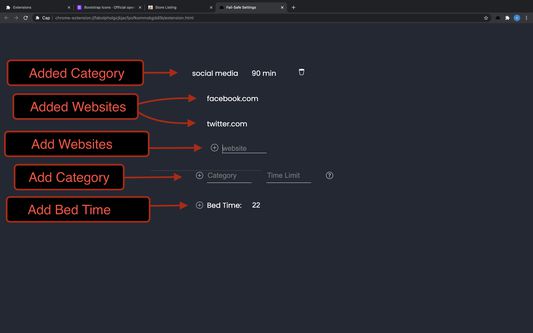
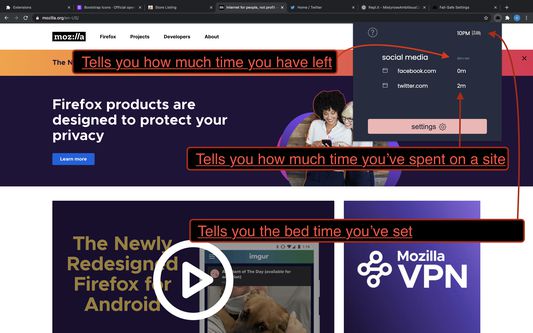
- Cap gives you the ability to set time limits on websites or categories of websites, and automatically keep track of how much time you've spent on each one. Once you reach your limit Cap will completely block you from the websites. When I say block I mean block. You're not going to be able to view it for 5 more minutes or anything like that.
- E.g. I want to only allow myself 30 minutes on my social media websites every day. So I would create a category called "Social Media" and put my websites under it: Twitter, Reddit, Facebook.
After I've spent 30 minutes total on these websites Cap will block me from visiting any of them.
- E.g. I want to only allow myself 30 minutes on my social media websites every day. So I would create a category called "Social Media" and put my websites under it: Twitter, Reddit, Facebook.
- Optionally allows you to set a bed time for yourself. When you set a bed time all websites become blocked after that time.
- E.g. I have a bad problem with surfing Youtube when I'm suppose to be sleeping, so I set my bed time for 10pm, and Cap blocks me from watching those Youtube videos.
- E.g. I have a bad problem with surfing Youtube when I'm suppose to be sleeping, so I set my bed time for 10pm, and Cap blocks me from watching those Youtube videos.
Stop endless browsing get Cap now!
Оценено 1 рецензентом на 5
Разрешения и данные
Требуемые разрешения:
- Получать доступ ко вкладкам браузера
- Получать доступ к вашим данных на всех сайтах
Больше сведений
- Ссылки дополнения
- Версия
- 1.1.22
- Размер
- 202,21 КБ
- Последнее обновление
- 5 лет назад (5 янв. 2021 г.)
- Связанные категории
- Лицензия
- Лицензия MIT
- История версий
- Добавить в подборку