
PastePass - Enable Right Click and Paste от Chitranjan Kumar Gupta
Easily Paste Anywhere, Even on Restricted Websites!
142 пользователя142 пользователя
Метаданные расширения
Скриншоты
Об этом расширении
PastePass: Unlock Efficient Password Management
https://youtu.be/wHqyhzPBaIA
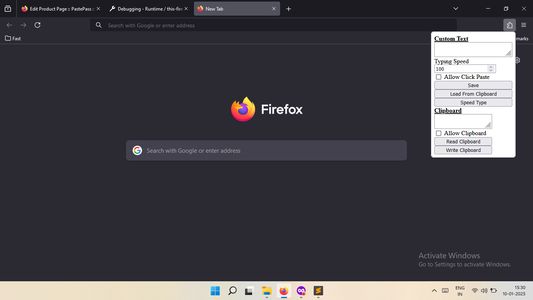
PastePass is a convenient Firefox addon designed to enhance your browsing experience, particularly on websites that restrict right-click functionality. With PastePass, you can effortlessly paste content from your clipboard into input fields and text areas with a simple click.
Key Features:
- Easy Paste: Enable the addon and click on any input field or text area to paste content from your clipboard, bypassing website restrictions.
- Password Reveal: A dedicated button is added to password input fields, allowing you to view the password as plain text, making it easier to manage and verify your credentials.
Benefits:
- Simplify your browsing experience by overcoming right-click restrictions.
- Efficiently manage your passwords with the password reveal feature.
- Compatible with a wide range of websites.
Installation and Usage:
- Install PastePass from the Firefox Addons store.
- Enable the addon from the Firefox toolbar or addons menu.
- Click on any input field or text area to paste content from your clipboard.
- Use the password reveal button to view passwords as plain text.
Enhance Your Browsing Experience Today!
Download PastePass now and discover a more streamlined and efficient way to interact with websites.
This extension is available for Edge Browser also
https://microsoftedge.microsoft.com/addons/detail/pastepass/ljljoebbabeaaofpdomohljodfhjloic
https://youtu.be/wHqyhzPBaIA
PastePass is a convenient Firefox addon designed to enhance your browsing experience, particularly on websites that restrict right-click functionality. With PastePass, you can effortlessly paste content from your clipboard into input fields and text areas with a simple click.
Key Features:
- Easy Paste: Enable the addon and click on any input field or text area to paste content from your clipboard, bypassing website restrictions.
- Password Reveal: A dedicated button is added to password input fields, allowing you to view the password as plain text, making it easier to manage and verify your credentials.
Benefits:
- Simplify your browsing experience by overcoming right-click restrictions.
- Efficiently manage your passwords with the password reveal feature.
- Compatible with a wide range of websites.
Installation and Usage:
- Install PastePass from the Firefox Addons store.
- Enable the addon from the Firefox toolbar or addons menu.
- Click on any input field or text area to paste content from your clipboard.
- Use the password reveal button to view passwords as plain text.
Enhance Your Browsing Experience Today!
Download PastePass now and discover a more streamlined and efficient way to interact with websites.
This extension is available for Edge Browser also
https://microsoftedge.microsoft.com/addons/detail/pastepass/ljljoebbabeaaofpdomohljodfhjloic
Оценено 1 рецензентом на 5
Разрешения и данные
Требуемые разрешения:
- Получать данные из буфера обмена
- Помещать данные в буфер обмена
- Получать доступ к вашим данных на всех сайтах
Больше сведений
- Ссылки дополнения
- Версия
- 1.0
- Размер
- 18,97 КБ
- Последнее обновление
- год назад (10 янв. 2025 г.)
- Связанные категории
- Лицензия
- Лицензия MIT
- История версий
- Добавить в подборку