WebExtension for TouchpadGestures Advanced de kamektx
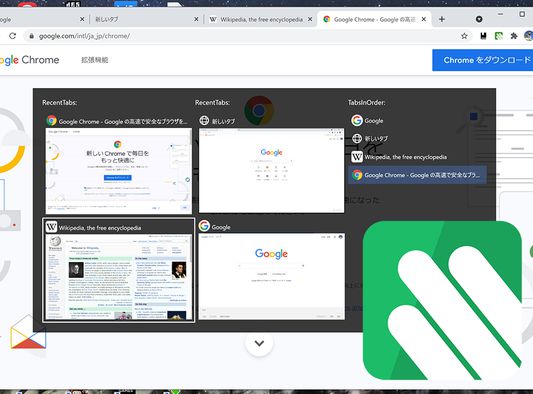
This Application was created to work with TouchpadGestures Advanced. You can switch tabs in a popup window by stroking the touchpad down with 3 fingers. https://github.com/kamektx/TouchpadGestures_Advanced
1 utilizator1 utilizator
Metadate extensie
Capturi de ecran
Despre această extensie
This Application was created to work with TouchpadGestures Advanced. To use this extension, you have to install TouchpadGestures Advanced software to your PC locally.
https://github.com/kamektx/TouchpadGestures_Advanced
What is TouchpadGestures Advanced?
This Application was created to extend the multi-fingered gesture experience of your Precision Touchpad.
The standard feature of Windows 10 allows users to switch foreground windows by sliding your touchpad with three-fingers to the right. This application also allows users to switch tabs within a window with similar touchpad gestures.
What can this application do?
- You can type Ctrl (+ Shift) + Tab by stroking the touchpad up and down with 3 fingers.
- With WebExtension(https://github.com/kamektx/WebExtensions_for_TGA), you can switch tabs by pop-up windows.
How to Use?
- This application is for **Windows 10** only.
- Download the installer in Releases page.
- Unzip the installer's zip.
- Run "setup.exe".
- Change your default touchpad gesture settings on Windows; Press start button, Go to Settings, Open "Devices", Select "Touchpad" tab, Click "Advanced gesture configuration" button, In "Configure your three finger gestures" paragraph, Set "Up" and "Down" to "Nothing". To set "Right" to "Switch apps" is recommended.
- Install WebExtension for TGA.
https://github.com/kamektx/TouchpadGestures_Advanced
What is TouchpadGestures Advanced?
This Application was created to extend the multi-fingered gesture experience of your Precision Touchpad.
The standard feature of Windows 10 allows users to switch foreground windows by sliding your touchpad with three-fingers to the right. This application also allows users to switch tabs within a window with similar touchpad gestures.
What can this application do?
- You can type Ctrl (+ Shift) + Tab by stroking the touchpad up and down with 3 fingers.
- With WebExtension(https://github.com/kamektx/WebExtensions_for_TGA), you can switch tabs by pop-up windows.
How to Use?
- This application is for **Windows 10** only.
- Download the installer in Releases page.
- Unzip the installer's zip.
- Run "setup.exe".
- Change your default touchpad gesture settings on Windows; Press start button, Go to Settings, Open "Devices", Select "Touchpad" tab, Click "Advanced gesture configuration" button, In "Configure your three finger gestures" paragraph, Set "Up" and "Down" to "Nothing". To set "Right" to "Switch apps" is recommended.
- Install WebExtension for TGA.
Evaluat cu 0 de către 0 recenzori
Permisiuni și date
Permisiuni necesare:
- Să facă schimb de mesaje cu alte programe în afară de Firefox
- Să acceseze filele browserului
- Să îți acceseze datele pentru toate site-urile web
Mai multe informații
- Linkurile suplimentului
- Versiune
- 0.2.9
- Mărime
- 194,9 KB
- Ultima actualizare
- 5 ani în urmă (29 iul. 2021)
- Categorii conexe
- Licență
- Licență MIT
- Istoricul versiunilor
- Adaugă în colecție