Suplimente pentru Firefox
  • Extensii
  • Teme
    • pentru Firefox
    • Dicționare și pachete lingvistice
    • Site-uri pentru alte browsere
    • Suplimente pentru Android
Intră în cont
Previzualizare Save to PDF now - with no preview

Save to PDF now - with no preview de jscher2000

Firefox can Print to PDF but some users want to speed it up by skipping the preview. Now you can call Firefox's built-in Save to PDF feature using a toolbar button, keyboard shortcut, or the right-click context menu.

3.5 (6 revizuiri)3.5 (6 revizuiri)
155 de utilizatori155 de utilizatori
Descarcă Firefox și obține extensia
Descarcă fișierul

Metadate extensie

Capturi de ecran
Use the toolbar button to print and also to manage custom settings. (Find the add-on button on the Extensions button drop-down.)Don't need a toolbar button? Use the right-click context menu on a blank area of the page.Don't want the context menu item? Use the toolbar button's right-click context menu to hide it.Customize your keyboard shortcut on the Add-ons page.
Despre această extensie
Three ways to print

Best for pages that you know will print correctly from past experience, since there's no preview.

Toolbar button

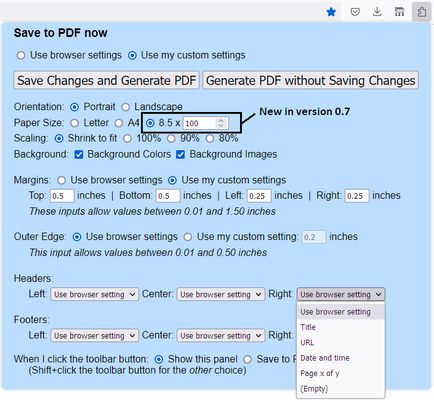
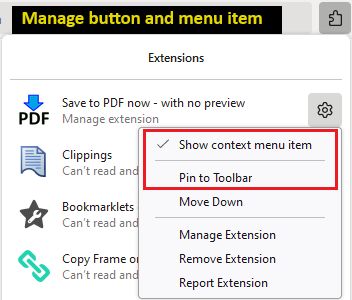
Click the button to open the setup panel. Print without customizing, or set your own margins, headers/footers, etc. Note: for quicker access, pin the button to the main part of the toolbar using the steps in Manage your extensions using the extensions button in the toolbar.

Or Shift+click the button to immediately generate the PDF. If you prefer to make a regular click do this, look for the "When I click the toolbar button" setting on the setup panel, and use Save Changes and Generate PDF to save it.

Right-click context menu

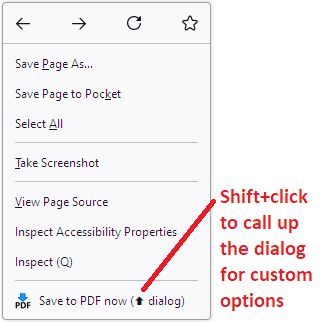
Regular click the "Save to PDF now" menu item to immediately generate the PDF. Shift+click it to drop the setup panel and customize your margins, header/footers, etc. (Note: drop-down doesn't appear in popup windows that do not have a regular toolbar.)

If you want to reduce menu clutter, you can remove this item. Right-click the toolbar button and uncheck "Show context menu item."

Keyboard shortcut

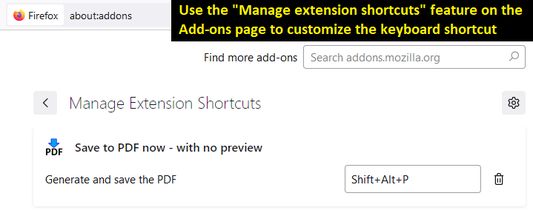
By default, Shift+Alt+P will immediately generate the PDF. Since this is a bit awkward, you can customize the keyboard shortcut using the steps in this support article: Manage extension shortcuts in Firefox.
Evaluat cu 3,5 de către 6 recenzori
Intră în cont pentru a evalua această extensie
Nu există încă evaluări

Evaluarea prin stele a fost salvată

5
2
4
2
3
0
2
1
1
1
Citește toate cele 6 recenzii
Mai multe informații
Linkurile suplimentului
  • Pagină de start
  • Site pentru asistență
  • E-mail pentru asistență
Versiune
0.9
Mărime
23,91 KB
Ultima actualizare
2 ani în urmă (19 mart. 2024)
Categorii conexe
  • Altele
Licență
Mozilla Public License 2.0
Istoricul versiunilor
  • Vezi toate versiunile
Adaugă în colecție
Raportează acest supliment
Du-te pe pagina de start Mozilla

Suplimente

  • Despre
  • Blog suplimente Firefox
  • Atelier de extensii
  • Centrul dezvoltatorilor
  • Politicile dezvoltatorilor
  • Blogul comunității
  • Forum
  • Raportează o defecțiune
  • Ghid pentru recenzii

Browsere

  • Desktop
  • Mobile
  • Enterprise

Produse

  • Browsers
  • VPN
  • Relay
  • Monitor
  • Pocket
  • Bluesky (@firefox.com)
  • Instagram (Firefox)
  • YouTube (firefoxchannel)
  • Confidențialitate
  • Cookie-uri
  • Mențiuni legale

Cu excepția cazurilor când se specifică altfel, conținutul de pe acest site este licențiat sub licența Creative Commons cu atribuire și distribuire în condiții identice v3.0 sau orice versiune ulterioară.