
RSS Sidebar de David Youster
Simple feed reader and aggregator for RSS and Atom feeds.
99 de utilizatori99 de utilizatori
Metadate extensie
Capturi de ecran
Despre această extensie
RSS Sidebar is a simple feed reader and aggregator for Firefox.
Once the extension is installed, the sidebar can be accessed either by clicking the toolbar icon, or navigating to View > Sidebar > RSS.
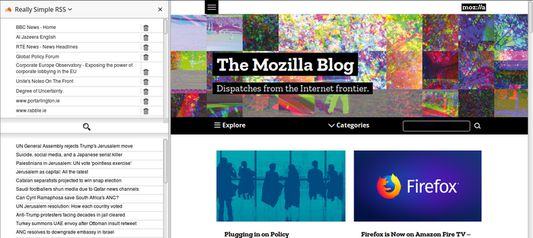
The top panel (by default) in the sidebar displays your list of saved feeds. Selecting one of these will display the titles of the items in that feed. Selecting a feed title in the panel below will send you to the page referenced.
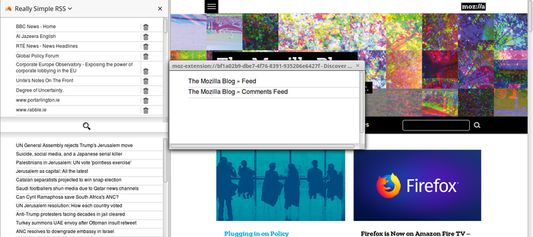
To check for feeds on a page, click the magnifying glass icon in the middle of the sidebar. If any feeds are detected, they will be displayed in the opened dialog window. Simply click the title of any discovered feed you want to save and you should see your feed list update immediately.
The extension saves its feed list in a bookmarks folder titled 'Simple Feeds'. Saved feeds can be edited as you would edit the contents of any other bookmarks folder. To add a feed manually, open it in your browser and bookmark it under the 'Simple Feeds' folder. The add on should pick it up automatically the next time you open the sidebar.
On the preferences page, you can choose to display the feed items on the top or the bottom of the panel by checking or unchecking the checkbox and clicking 'Save'.
Once the extension is installed, the sidebar can be accessed either by clicking the toolbar icon, or navigating to View > Sidebar > RSS.
The top panel (by default) in the sidebar displays your list of saved feeds. Selecting one of these will display the titles of the items in that feed. Selecting a feed title in the panel below will send you to the page referenced.
To check for feeds on a page, click the magnifying glass icon in the middle of the sidebar. If any feeds are detected, they will be displayed in the opened dialog window. Simply click the title of any discovered feed you want to save and you should see your feed list update immediately.
The extension saves its feed list in a bookmarks folder titled 'Simple Feeds'. Saved feeds can be edited as you would edit the contents of any other bookmarks folder. To add a feed manually, open it in your browser and bookmark it under the 'Simple Feeds' folder. The add on should pick it up automatically the next time you open the sidebar.
On the preferences page, you can choose to display the feed items on the top or the bottom of the panel by checking or unchecking the checkbox and clicking 'Save'.
Evaluat cu 3,3 de către 9 recenzori
Permisiuni și date
Permisiuni necesare:
- Să citească și să modifice marcaje
- Să îți acceseze datele pentru toate site-urile web
Permisiuni opționale:
- Să îți acceseze datele pentru toate site-urile web
Mai multe informații
- Linkurile suplimentului
- Versiune
- 2.1.1
- Mărime
- 42,46 KB
- Ultima actualizare
- 10 luni în urmă (21 mai 2025)
- Categorii conexe
- Licență
- Mozilla Public License 2.0
- Istoricul versiunilor
- Adaugă în colecție