
Next Meeting de STNC
Enhances Google Meet meetings including adding a button that lets you join the next meeting on your calendar directly from the current one.
Vei avea nevoie de Firefox pentru a folosi această extensie
Metadate extensie
Capturi de ecran



Despre această extensie
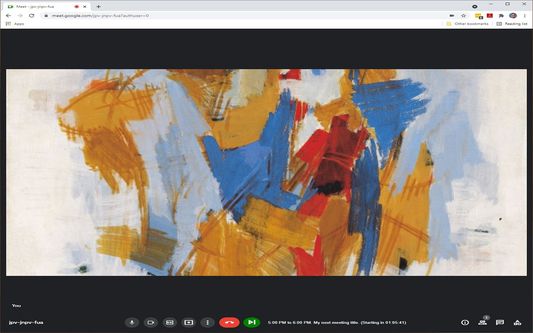
Adds a button to Google Meet meetings that lets you join the next meeting on your calendar directly from the current one.
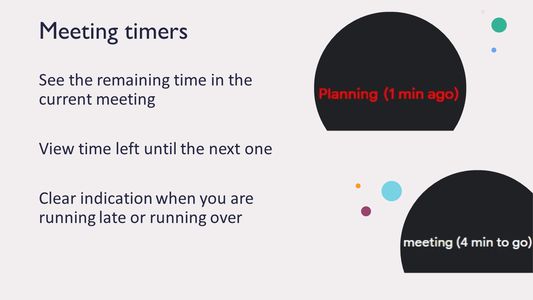
A green "Next Meeting" button and associated text showing the title and time to the next meeting will be shown if you are in an active meeting and there is another meeting on the Google calendar of the same account for the same day with a Google Meet meeting ID.
If meetings are added, moved, or removed from the calendar while you are on the call, the button and text will update to reflect the new meetings within 1 minute of the change happening.
Options are available (click on the extension icon) to configure whether space bar acts as temporary unmute, which meetings to show, and whether to display a timer showing time until the end of this meeting or beginning of next meeting.
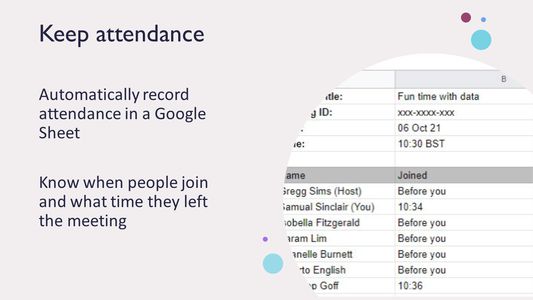
Ability to save participant list for current meeting to a Google Sheet in your Google Drive. Click the "save" icon at the bottom right of the participants pane.
NOTE: Animations and text appear mirrored on your own video but show up in the right orientation for other participants.
The extension collects generalized statistics (number of meetings in which it is used, total number of participants in meeting, etc) but does not collect any personal information.
Additional features:
Press and hold space bar to temporarily unmute yourself
While in chat:
Use @date and @time to insert date or time into chat
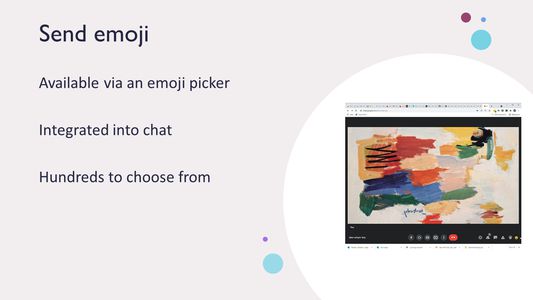
Use @smile 🙂, @sad 🙁 ,@love ❤️ ,@thumbsup 👍 ,@angry 👿, @fire 🔥, @100% 💯,
and more.. to insert emoji into chat and display animation in video
Use >> prefix in front of chats messages (e.g. ">>This is an important
announcement") to have the text repeated whenever new people join the meeting
Use colon (":") as first character of meeting title to have the meeting ignored by the
extension
Use @. to repeat last message you sent
Use %n:<text> to send <text> n times (up to 50). Try "%20:@smile"
Version updates:
1.0.0: Moved from Private to Unlisted. Changed icon + minor bug fixes.
1.1.0: Added unmute using space bar, support for @ directives and >>
broadcast messages
Minor bug fixes. Added options in popup. More bug fixes.
1.2.0: Bug fixes and performance improvements.
Added option to display time remaining in current meeting
Added additional emoji
Animations now work when background is turned on in Meet
Added help text for chat commands
1.2.1 Minor bug fixes.
1.3.0 Bug fixes and performance improvements.
Option to show watermark with local time on video feed
Improved Fireworks display
Allow random position for animated emoji. When enabled, multiple emojis
can be animated at the same time.
%n:<string> where 0<=n<=50 in chat repeats string n times (useful for
emoji showers like "%50:@smile")
@. in chat repeats the last input line.
Improved display for timers.
Option to use AM/PM or 24 hour clock
1.3.1 Bug fixes and performance improvements
Experimental transcription feature
1.4.0 Bug fixes and performance improvements
Added attendee list to the transcription
Added Emoji picker
Added instrumentation
Added global (Ctrl+ Shift + 0) and local (Alt+M) command keys to bring
tab with active meeting to the foreground
1.4.1 Minor instrumentation bug fix
1.4.2 Bug fixes and performance improvements
Minified
Added support for licensing
Added ability to save participant list to a Google Sheet
1.4.3 Introduced FireFox compatibility
A green "Next Meeting" button and associated text showing the title and time to the next meeting will be shown if you are in an active meeting and there is another meeting on the Google calendar of the same account for the same day with a Google Meet meeting ID.
If meetings are added, moved, or removed from the calendar while you are on the call, the button and text will update to reflect the new meetings within 1 minute of the change happening.
Options are available (click on the extension icon) to configure whether space bar acts as temporary unmute, which meetings to show, and whether to display a timer showing time until the end of this meeting or beginning of next meeting.
Ability to save participant list for current meeting to a Google Sheet in your Google Drive. Click the "save" icon at the bottom right of the participants pane.
NOTE: Animations and text appear mirrored on your own video but show up in the right orientation for other participants.
The extension collects generalized statistics (number of meetings in which it is used, total number of participants in meeting, etc) but does not collect any personal information.
Additional features:
Press and hold space bar to temporarily unmute yourself
While in chat:
Use @date and @time to insert date or time into chat
Use @smile 🙂, @sad 🙁 ,@love ❤️ ,@thumbsup 👍 ,@angry 👿, @fire 🔥, @100% 💯,
and more.. to insert emoji into chat and display animation in video
Use >> prefix in front of chats messages (e.g. ">>This is an important
announcement") to have the text repeated whenever new people join the meeting
Use colon (":") as first character of meeting title to have the meeting ignored by the
extension
Use @. to repeat last message you sent
Use %n:<text> to send <text> n times (up to 50). Try "%20:@smile"
Version updates:
1.0.0: Moved from Private to Unlisted. Changed icon + minor bug fixes.
1.1.0: Added unmute using space bar, support for @ directives and >>
broadcast messages
Minor bug fixes. Added options in popup. More bug fixes.
1.2.0: Bug fixes and performance improvements.
Added option to display time remaining in current meeting
Added additional emoji
Animations now work when background is turned on in Meet
Added help text for chat commands
1.2.1 Minor bug fixes.
1.3.0 Bug fixes and performance improvements.
Option to show watermark with local time on video feed
Improved Fireworks display
Allow random position for animated emoji. When enabled, multiple emojis
can be animated at the same time.
%n:<string> where 0<=n<=50 in chat repeats string n times (useful for
emoji showers like "%50:@smile")
@. in chat repeats the last input line.
Improved display for timers.
Option to use AM/PM or 24 hour clock
1.3.1 Bug fixes and performance improvements
Experimental transcription feature
1.4.0 Bug fixes and performance improvements
Added attendee list to the transcription
Added Emoji picker
Added instrumentation
Added global (Ctrl+ Shift + 0) and local (Alt+M) command keys to bring
tab with active meeting to the foreground
1.4.1 Minor instrumentation bug fix
1.4.2 Bug fixes and performance improvements
Minified
Added support for licensing
Added ability to save participant list to a Google Sheet
1.4.3 Introduced FireFox compatibility
Evaluează experiența
PermisiuniAflă mai multe
Acest supliment are nevoie:
- Să îți acceseze datele pentru site-uri din domeniul meet.google.com
- Să îți acceseze datele pentru site-uri din domeniul googleusercontent.com
- Să îți acceseze datele pentru sheets.googleapis.com
- Să îți acceseze datele pentru www.googleapis.com
- Să îți acceseze datele pentru 246omlcqh4.execute-api.us-east-1.amazonaws.com
- Să îți acceseze datele pentru meet.google.com
Mai multe informații
- Linkurile suplimentului
- Versiune
- 1.4.3
- Mărime
- 6,75 MB
- Ultima actualizare
- 3 ani în urmă (26 oct. 2021)
- Categorii conexe
- Licență
- Toate drepturile rezervate
- Politică de confidențialitate
- Citește politica de confidențialitate pentru acest supliment
- Istoricul versiunilor
Adaugă în colecție
Mai multe extensii create de STNC
 Nu există încă evaluări
- Nu există încă evaluări
- Nu există încă evaluări
- Nu există încă evaluări
- Nu există încă evaluări
- Nu există încă evaluări