
Moodify de Bilal Ashraf
An elegant extension that adapts webpage aesthetics to match your mood and enhance readability.
Niciun utilizatorNiciun utilizator
Metadate extensie
Capturi de ecran
Despre această extensie
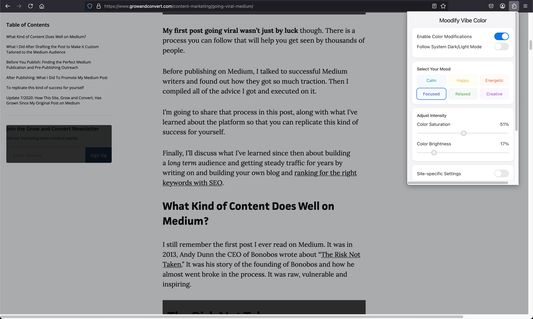
Moodify is a thoughtfully designed browser extension that transforms your web browsing experience by adjusting webpage aesthetics based on your mood and preferences. Whether you're working, reading, or browsing, this extension helps create the perfect visual environment for your online activities.
Key Features:
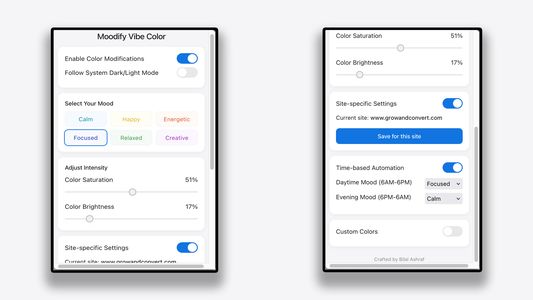
• Mood-Based Color Schemes: Choose from six carefully crafted moods - Calm, Happy, Energetic, Focused, Relaxed, and Creative
• Smart Color Adjustments: Automatically adjusts text and background colors to ensure optimal readability
• Customizable Intensity: Fine-tune color saturation and brightness to match your preferences
• Site-Specific Settings: Save different color schemes for different websites
• Time-Based Automation: Automatically switch between moods based on time of day
• System Theme Integration: Seamlessly adapts to your system's dark/light mode
• Custom Color Palette: Create your own color scheme with the custom color picker
Perfect for:
• Reducing eye strain during long browsing sessions
• Creating a more comfortable reading environment
• Maintaining focus while working online
• Personalizing your browsing experience
• Improving readability on any website
Privacy & Performance:
• Works entirely locally - no data collection
• Lightweight and fast
• No impact on page loading speed
• Respects your privacy and browsing habits
Created with care by Bilal Ashraf, Moodify combines aesthetic appeal with practical functionality to enhance your daily browsing experience.
Key Features:
• Mood-Based Color Schemes: Choose from six carefully crafted moods - Calm, Happy, Energetic, Focused, Relaxed, and Creative
• Smart Color Adjustments: Automatically adjusts text and background colors to ensure optimal readability
• Customizable Intensity: Fine-tune color saturation and brightness to match your preferences
• Site-Specific Settings: Save different color schemes for different websites
• Time-Based Automation: Automatically switch between moods based on time of day
• System Theme Integration: Seamlessly adapts to your system's dark/light mode
• Custom Color Palette: Create your own color scheme with the custom color picker
Perfect for:
• Reducing eye strain during long browsing sessions
• Creating a more comfortable reading environment
• Maintaining focus while working online
• Personalizing your browsing experience
• Improving readability on any website
Privacy & Performance:
• Works entirely locally - no data collection
• Lightweight and fast
• No impact on page loading speed
• Respects your privacy and browsing habits
Created with care by Bilal Ashraf, Moodify combines aesthetic appeal with practical functionality to enhance your daily browsing experience.
Evaluat cu 0 de către 0 recenzori
Permisiuni și date
Permisiuni necesare:
- Să acceseze filele browserului
- Să îți acceseze datele pentru toate site-urile web
Mai multe informații
- Versiune
- 1.0.0
- Mărime
- 38,44 KB
- Ultima actualizare
- un an în urmă (23 mart. 2025)
- Categorii conexe
- Licență
- Licență MIT
- Politică de confidențialitate
- Citește politica de confidențialitate pentru acest supliment
- Istoricul versiunilor
- Etichete
- Adaugă în colecție
- Uses CSS variables for dynamic color management
- Implements WCAG contrast checking for text readability
- Handles system theme changes through matchMedia API
- Uses MutationObserver for dynamic content updates
- Implements efficient color blending algorithms
- Stores preferences using browser.storage.local
Testing Notes:
- Tested on various websites including news, social media, and documentation sites
- Verified color modifications work with different content types
- Confirmed system theme integration works across different OS settings
- Validated time-based automation accuracy
- Tested with different screen sizes and resolutions
Known Limitations:
- Some websites with complex CSS may show minor visual artifacts
- Color modifications may not affect certain dynamic content immediately
- Some browser-specific CSS properties may not be fully supported