Link Peek de Dogan Engin
Link Peek provides a cool summary of the webpage behind a link. Imagine you are reading a newspaper... You no longer need to click each link and open every single page. Instead, you can browse webpages in a fun and effective way. Save time and enjoy!
1 utilizator1 utilizator
Metadate extensie
Capturi de ecran
Despre această extensie
This extension will revolutionize the way you surf the web!
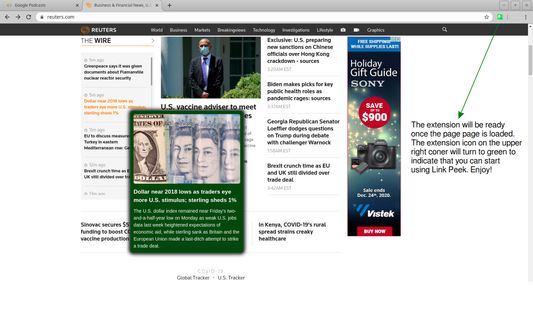
Instead of clicking links on a website to check what is behind each and every one of them, use the Link Peek to get a summary of the page behind that link! This extension will improve your efficiency and help you go through the content of a website much quicker.
It is perfect for news sites, forums, shopping sites, corporate web pages and many more.
Be ready to experience a new way of using your browser!
IMPORTANT:
- The extension will be ready once the website is fully loaded. You can check the status of the extension from its icon as it will turn to green once ready.
- To activate the extension press Ctrl and move your mouse over a link.
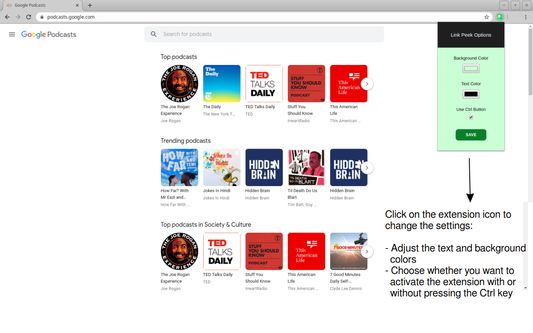
- You can change your settings by clicking on the extension icon. For ex, if you do not want to keep pressing Ctrl, you can update the behavior at the settings section.
ENJOY!
Please send us an email if you want new features and we'd be more than happy to implement :)
Instead of clicking links on a website to check what is behind each and every one of them, use the Link Peek to get a summary of the page behind that link! This extension will improve your efficiency and help you go through the content of a website much quicker.
It is perfect for news sites, forums, shopping sites, corporate web pages and many more.
Be ready to experience a new way of using your browser!
IMPORTANT:
- The extension will be ready once the website is fully loaded. You can check the status of the extension from its icon as it will turn to green once ready.
- To activate the extension press Ctrl and move your mouse over a link.
- You can change your settings by clicking on the extension icon. For ex, if you do not want to keep pressing Ctrl, you can update the behavior at the settings section.
ENJOY!
Please send us an email if you want new features and we'd be more than happy to implement :)
Evaluat cu 5 de către 1 recenzor
Permisiuni și date
Mai multe informații
- Linkurile suplimentului
- Versiune
- 0.0.0.8
- Mărime
- 59,41 KB
- Ultima actualizare
- 5 ani în urmă (29 nov. 2021)
- Categorii conexe
- Licență
- Toate drepturile rezervate
- Istoricul versiunilor
- Adaugă în colecție