
Lightning Tab Groups de gchristnsn
Tab group manager for keyboard ninjas. Quickly switch between tab groups using keyboard shortcuts.
4 utilizatori4 utilizatori
Metadate extensie
Capturi de ecran
Despre această extensie
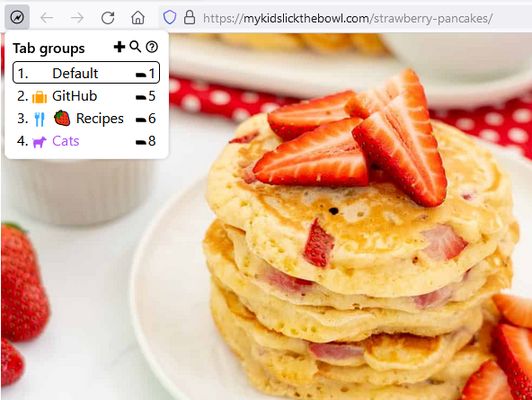
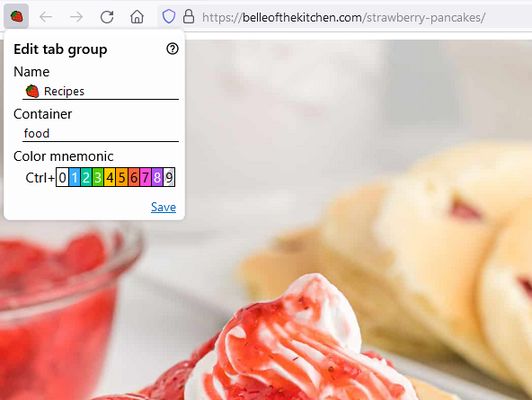
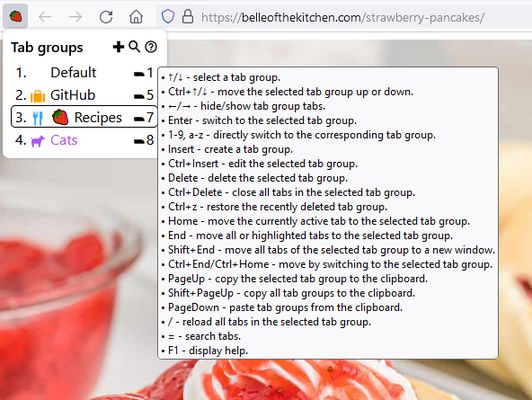
Lightning Tab Groups is a lightweight Firefox tab group manager based on tab hiding. It is designed to be operated primarily from the keyboard and allows the use of visual mnemonics for the active tab group. The users can quickly switch between tab groups by applying keyboard shortcuts while the extension popup window is open. See the online help for a more detailed description of the add-on features.
Key Features
Q&A
Q: Is it possible to back up tab groups?
A: Currently, it is only possible to copy all existing tab groups to the clipboard in JSON format with the Ctrl+PageUp keyboard shortcut. The tab groups intended to be disposable containers that separate tabs by context. If you need a long-term link or page archive storage, please consider using Scrapyard where you can save links in different shelves (collections).
Q: Is there a panorama?
A: Currently, there is no panorama, but it is possible to directly move tabs between tab groups. Please see the corresponding section of the user manual.
Key Features
- Switching between tab groups with keyboard shortcuts.
- Use of color tab group mnemonics.
- Use of emoji as a tab group mnemonic.
- Ability to close or reload all tabs in the tab group.
- Ability to copy and paste tab groups between browser instances.
- iShell integration.
Q&A
Q: Is it possible to back up tab groups?
A: Currently, it is only possible to copy all existing tab groups to the clipboard in JSON format with the Ctrl+PageUp keyboard shortcut. The tab groups intended to be disposable containers that separate tabs by context. If you need a long-term link or page archive storage, please consider using Scrapyard where you can save links in different shelves (collections).
Q: Is there a panorama?
A: Currently, there is no panorama, but it is possible to directly move tabs between tab groups. Please see the corresponding section of the user manual.
Evaluat cu 5 de către 1 recenzor
Permisiuni și date
Permisiuni necesare:
- Să obțină date din clipboard
- Să introducă date în clipboard
- Să îți afișeze notificări
- Să acceseze filele închise recent
- Să ascundă și să afișeze filele browserului
- Să acceseze filele browserului
- Să îți acceseze datele pentru toate site-urile web
Mai multe informații
- Linkurile suplimentului
- Versiune
- 0.1.2
- Mărime
- 193,05 KB
- Ultima actualizare
- un an în urmă (17 oct. 2024)
- Categorii conexe
- Istoricul versiunilor
- Adaugă în colecție