
LaTeXify de Shwetangshu Biswas
Copy MathML and LaTeX from math elements in ChatGPT. Easily convert math equations and formulas to Word and LaTeX formats directly from the web.
224 de utilizatori224 de utilizatori
Metadate extensie
Capturi de ecran
Despre această extensie
LaTeXify is a browser extension designed to streamline the process of copying MathML and LaTeX expressions from mathematical elements in ChatGPT. With LaTeXify, you can effortlessly convert mathematical equations and formulas to Word and LaTeX formats directly from your web browser.
Features:
1. Effortless Copying:
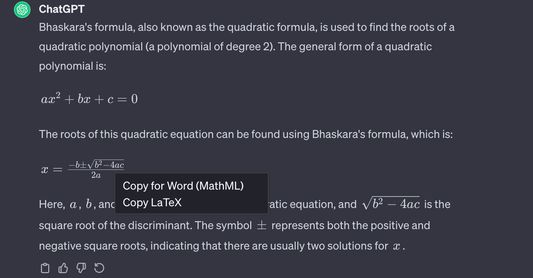
Right-click on mathematical expressions in ChatGPT to access a custom context menu, allowing you to copy both MathML and LaTeX representations with ease.
2. Conversion for Word and LaTeX:
LaTeXify simplifies the process of converting copied equations for immediate use in Word documents or LaTeX distributions.
3. Modern User Interface:
Enjoy a modern and intuitive user interface that enhances your experience when working with mathematical content.
4. MathML and LaTeX Renderers:
LaTeXify integrates MathML and LaTeX renderers, providing options to copy plain text or rendered images for LaTeX expressions.
5. Flexible Usage:
LaTeXify is designed to work seamlessly with ChatGPT, ensuring a hassle-free and efficient workflow for users dealing with mathematical content.
How to Use:
1. Install the LaTeXify extension in your preferred browser (Chrome, Edge, Brave, etc.).
2.Visit the ChatGPT web interface.
3.Right-click on a mathematical expression to access the context menu.
4.Choose between copying MathML, LaTeX, or rendering LaTeX as an image.
5.Paste the copied content directly into Word documents or LaTeX distributions.
Features:
1. Effortless Copying:
Right-click on mathematical expressions in ChatGPT to access a custom context menu, allowing you to copy both MathML and LaTeX representations with ease.
2. Conversion for Word and LaTeX:
LaTeXify simplifies the process of converting copied equations for immediate use in Word documents or LaTeX distributions.
3. Modern User Interface:
Enjoy a modern and intuitive user interface that enhances your experience when working with mathematical content.
4. MathML and LaTeX Renderers:
LaTeXify integrates MathML and LaTeX renderers, providing options to copy plain text or rendered images for LaTeX expressions.
5. Flexible Usage:
LaTeXify is designed to work seamlessly with ChatGPT, ensuring a hassle-free and efficient workflow for users dealing with mathematical content.
How to Use:
1. Install the LaTeXify extension in your preferred browser (Chrome, Edge, Brave, etc.).
2.Visit the ChatGPT web interface.
3.Right-click on a mathematical expression to access the context menu.
4.Choose between copying MathML, LaTeX, or rendering LaTeX as an image.
5.Paste the copied content directly into Word documents or LaTeX distributions.
Evaluat cu 5 de către 1 recenzor
Permisiuni și date
Mai multe informații
- Linkurile suplimentului
- Versiune
- 1.0.0
- Mărime
- 32,14 KB
- Ultima actualizare
- 2 ani în urmă (13 ian. 2024)
- Categorii conexe
- Licență
- Toate drepturile rezervate
- Istoricul versiunilor
- Adaugă în colecție