
CookiErazor de Miraculix
Enhance privacy by automatically deleting cookies when they're not needed anymore
53 de utilizatori53 de utilizatori
Metadate extensie
Capturi de ecran
Despre această extensie
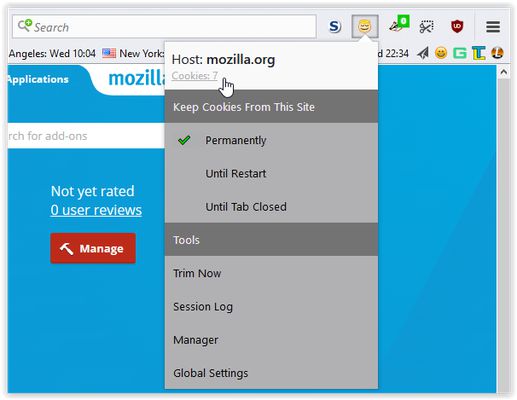
CookiErazor automatically removes cookies when they are not needed anymore. Permissions to store cookies for a whole session or permanently can be easily set on a per-site basis via the browser action icon.
It's a simple and easy to use replacement for CookieMonster, which I created for myself, as the creator of CookieMonster discontinued the addon. It's not possible to create an addon exactly like CookieMonster using webextensions, and this addon doesn't have all the features CookieMonster had, so don't expect that.
By default, any cookies a site sets are removed when the tab displaying that site is closed. Optionally selected sites can store cookies permanently or until the browser restarts.
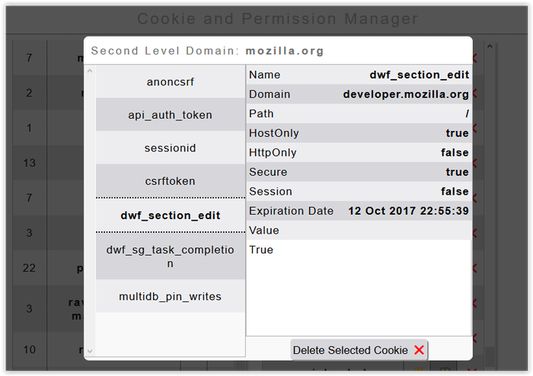
The addon includes a simple cookie manager to show cookies from all cookie stores and delete them manually if desired. Cookies set in Container Tabs are detected as well, and dealt with.
When the addon is run for the first time, it will detect all cookies which are present in the default cookie store and allow them to be stored permanently. These permissions can be changed in the permission manager of the addon.
It does not affect the permissions which are already set through CookieMonster or Firefox permissions, as it's currently not possible to read or write these Firefox internal permissions for Firefox57+ addons. These permissions can be reset by deleting the permissions.sqlite file in the Firefox profile folder, if desired. For the addon to do its job it is necessary to allow cookies to be set in the Firefox settings. Otherwise all cookies will be blocked. If desired, 3rd party cookies can be enabled too. The addon will simply remove them along with the other cookies, when a tab closes.
CookiErazor should run well on both the desktop and mobile version of Firefox, but it wasn't really tested with the mobile version. The addon may not work as intended with punycode domains.
It's a simple and easy to use replacement for CookieMonster, which I created for myself, as the creator of CookieMonster discontinued the addon. It's not possible to create an addon exactly like CookieMonster using webextensions, and this addon doesn't have all the features CookieMonster had, so don't expect that.
By default, any cookies a site sets are removed when the tab displaying that site is closed. Optionally selected sites can store cookies permanently or until the browser restarts.
The addon includes a simple cookie manager to show cookies from all cookie stores and delete them manually if desired. Cookies set in Container Tabs are detected as well, and dealt with.
When the addon is run for the first time, it will detect all cookies which are present in the default cookie store and allow them to be stored permanently. These permissions can be changed in the permission manager of the addon.
It does not affect the permissions which are already set through CookieMonster or Firefox permissions, as it's currently not possible to read or write these Firefox internal permissions for Firefox57+ addons. These permissions can be reset by deleting the permissions.sqlite file in the Firefox profile folder, if desired. For the addon to do its job it is necessary to allow cookies to be set in the Firefox settings. Otherwise all cookies will be blocked. If desired, 3rd party cookies can be enabled too. The addon will simply remove them along with the other cookies, when a tab closes.
CookiErazor should run well on both the desktop and mobile version of Firefox, but it wasn't really tested with the mobile version. The addon may not work as intended with punycode domains.
Evaluat cu 3,7 de către 6 recenzori
Permisiuni și date
Permisiuni necesare:
- Să îți afișeze notificări
- Să acceseze filele browserului
- Să îți acceseze datele pentru toate site-urile web
Mai multe informații
- Linkurile suplimentului
- Versiune
- 1.2resigned1
- Mărime
- 136,77 KB
- Ultima actualizare
- 2 ani în urmă (2 mai 2024)
- Categorii conexe
- Licență
- Licență MIT
- Istoricul versiunilor
- Adaugă în colecție