
CaptchaSonic: Solve BLS Captcha de captchaSonic
Effortlessly Solve BLS CAPTCHAs with CaptchaSonic – The Fastest AI-Powered Solution!
Unele funcționalități pot fi cu platăUnele funcționalități pot fi cu plată
7 utilizatori7 utilizatori
Metadate extensie
Capturi de ecran

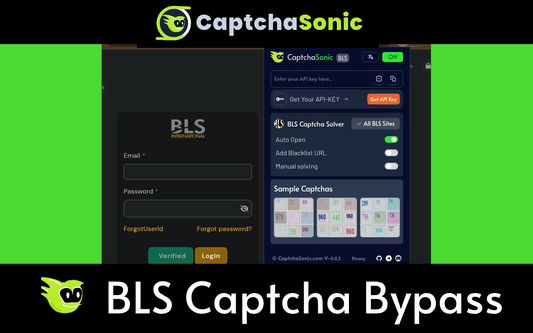

Despre această extensie
CaptchaSonic: BLS CAPTCHA Solver Extension for Firefox
Ai based BLS Captcha Solver extension designed specifically to help solve BLS Captcha's and bypass them with machine learning. Helps peoples disabilities and accessibility challenges bypass BLS CAPTCHAs during their daily web browsing.
Official CaptchaSonic browser extension - best and fastest browser BLS captcha solver (based on AI)
Features:
- Solve unlimited BLS Captchas
- No interruptions while browsing
- Uses latest standards and extension service worker for requests
- Small extension size and runs smooth
How to use:
1) Simply install CaptchaSonic BLS Captcha Solver extension
2) Simply paste your APIKEY from my.captchasonic.com on the popup
3) keep browsing, extension detects BLS Captcha on any page and automatically solve the challenges.
4) Upgrade plan for premium usage limit at my.captchasonic.com
How to solve BLS Captcha with CaptchaSonic and Puppeteer/ Playwright/ Selenium:
a) Extract "CaptchaSonic BLS Captcha Browser Extension.zip".
b) Navigate to extracted folder and look for "/assets/defaultConfig.json".
c) Edit "defaultConfig.json", paste APIKEY, save.
d) Then open the Firefox
e) Visit to the Extensions management page and enable Developer mode.
f) Remove existing BLS CaptchaSonic Extension. If previously installed
g) Click "Load unpacked", and select the folder you just extracted.
Motivation:
BLS Captcha challenges are a significant burden on various cultural, literacy and other factors and backgrounds where it's complexity, availability of internet impacts the web experience significantly.
- Also for Edge, Brave, Opera, Vivaldi, Firefox and variants: https://github.com/Captcha-Sonic
- Visit the extension's privacy policy for more information: https://captchasonic.com/privacy
- GitHub for issues & feature requests. https://github.com/Captcha-Sonic/CaptchaSonic-Extension
Permission Declarations:
- tabs : determine which actions are from which tabs
- storage : use to store configuration
Contact Support:
- Github: https://github.captchasonic.com
- Telegram: https://telegram.captchasonic.com
- Discord: https://discord.captchasonic.com
- Dashboard: https://my.captchasonic.com
- HomePage: https://captchasonic.com
- Developer API: https://captchasonic.com/products
Ai based BLS Captcha Solver extension designed specifically to help solve BLS Captcha's and bypass them with machine learning. Helps peoples disabilities and accessibility challenges bypass BLS CAPTCHAs during their daily web browsing.
Official CaptchaSonic browser extension - best and fastest browser BLS captcha solver (based on AI)
Features:
- Solve unlimited BLS Captchas
- No interruptions while browsing
- Uses latest standards and extension service worker for requests
- Small extension size and runs smooth
How to use:
1) Simply install CaptchaSonic BLS Captcha Solver extension
2) Simply paste your APIKEY from my.captchasonic.com on the popup
3) keep browsing, extension detects BLS Captcha on any page and automatically solve the challenges.
4) Upgrade plan for premium usage limit at my.captchasonic.com
How to solve BLS Captcha with CaptchaSonic and Puppeteer/ Playwright/ Selenium:
a) Extract "CaptchaSonic BLS Captcha Browser Extension.zip".
b) Navigate to extracted folder and look for "/assets/defaultConfig.json".
c) Edit "defaultConfig.json", paste APIKEY, save.
d) Then open the Firefox
e) Visit to the Extensions management page and enable Developer mode.
f) Remove existing BLS CaptchaSonic Extension. If previously installed
g) Click "Load unpacked", and select the folder you just extracted.
Motivation:
BLS Captcha challenges are a significant burden on various cultural, literacy and other factors and backgrounds where it's complexity, availability of internet impacts the web experience significantly.
- Also for Edge, Brave, Opera, Vivaldi, Firefox and variants: https://github.com/Captcha-Sonic
- Visit the extension's privacy policy for more information: https://captchasonic.com/privacy
- GitHub for issues & feature requests. https://github.com/Captcha-Sonic/CaptchaSonic-Extension
Permission Declarations:
- tabs : determine which actions are from which tabs
- storage : use to store configuration
Contact Support:
- Github: https://github.captchasonic.com
- Telegram: https://telegram.captchasonic.com
- Discord: https://discord.captchasonic.com
- Dashboard: https://my.captchasonic.com
- HomePage: https://captchasonic.com
- Developer API: https://captchasonic.com/products
Evaluat cu 0 de către 0 recenzori
Permisiuni și date
Permisiuni necesare:
- Să acceseze filele browserului
- Să îți acceseze datele pentru toate site-urile web
Mai multe informații
- Linkurile suplimentului
- Versiune
- 0.1.4
- Mărime
- 433,48 KB
- Ultima actualizare
- 8 luni în urmă (24 iun. 2025)
- Categorii conexe
- Licență
- Toate drepturile rezervate
- Politică de confidențialitate
- Citește politica de confidențialitate pentru acest supliment
- Istoricul versiunilor
- Adaugă în colecție