
Amzpecty de Crystal Ball Systems Inc.
Amzpecty can check Amazon stock easily. How many total Amazon quantity is a vital info in buying new Amazon inventory. Check Amazon competitor quantity before falling into a trap! A must have Amazon Seller tool to check Amazon available quantity.
52 de utilizatori52 de utilizatori
Metadate extensie
Capturi de ecran
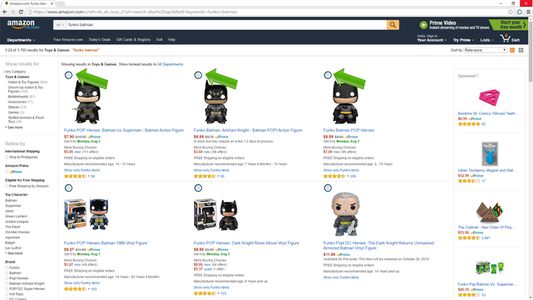
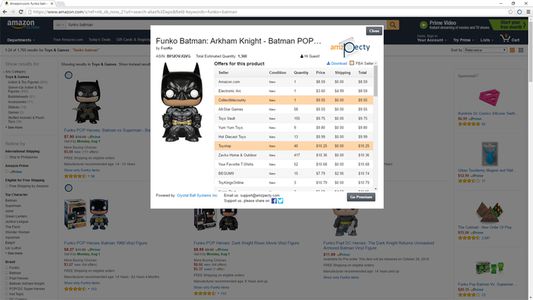
Despre această extensie
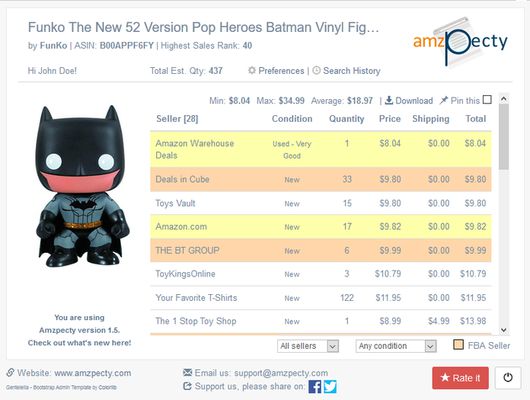
Amzpecty is a browser-based Amazon seller tool that will help retailers check competitor quantity with just one-click. The extension will help sellers keep track of competitor stock, know more about Amazon available inventory for their competitors, and add product notes.
January 18, 2017 Update!
1. By default, Amzpecty will show up to 10 sellers. Users will have the option to show all by default through the preferences page.
2. Daily Snapshot data is now shown in tabular form.
What's new in version 2.0?
> Daily Product Snapshot Add-on - Amzpecty can now track your nominated products by taking daily snapshot of data. Learn more at: https://www.amzpecty.com/?#section-features
You no longer need to take the long-winded ‘999’ route to check Amazon competitor stock with this Amazon inventory tool installed! With Amzpecty, it only takes one click to check Amazon stock.
Show Product's:
> Estimated Total Listed Quantity (all sellers)
> Number of offers (Sellers)
> Each offer's available quantity
> Price, Estimated Shipping, and Total
> FBA indicator
> Product condition
> Highest Sales Rank
> Download Search Result as CSV File
> Filter Result by FBA/MFN and/or Condition
NEW! > View/Review Latest 100 search results (Premium only)
FREE to install and try for 5 queries.
GO UNLIMITED WITH PREMIUM SUBSCRIPTIONS
HOW-TO
1. Install FREE Amzpecty
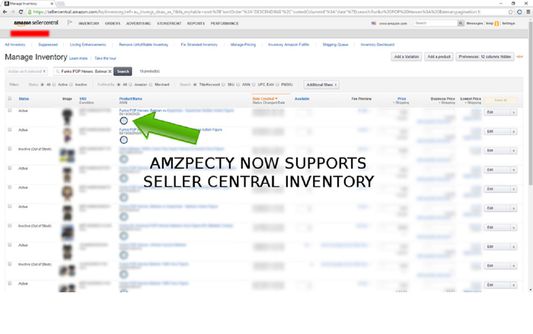
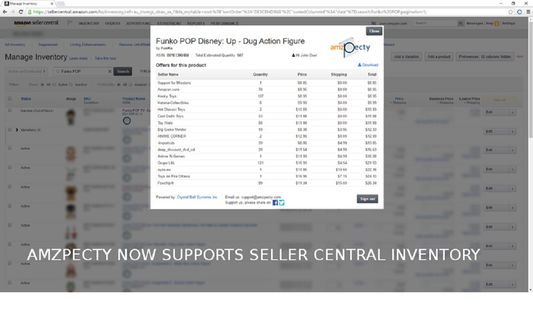
2. Goto "Amazon Product Page" or "Amazon Search Result Page" or "Seller Central Manage Inventory"
3. Click Amzpecty icon
4. Browse the seller quantities and total
**Version 2.0**
Daily Product Snapshot Add-on - Amzpecty can now track your preferred products by taking daily snapshot of data. Learn more at: https://www.amzpecty.com/?#section-features
**Version 1.6**
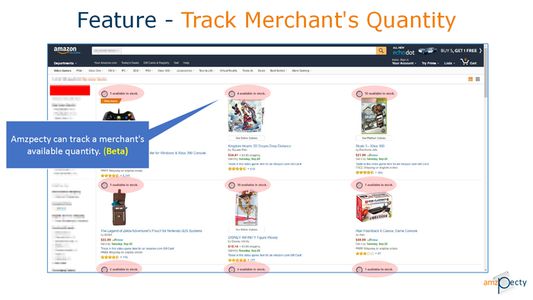
Amzpecty can now check quantity in stock of products on a merchant's Amazon storefront.
**Version 1.5**
Added note input for each product listed in Seller Central Manage Inventory page.
**Version 1.4**
Added Seller Type and Product Condition filter that updates Total Est. Qty and Average Price on change.
**Version 1.3.1**
Amzpecty can now auto inject Amzpecty icon in Seller Central and Amazon search results.
**Version 1.3**
Amzpecty can now show item condition and identify FBA.
Amzpecty can inject Amzpecty icon within Amazon Search results.
**Version 1.2**
Amzpecty can inject Amzpecty icon within "Seller Central Manage Inventory".
Note:
Please ensure cookies are enabled in your browser.
This app may not work if you have other apps installed that inject or alter the structure of html code.
This app may not work if you use slow proxy servers.
Feature Requests/Comments/Suggestions
We'll be delighted to have them. Just send to support@amzpecty.com .
KNOWN LIMITATIONS:
1. Maximum quantity Amzpecty can get is 999 even if the seller has more in stock.
2. If a product has purchase quantity limits in place, only the maximum allowed purchase quantity is what Amzpecty can get.
3. Some merchant store fronts(custom store fronts) are not supported. Automatic quantity query may not work.
4. Amzpecty is not able to provide information that is sold subscription based unless other sellers have quantity listed.
January 18, 2017 Update!
1. By default, Amzpecty will show up to 10 sellers. Users will have the option to show all by default through the preferences page.
2. Daily Snapshot data is now shown in tabular form.
What's new in version 2.0?
> Daily Product Snapshot Add-on - Amzpecty can now track your nominated products by taking daily snapshot of data. Learn more at: https://www.amzpecty.com/?#section-features
You no longer need to take the long-winded ‘999’ route to check Amazon competitor stock with this Amazon inventory tool installed! With Amzpecty, it only takes one click to check Amazon stock.
Show Product's:
> Estimated Total Listed Quantity (all sellers)
> Number of offers (Sellers)
> Each offer's available quantity
> Price, Estimated Shipping, and Total
> FBA indicator
> Product condition
> Highest Sales Rank
> Download Search Result as CSV File
> Filter Result by FBA/MFN and/or Condition
NEW! > View/Review Latest 100 search results (Premium only)
FREE to install and try for 5 queries.
GO UNLIMITED WITH PREMIUM SUBSCRIPTIONS
HOW-TO
1. Install FREE Amzpecty
2. Goto "Amazon Product Page" or "Amazon Search Result Page" or "Seller Central Manage Inventory"
3. Click Amzpecty icon
4. Browse the seller quantities and total
**Version 2.0**
Daily Product Snapshot Add-on - Amzpecty can now track your preferred products by taking daily snapshot of data. Learn more at: https://www.amzpecty.com/?#section-features
**Version 1.6**
Amzpecty can now check quantity in stock of products on a merchant's Amazon storefront.
**Version 1.5**
Added note input for each product listed in Seller Central Manage Inventory page.
**Version 1.4**
Added Seller Type and Product Condition filter that updates Total Est. Qty and Average Price on change.
**Version 1.3.1**
Amzpecty can now auto inject Amzpecty icon in Seller Central and Amazon search results.
**Version 1.3**
Amzpecty can now show item condition and identify FBA.
Amzpecty can inject Amzpecty icon within Amazon Search results.
**Version 1.2**
Amzpecty can inject Amzpecty icon within "Seller Central Manage Inventory".
Note:
Please ensure cookies are enabled in your browser.
This app may not work if you have other apps installed that inject or alter the structure of html code.
This app may not work if you use slow proxy servers.
Feature Requests/Comments/Suggestions
We'll be delighted to have them. Just send to support@amzpecty.com .
KNOWN LIMITATIONS:
1. Maximum quantity Amzpecty can get is 999 even if the seller has more in stock.
2. If a product has purchase quantity limits in place, only the maximum allowed purchase quantity is what Amzpecty can get.
3. Some merchant store fronts(custom store fronts) are not supported. Automatic quantity query may not work.
4. Amzpecty is not able to provide information that is sold subscription based unless other sellers have quantity listed.
Evaluat cu 5 de către 2 recenzori
Permisiuni și date
Permisiuni necesare:
- Să acceseze filele browserului
- Să îți acceseze datele pentru toate site-urile web
Mai multe informații
- Linkurile suplimentului
- Versiune
- 2.1resigned1
- Mărime
- 306,07 KB
- Ultima actualizare
- 2 ani în urmă (25 apr. 2024)
- Categorii conexe
- Licență
- Mozilla Public License 2.0
- Politică de confidențialitate
- Citește politica de confidențialitate pentru acest supliment
- Acord de licență pentru utilizatorul final
- Citește acordul de licență pentru acest supliment
- Istoricul versiunilor
- Adaugă în colecție