
NetSuite Record Scripts Autor: Alien Technology
NetSuite Record Scripts – View Scripts & Workflows Instantly
35 użytkowników35 użytkowników
Metadane rozszerzenia
Zrzuty ekranu
O tym rozszerzeniu
NetSuite Record Scripts is a productivity-boosting browser extension designed for NetSuite administrators, developers, and power users. It lets you instantly see all deployed scripts and associated workflows on any record you're viewing in NetSuite. No more digging through script deployments or the workflow manager. Open any record, click the icon, and get a clean, organized breakdown of everything running on that page.
✅ Key Features:
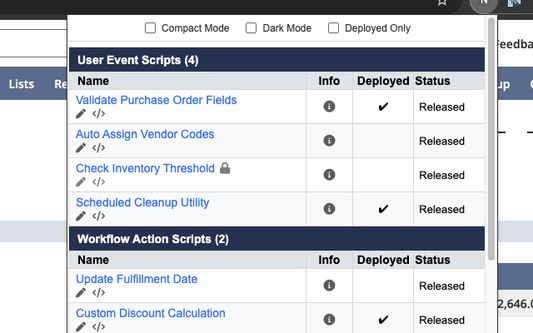
🔍 Auto-detect record type · Reads the record type from the page and dynamically retrieves all relevant SuiteScript deployments and workflows. Works on standard records, custom records, and custom transactions.
🧠 Dual API support · Uses SuiteScript 2.x (N/query, N/search, N/currentRecord) as the primary engine, with automatic SuiteScript 1.0 fallback for pages where 2.x modules aren't available. Maximum compatibility across all NetSuite pages.
⚡ On-demand execution · Scripts only run when you click the extension icon, not on every page load. Zero impact on your daily NetSuite browsing and no wasted governance.
🔘 Smart icon · The extension icon is only active on NetSuite pages. It grays out automatically on non-NetSuite sites.
↕️ Sort · Sort scripts alphabetically (A→Z or Z→A) within their type groups.
🔀 Drag-and-drop group ordering · Arrange script type groups in your preferred priority (e.g., User Events first, then Client Scripts, then Workflows). Your order is saved automatically.
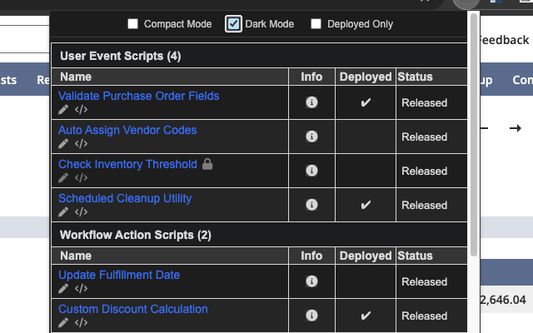
🌙 Dark / Light mode · Choose between clean light or sleek dark appearance.
🧩 Compact mode · Condensed view with smaller font and spacing.
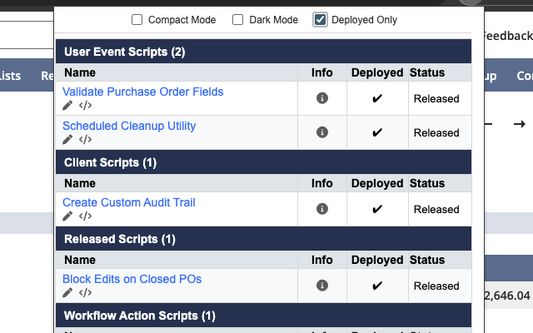
🛠️ Deployed-only filter · Show only deployed scripts and released workflows to keep your view clean and relevant.
🔄 Refresh · Force a fresh data fetch at any time with one click.
📋 Script Details at a Glance:
• Script Name (clickable link to the script record)
• Script Type (User Event, Client, Mass Update, Workflow Action, etc.)
• Deployment Status (Deployed ✔ / Not Deployed)
• Current Status (Released, Testing, etc.)
• Script File Name, API Version, and Description (hover the info icon)
📋 Workflow Details:
• Workflow Name (clickable link to the workflow definition)
• Release Status (Released ✔, Testing, Not Initiating, Suspended)
• Description (hover the info icon)
⚙️ One-Click Access:
• Open script records directly in NetSuite
• Edit script record
• Edit script source code
• Open workflow definitions in view or edit mode, all in a new tab
🧠 How It Works:
• Step 1: Navigate to any record page in NetSuite.
• Step 2: Click the NetSuite Record Scripts icon (it lights up on NetSuite pages).
• Step 3: View grouped sections for Script Deployments (grouped by type) and Workflows.
• Step 4: Click on any name to navigate to the script record. Use the pencil icon for edit mode, or the code icon for the source file.
• Step 5: Hover the info icon for API Version, Description, and File Name.
• Step 6: Use the toolbar to toggle Dark Mode, Compact View, Deployed Only, Sort order, and Group arrangement.
All data is retrieved live from the page context via NetSuite's native APIs. No external data collection, no login prompts, no storage of sensitive info.
🔒 Privacy & Security:
This extension is fully open source — anyone can audit the code and verify its behavior. In response to Oracle's security notification regarding Chrome extensions (https://community.oracle.com/netsuite/english/discussion/4512418/security-notification-chrome-extensions), this extension has been made open source to ensure full transparency.
📂 Source Code: https://github.com/alien4u/ns-record-scripts
🌐 Compatibility: Chrome, Edge, Firefox (Manifest V3, 109+), and Safari (via Web Extension wrapper).
Changelog (v2.0.5)
🚀 Major Improvements
• On-demand execution: The extension no longer runs queries on every NetSuite page you visit. Scripts only execute when you click the icon. This eliminates wasted governance and keeps your browsing fast.
• SuiteScript 1.0 fallback: Automatically falls back to SuiteScript 1.0 APIs on pages where 2.x modules aren't available. More pages, more compatibility.
• Background service worker: Manifest V3 architecture for smarter script injection and icon management.
✨ New Features
• Smart icon activation: Icon grays out on non-NetSuite pages and only activates on *.netsuite.com.
• Sort scripts (A→Z / Z→A): Sort dropdown orders scripts alphabetically within their type groups. Preference is saved.
• Drag-and-drop group ordering: Arrange script type groups in your preferred display order. Saved across sessions.
• Refresh button: Force a fresh data fetch at any time without reloading the page.
🐛 Bug Fixes
• Fixed workflow query bug: The workflow search was referencing an incorrect variable, which could cause query failures on some records.
• Fixed workflow release status display: Status now correctly displays as "Released", "Testing", "Not Initiating", or "Suspended" regardless of which internal format NetSuite returns.
• Workflows now show Released column: Proper "Released" column with ✔ checkmark for released workflows, matching the "Deployed" column used for scripts.
🔧 v2.0.5 — Coding Standards
• Full coding standards compliance across all JavaScript files (JSDoc, Hungarian notation, formatting).
• No logic or functionality changes.
🔐 Permission Changes (since v1.x)
Two permissions added (required for on-demand architecture):
• scripting: Inject data-fetching scripts into the page only when you click the icon.
• tabs: Detect NetSuite pages to enable/disable the icon contextually.
✅ Key Features:
🔍 Auto-detect record type · Reads the record type from the page and dynamically retrieves all relevant SuiteScript deployments and workflows. Works on standard records, custom records, and custom transactions.
🧠 Dual API support · Uses SuiteScript 2.x (N/query, N/search, N/currentRecord) as the primary engine, with automatic SuiteScript 1.0 fallback for pages where 2.x modules aren't available. Maximum compatibility across all NetSuite pages.
⚡ On-demand execution · Scripts only run when you click the extension icon, not on every page load. Zero impact on your daily NetSuite browsing and no wasted governance.
🔘 Smart icon · The extension icon is only active on NetSuite pages. It grays out automatically on non-NetSuite sites.
↕️ Sort · Sort scripts alphabetically (A→Z or Z→A) within their type groups.
🔀 Drag-and-drop group ordering · Arrange script type groups in your preferred priority (e.g., User Events first, then Client Scripts, then Workflows). Your order is saved automatically.
🌙 Dark / Light mode · Choose between clean light or sleek dark appearance.
🧩 Compact mode · Condensed view with smaller font and spacing.
🛠️ Deployed-only filter · Show only deployed scripts and released workflows to keep your view clean and relevant.
🔄 Refresh · Force a fresh data fetch at any time with one click.
📋 Script Details at a Glance:
• Script Name (clickable link to the script record)
• Script Type (User Event, Client, Mass Update, Workflow Action, etc.)
• Deployment Status (Deployed ✔ / Not Deployed)
• Current Status (Released, Testing, etc.)
• Script File Name, API Version, and Description (hover the info icon)
📋 Workflow Details:
• Workflow Name (clickable link to the workflow definition)
• Release Status (Released ✔, Testing, Not Initiating, Suspended)
• Description (hover the info icon)
⚙️ One-Click Access:
• Open script records directly in NetSuite
• Edit script record
• Edit script source code
• Open workflow definitions in view or edit mode, all in a new tab
🧠 How It Works:
• Step 1: Navigate to any record page in NetSuite.
• Step 2: Click the NetSuite Record Scripts icon (it lights up on NetSuite pages).
• Step 3: View grouped sections for Script Deployments (grouped by type) and Workflows.
• Step 4: Click on any name to navigate to the script record. Use the pencil icon for edit mode, or the code icon for the source file.
• Step 5: Hover the info icon for API Version, Description, and File Name.
• Step 6: Use the toolbar to toggle Dark Mode, Compact View, Deployed Only, Sort order, and Group arrangement.
All data is retrieved live from the page context via NetSuite's native APIs. No external data collection, no login prompts, no storage of sensitive info.
🔒 Privacy & Security:
This extension is fully open source — anyone can audit the code and verify its behavior. In response to Oracle's security notification regarding Chrome extensions (https://community.oracle.com/netsuite/english/discussion/4512418/security-notification-chrome-extensions), this extension has been made open source to ensure full transparency.
📂 Source Code: https://github.com/alien4u/ns-record-scripts
🌐 Compatibility: Chrome, Edge, Firefox (Manifest V3, 109+), and Safari (via Web Extension wrapper).
Changelog (v2.0.5)
🚀 Major Improvements
• On-demand execution: The extension no longer runs queries on every NetSuite page you visit. Scripts only execute when you click the icon. This eliminates wasted governance and keeps your browsing fast.
• SuiteScript 1.0 fallback: Automatically falls back to SuiteScript 1.0 APIs on pages where 2.x modules aren't available. More pages, more compatibility.
• Background service worker: Manifest V3 architecture for smarter script injection and icon management.
✨ New Features
• Smart icon activation: Icon grays out on non-NetSuite pages and only activates on *.netsuite.com.
• Sort scripts (A→Z / Z→A): Sort dropdown orders scripts alphabetically within their type groups. Preference is saved.
• Drag-and-drop group ordering: Arrange script type groups in your preferred display order. Saved across sessions.
• Refresh button: Force a fresh data fetch at any time without reloading the page.
🐛 Bug Fixes
• Fixed workflow query bug: The workflow search was referencing an incorrect variable, which could cause query failures on some records.
• Fixed workflow release status display: Status now correctly displays as "Released", "Testing", "Not Initiating", or "Suspended" regardless of which internal format NetSuite returns.
• Workflows now show Released column: Proper "Released" column with ✔ checkmark for released workflows, matching the "Deployed" column used for scripts.
🔧 v2.0.5 — Coding Standards
• Full coding standards compliance across all JavaScript files (JSDoc, Hungarian notation, formatting).
• No logic or functionality changes.
🔐 Permission Changes (since v1.x)
Two permissions added (required for on-demand architecture):
• scripting: Inject data-fetching scripts into the page only when you click the icon.
• tabs: Detect NetSuite pages to enable/disable the icon contextually.
Ocenione na 3 przez 2 recenzentów
Uprawnienia i dane
Wymagane uprawnienia:
- Mieć dostęp do kart przeglądarki
Opcjonalne uprawnienia:
- Mieć dostęp do danych użytkownika w domenie „netsuite.com”
Zbieranie danych:
- Autorzy tego rozszerzenia twierdzą, że nie wymaga ono zbierania danych.
Więcej informacji
- Strony dodatku
- Wersja
- 2.0.6
- Rozmiar
- 51,73 KB
- Ostatnia aktualizacja
- 1 dzień temu (8 lut 2026)
- Powiązane kategorie
- Licencja
- Licencja MIT
- Prywatność
- Zasady ochrony prywatności tego dodatku
- Historia wersji
- Etykiety
- Dodaj do kolekcji