
Jumpforce Autor: Lukas
The fastest way to move through Salesforce
3 użytkowników3 użytkowników
Metadane rozszerzenia
Zrzuty ekranu

O tym rozszerzeniu
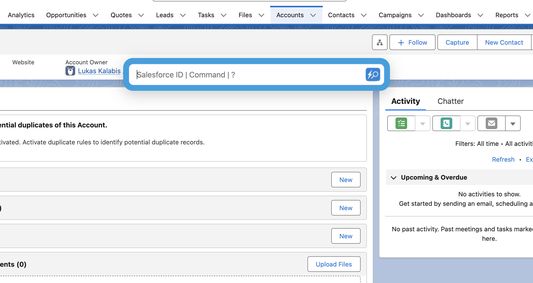
Jumpforce brings lightning-fast keyboard navigation to Salesforce.
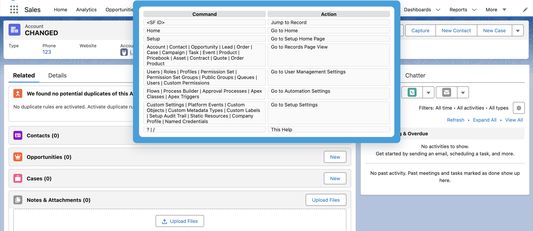
Open records by ID instantly, autocomplete commands like home, object manager, flows, and more.
Designed for keyboard-only users who want to save clicks and move faster inside Salesforce Lightning Experience.
New:
• Command palette with arrow-key selection
• Object API shortcuts (obj Account)
• Direct object setup sections (fields, layouts, record types, validation rules, triggers, etc.)
• “My …” list shortcuts (My Accounts, My Leads, My Tasks, My Opps)
Features:
• Jump to records (15/18 digit IDs)
• Autocomplete smart commands
• Focus on speed and productivity
• No Salesforce API access required (safe & fast)
Supported Browsers: Chrome, Edge, Firefox
Install Jumpforce and navigate Salesforce like never before!
Checkout https://lkalabis.github.io/jumpforce for more information
Open records by ID instantly, autocomplete commands like home, object manager, flows, and more.
Designed for keyboard-only users who want to save clicks and move faster inside Salesforce Lightning Experience.
New:
• Command palette with arrow-key selection
• Object API shortcuts (obj Account)
• Direct object setup sections (fields, layouts, record types, validation rules, triggers, etc.)
• “My …” list shortcuts (My Accounts, My Leads, My Tasks, My Opps)
Features:
• Jump to records (15/18 digit IDs)
• Autocomplete smart commands
• Focus on speed and productivity
• No Salesforce API access required (safe & fast)
Supported Browsers: Chrome, Edge, Firefox
Install Jumpforce and navigate Salesforce like never before!
Checkout https://lkalabis.github.io/jumpforce for more information
Ocenione na 0 przez 0 recenzentów
Uprawnienia i dane
Wymagane uprawnienia:
- Mieć dostęp do kart przeglądarki
Opcjonalne uprawnienia:
- Mieć dostęp do danych użytkownika w domenie „salesforce.com”
- Mieć dostęp do danych użytkownika w domenie „salesforce-setup.com”
- Mieć dostęp do danych użytkownika w domenie „force.com”
- Mieć dostęp do danych użytkownika w domenie „visualforce.com”
- Mieć dostęp do danych użytkownika w domenie „lightning.force.com”
- Mieć dostęp do danych użytkownika w domenie „salesforce.mil”
- Mieć dostęp do danych użytkownika w domenie „force.mil”
Więcej informacji
- Strony dodatku
- Wersja
- 0.20
- Rozmiar
- 32,88 KB
- Ostatnia aktualizacja
- 2 dni temu (8 kwi 2026)
- Powiązane kategorie
- Licencja
- Wszelkie prawa zastrzeżone
- Prywatność
- Zasady ochrony prywatności tego dodatku
- Historia wersji
- Dodaj do kolekcji