
Export Memrise Progress av neoncube
Export your Memrise community course's progress.
47 brukarar47 brukarar
Metadata for utvidingar
Skjermbilde
Om denne utvidinga
This extension lets you save your Memrise community course's progress, so that you can import it into another site, such as mylittlewordland.com
To download your progress:
1. Go to https://community-courses.memrise.com
2. Open a course. You should now be on the course's overview page.
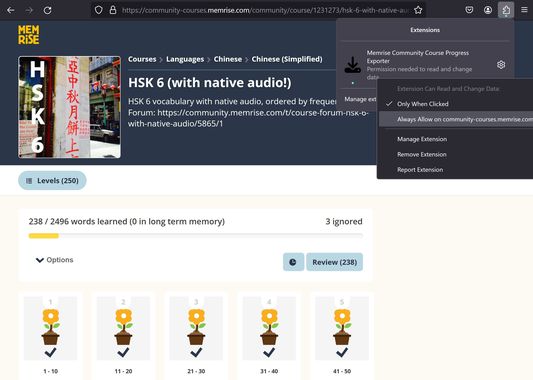
3. Click the Firefox extensions icon, right click the Memrise Community Course Progress Exporter extension, and select "Always Allow on community-courses.memrise.com" (See screenshot).
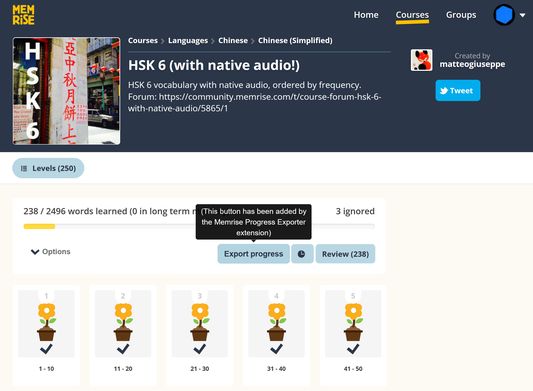
4. Click the blue "Export progress" button.
To download your progress:
1. Go to https://community-courses.memrise.com
2. Open a course. You should now be on the course's overview page.
3. Click the Firefox extensions icon, right click the Memrise Community Course Progress Exporter extension, and select "Always Allow on community-courses.memrise.com" (See screenshot).
4. Click the blue "Export progress" button.
Vurdert 0 av 0 meldarar
Løyve og data
Påkravde løyve:
- Tilgang til dataa dine for community-courses.memrise.com
- Tilgang til dataa dine for app.memrise.com
Valfrie løyve:
- Tilgang til dataa dine for community-courses.memrise.com
- Tilgang til dataa dine for app.memrise.com
Meir informasjon
- Lenker for tillegg
- Versjon
- 1.13
- Storleik
- 24,21 KB
- Sist oppdatert
- 5 månader sidan (29. mai 2026)
- Liknande kategoriar
- Lisens
- Alle rettar med atterhald
- Versjonshistorikk
- Legg til i samling