Add-ons voor Firefox Browser
  • Extensies
  • Thema’s
    • voor Firefox
    • Woordenboeken en taalpakketten
    • Websites voor andere browsers
    • Add-ons voor Android
Aanmelden
Voorbeeld van REtoUN

REtoUN door DBSH

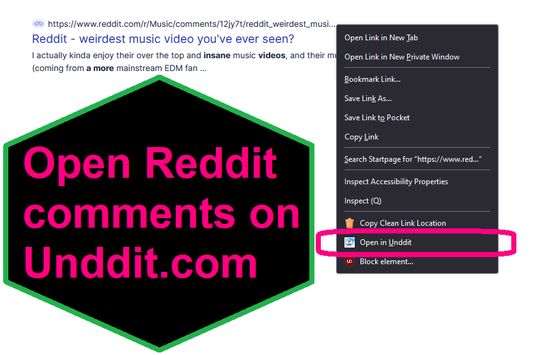
EXTENSION IS DEPRECATED - SEE ABOUT THIS EXTENSION BELOW FOR MORE DETAIL A simple extension that adds an option to the context menu to open links to Reddit comments on unddit.com instead, in a new tab.

0 (0 beoordelingen)0 (0 beoordelingen)
2 gebruikers2 gebruikers
Firefox downloaden en de extensie ontvangen
Bestand downloaden

Metagegevens van extensie

Schermafbeeldingen
Over deze extensie
EXTENSION IS DEPRECATED. NOTES: https://www.unddit.com is gone, and its existence was necessary for this extension to function. I am leaving this extension published for educational purposes (someone may want to use the source for a similar use case where an option in the context menu links to a re-written URL)

This is for those who prefer to read Reddit comments on https://www.unddit.com - maybe you prefer to see deleted comments, or maybe you think "continue this thread" is a crime against UI.
To use, right-click on a link to a Reddit post, and choose Open in Unddit from the context menu. If the link to the Reddit post is https://www.reddit.com/r/news/comments/130kndv for example, using REtoUN will open https://www.unddit.com/r/news/comments/130kndv instead, in a new tab.
Ontwikkelaarsopmerkingen
Note that in Firefox, content on https://www.unddit.com requires turning off Enhanced Tracking Protection to load. This behavior is not at all related to this extension.

Developer is not affiliated with Unddit.com, but is a huge fan of the project.

To view this extension's source code:
1. In a Firefox instance that already has this extension installed, type about:profiles in the Firefox address bar, then press Enter
2. Under the profile labeled This is the profile in use and it cannot be deleted, click on the Open Directory button (appears as Open Folder on Windows) next to Root Directory
3. In the file explorer window that opens, go into the extensions directory (the extensions folder)
4. Copy the file {d40ec1bd-9875-4dbd-a1f7-cba6e2d9d281}.xpi and paste it somewhere else, such as your Desktop
5. Rename the file you just pasted, changing the extension to .zip - so {d40ec1bd-9875-4dbd-a1f7-cba6e2d9d281}.xpi becomes {d40ec1bd-9875-4dbd-a1f7-cba6e2d9d281}.zip
6. Unzip the file {d40ec1bd-9875-4dbd-a1f7-cba6e2d9d281}.zip. The extracted files are the source, especially the .json and .js files.
Met 0 gewaardeerd door 0 beoordelaars
Meld u aan om deze extensie te waarderen
Er zijn nog geen waarderingen

Sterrenwaardering opgeslagen

5
0
4
0
3
0
2
0
1
0
Nog geen beoordelingen
Toestemmingen en gegevens

Vereiste machtigingen:

  • Browsertabbladen benaderen
Meer info
Meer informatie
Versie
1.0
Grootte
26,31 KB
Laatst bijgewerkt
3 jaar geleden (27 apr. 2023)
Verwante categorieën
  • Feeds, nieuws en blogging
  • Privacy en beveiliging
  • Sociaal en communicatie
Licentie
Alleen GNU General Public License v3.0
Privacybeleid
Het privacybeleid voor deze add-on lezen
Versiegeschiedenis
  • Alle versies bekijken
Toevoegen aan collectie
Deze add-on rapporteren
Naar Mozilla’s startpagina

Add-ons

  • Over
  • Firefox-add-onsblog
  • Extensieworkshop
  • Ontwikkelaarshub
  • Ontwikkelaarsbeleid
  • Gemeenschapsblog
  • Forum
  • Een bug melden
  • Beoordelingsrichtlijnen

Browsers

  • Desktop
  • Mobile
  • Enterprise

Producten

  • Browsers
  • VPN
  • Relay
  • Monitor
  • Pocket
  • Bluesky (@firefox.com)
  • Instagram (Firefox)
  • YouTube (firefoxchannel)
  • Privacy
  • Cookies
  • Juridisch

Tenzij anders vermeld, is op de inhoud van deze website de Creative Commons Attribution Share-Alike License v3.0 of latere versie van toepassing.