
GUTS door Viet Tran
Web extension that helps you avoid distraction on the Internet . The extension can rick-roll you whenever it finds certain words or combinations of words from either the URL or the website content.
Geen gebruikersGeen gebruikers
Metagegevens van extensie
Schermafbeeldingen


Over deze extensie
GUTS
Web extension that helps you avoid distraction on the Internet . The extension can rick-roll you whenever it finds certain words or combinations of words from either the URL or the website content.
How to use
1. Check current words/combinations of words
2. Add new word(s)/combination of words
3. Edit word(s)/combination of words
4. Delete word(s)/combination of words
Web extension that helps you avoid distraction on the Internet . The extension can rick-roll you whenever it finds certain words or combinations of words from either the URL or the website content.
How to use
1. Check current words/combinations of words
- Go to `about:addons`.
- In the GUTS extension area, select "Preferences". This will lead you to the extension settings main menu.
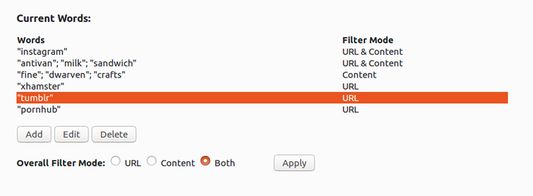
- In the main menu, you will see a table with 2 columns "Words" and "Filter Mode", indicating the words/combinations of words and where they are filtered (URL, content or both) respectively.
2. Add new word(s)/combination of words
- Go to extension main menu and select "Add". This will lead you to the add menu.
- Type in the word(s) you want to be filtered in the "New Words" input section.
- To add another word(s) that you need to be found in the same filtering area (URL, content), Click the "And..." button and type in the word in the newly spawned input. (Note: a combination of words can only trigger a URL redirection if and only if all of the words in the combination found in the filtering area).
- Select the where you want the word(s)/combination of words to be filtered in the "Find in" option.
- Click "Save" to save the new word(s)/combination of words into the local storage.
3. Edit word(s)/combination of words
- Go to extension main menu.
- Select the word(s)/combination of words you want to edit by clicking on one of rows in the "Current Words" table.
- Click "Edit" to begin editing.
- Click "Save" to update the word(s)/combination of words.
4. Delete word(s)/combination of words
- Go to extension main menu.
- Select the word(s)/combination of words you want to delete by clicking on one of rows in the "Current Words" table.
- Click "Delete" to delete selected word(s)/combination of words.
Met 0 gewaardeerd door 0 beoordelaars
Toestemmingen en gegevens
Meer informatie
- Add-on-koppelingen
- Versie
- 1.3resigned1
- Grootte
- 13,13 KB
- Laatst bijgewerkt
- 2 jaar geleden (25 apr. 2024)
- Verwante categorieën
- Licentie
- Mozilla Public License 2.0
- Versiegeschiedenis
- Toevoegen aan collectie