
FastEasypdf door Lemonrick
FastEasypdf provides the ability to convert any image webpage or document into a PDF File.
Geen gebruikersGeen gebruikers
Metagegevens van extensie
Schermafbeeldingen
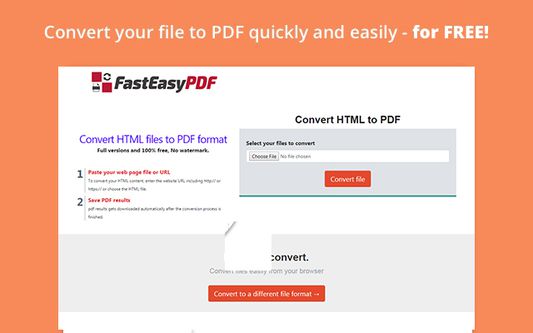
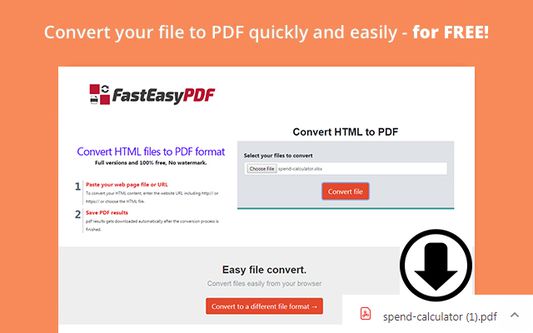
Over deze extensie
FastEasyPDF Converter Allows quick conversion any file to PDF from the task bar icon
Convert any file to PDF straight from your extension icon. This easy-to-use free extension allows you to convert your files to PDF easily without downloading an application and slowing down your computer.
**In order to provide the extension feature, your default search settings would be modified.
Need assistance?
FAQs and Uninstall instructions can be found at https://fasteasypdf.com/wp/help/
You can type the word "PDF" in the Omnibox and click "CTRL + Tab" on the keyboard, and get access to the online conversion software.
How does it work?
1. Click on the extension icon on the top right corner
2. Click on the "Choose File" button. You can also "drag and drop" the file if it’s easier for you
3. Select the file you want to convert
4. Click on the “Convert file” button and your desired file will be automatically downloaded to your computer.
5. Preview your file by clicking on the “View” button
The extension requires the following permissions:
tabs” - The extension requires this permission in order to allow payment for distribution affiliates and to show a better user experience.
“Manage your apps, extensions, and themes” (“Management”) - The extension requires this permission in order to allow you to disable or remove our extension easily from different menus via the extension’s interface.
“Read and change your data on a number of websites” - For our product to work, we require access solely to the websites we own and manage.
"webRequest", "webRequestBlocking" - The extension requires this permission in order to provide you with search results. It allows us to provide you with a search feature related to the extension you have chosen to install. It also allows the extension to redirect specific queries to affiliated partners in order to allow you better browsing experience.
"contextMenus"- The extension requires this permission in order to make the access to the Privacy Policy and About pages as convenient as possible, through the extension “browser action” button.
“Cookies” - The extension requires this permission in order to allow payment for distribution affiliates.
For more information please visit: https://fasteasypdf.com/wp/eula-search-application/
How do I uninstall this extension?
Click on the Chrome Menu icon to open the menu
Click on Settings
On the left window pane click on Extensions
Choose the extension from the list
Click on the Trash bin icon to the right of the extension
On the pop-up window click on the Remove button
EULA: https://fasteasypdf.com/wp/eula-search-application/
Privacy Policy : https://fasteasypdf.com/wp/privacy-policy/
You can always contact us at https://fasteasypdf.com/wp/contact-us/
Convert any file to PDF straight from your extension icon. This easy-to-use free extension allows you to convert your files to PDF easily without downloading an application and slowing down your computer.
**In order to provide the extension feature, your default search settings would be modified.
Need assistance?
FAQs and Uninstall instructions can be found at https://fasteasypdf.com/wp/help/
You can type the word "PDF" in the Omnibox and click "CTRL + Tab" on the keyboard, and get access to the online conversion software.
How does it work?
1. Click on the extension icon on the top right corner
2. Click on the "Choose File" button. You can also "drag and drop" the file if it’s easier for you
3. Select the file you want to convert
4. Click on the “Convert file” button and your desired file will be automatically downloaded to your computer.
5. Preview your file by clicking on the “View” button
The extension requires the following permissions:
tabs” - The extension requires this permission in order to allow payment for distribution affiliates and to show a better user experience.
“Manage your apps, extensions, and themes” (“Management”) - The extension requires this permission in order to allow you to disable or remove our extension easily from different menus via the extension’s interface.
“Read and change your data on a number of websites” - For our product to work, we require access solely to the websites we own and manage.
"webRequest", "webRequestBlocking" - The extension requires this permission in order to provide you with search results. It allows us to provide you with a search feature related to the extension you have chosen to install. It also allows the extension to redirect specific queries to affiliated partners in order to allow you better browsing experience.
"contextMenus"- The extension requires this permission in order to make the access to the Privacy Policy and About pages as convenient as possible, through the extension “browser action” button.
“Cookies” - The extension requires this permission in order to allow payment for distribution affiliates.
For more information please visit: https://fasteasypdf.com/wp/eula-search-application/
How do I uninstall this extension?
Click on the Chrome Menu icon to open the menu
Click on Settings
On the left window pane click on Extensions
Choose the extension from the list
Click on the Trash bin icon to the right of the extension
On the pop-up window click on the Remove button
EULA: https://fasteasypdf.com/wp/eula-search-application/
Privacy Policy : https://fasteasypdf.com/wp/privacy-policy/
You can always contact us at https://fasteasypdf.com/wp/contact-us/
Met 4 gewaardeerd door 1 beoordelaar
Toestemmingen en gegevens
Vereiste machtigingen:
- Browsertabbladen benaderen
- Uw gegevens voor websites in het domein google.com benaderen
- Uw gegevens voor search.fasteasypdf.com benaderen
Meer informatie
- Add-on-koppelingen
- Versie
- 0.0.5
- Grootte
- 1,52 MB
- Laatst bijgewerkt
- 6 jaar geleden (15 dec. 2019)
- Verwante categorieën
- Licentie
- Mozilla Public License 2.0
- Privacybeleid
- Het privacybeleid voor deze add-on lezen
- Versiegeschiedenis
- Toevoegen aan collectie