
Enhanced GitHub door Varun Malhotra
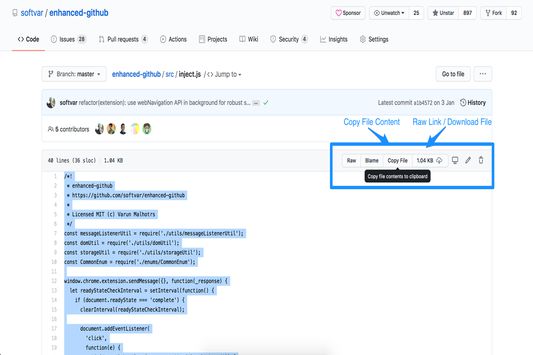
Display repo size, size of each file, download link and option to copy file contents
501 gebruikers501 gebruikers
Metagegevens van extensie
Schermafbeeldingen

Over deze extensie
Display repo size, size of each file, download link and option to copy file contents
Extension that provides useful features on top of GitHub Website.
FEATURES
1. Displays repo size.
2. Displays each file size in every active branch (not applicable for folder / symlink)
3. Show download link for each individual file (not applicable for folder / symlink)
4. Copy file's contents directly to Clipboard (just won't work for markdown files)
5. Download file
7. Coming soon...please suggest by opening an issue on https://github.com/softvar/enhanced-github/issues
NO BS POLICY:
Enhanced GitHub Chrome Extension doesn't collect/share/care about your data at all.
Asks for GitHub Access Token only for private repos and if Rate Limiting is your concern.
PERMISSION REQUIRED:
1. "*://*.github.com/*" - for running on github.com domain.
2. storage - for storing GitHub access token on your local system. GitHub Access token is required for private repos and for handling API rate-limiting issues.
3. webRequest - to support GitHub being a single-page-application now.
4. webNavigation - to support GitHub being a single-page-application now.
Read the detailed blog to support SPA and for requesting permissions #3 and #4 - https://medium.com/@softvar/making-chrome-extension-smart-by-supporting-spa-websites-1f76593637e8
CHANGELOG:
Please check the detailed CHANGELOG - https://github.com/softvar/enhanced-github/blob/master/CHANGELOG.md
OPEN-SOURCED and LICENSE:
- It's open-sourced - https://github.com/softvar/enhanced-github under MIT License
CONTACT:
For more updates, please stay tuned!
For any queries/issues - open an issue on https://github.com/softvar/enhanced-github/issues
For any query, drop me an email at varun2902@gmail.com
Extension that provides useful features on top of GitHub Website.
FEATURES
1. Displays repo size.
2. Displays each file size in every active branch (not applicable for folder / symlink)
3. Show download link for each individual file (not applicable for folder / symlink)
4. Copy file's contents directly to Clipboard (just won't work for markdown files)
5. Download file
7. Coming soon...please suggest by opening an issue on https://github.com/softvar/enhanced-github/issues
NO BS POLICY:
Enhanced GitHub Chrome Extension doesn't collect/share/care about your data at all.
Asks for GitHub Access Token only for private repos and if Rate Limiting is your concern.
PERMISSION REQUIRED:
1. "*://*.github.com/*" - for running on github.com domain.
2. storage - for storing GitHub access token on your local system. GitHub Access token is required for private repos and for handling API rate-limiting issues.
3. webRequest - to support GitHub being a single-page-application now.
4. webNavigation - to support GitHub being a single-page-application now.
Read the detailed blog to support SPA and for requesting permissions #3 and #4 - https://medium.com/@softvar/making-chrome-extension-smart-by-supporting-spa-websites-1f76593637e8
CHANGELOG:
Please check the detailed CHANGELOG - https://github.com/softvar/enhanced-github/blob/master/CHANGELOG.md
OPEN-SOURCED and LICENSE:
- It's open-sourced - https://github.com/softvar/enhanced-github under MIT License
CONTACT:
For more updates, please stay tuned!
For any queries/issues - open an issue on https://github.com/softvar/enhanced-github/issues
For any query, drop me an email at varun2902@gmail.com
Met 4,6 gewaardeerd door 11 beoordelaars
Toestemmingen en gegevens
Vereiste machtigingen:
- Browseractiviteit tijdens navigeren benaderen
- Uw gegevens voor websites in het domein github.com benaderen
Optionele machtigingen:
- Uw gegevens voor websites in het domein github.com benaderen
Meer informatie
- Add-on-koppelingen
- Versie
- 6.1.0
- Grootte
- 51,74 KB
- Laatst bijgewerkt
- 2 jaar geleden (3 jun. 2024)
- Verwante categorieën
- Licentie
- MIT-licentie
- Privacybeleid
- Het privacybeleid voor deze add-on lezen
- Versiegeschiedenis
- Toevoegen aan collectie