
Convert Case door Convert Case Ltd
Convert text in your browser between UPPER CASE, lower case and more.
783 gebruikers783 gebruikers
Metagegevens van extensie
Schermafbeeldingen
Over deze extensie
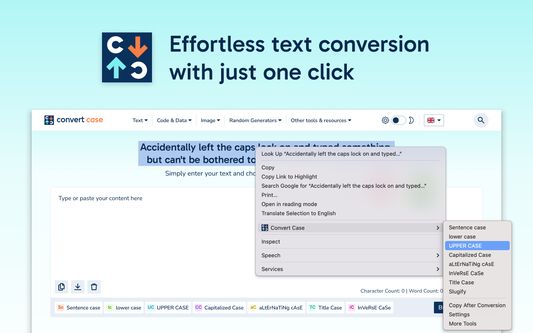
Tired of retyping text just to change the case? Select text anywhere in your browser, right-click, and convert it instantly - no copy-pasting to external tools.
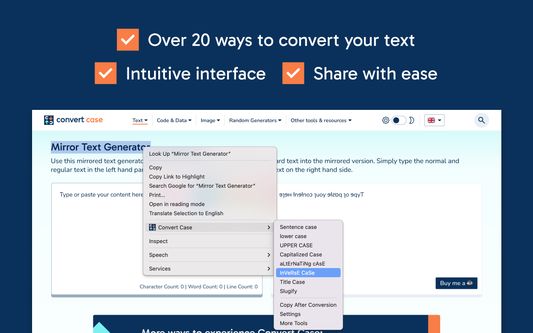
Convert Case is a fast, lightweight text case changer with 16 conversions, keyboard shortcuts, automatic clipboard copy, and full UI translations in 15 languages. Change case directly in your browser - select, right-click, done. Works on regular web pages, Google Docs, Reddit, and more.
Writing conversions
UPPER CASE, lower case, Title Case, Sentence case, Capitalized Case, No Accents
Developer conversions
camelCase, PascalCase, snake_case, CONSTANT_CASE, param-case (slugify), dot.case, path/case
Utility conversions
Alternating Case, Inverse Case, No Case (plain lowercase words)
Features
- Change case in place via right-click context menu
- Keyboard shortcuts for quick access (Alt+U, Alt+L, Alt+C, Alt+A) - or set your own
- Copy After Conversion - automatically copies converted text to the clipboard
- Automatic proper noun casing in Title Case, Sentence case, and Capitalized Case - thousands of names, places, brands, and acronyms are recognised and cased correctly (Paris, IBM, Abu Dhabi, iOS) - toggle off or add your own custom terms in Settings
- Counts submenu with live character, word, sentence, and line counts for the current selection
- Configurable Title Case options (ignore words like "the", "and", "of")
Works with
Google Docs (Shift+right-click or keyboard shortcut), Reddit, Disqus, WYSIWYG editors, TinyMCE, and iframe-based content.
Privacy
All conversions are performed locally on your device. Convert Case does not collect, transmit, or store any user data.
Languages
English, British English, Deutsch, Ελληνικά, Español, Filipino, Français, हिन्दी, Magyar, Italiano, Polski, Português, Slovenščina, Türkçe, Українська. Automatically follows your browser's language; can be overridden in Settings.
Changelog
- 2.3.0 - New "Proper Nouns" setting replaces Ignored Words and Correct Words; toggle auto-correction of built-in proper nouns and abbreviations on or off, and add your own custom terms whose casing overrides the built-in list. Existing Correct Words are migrated automatically; Ignored Words are retired (add the word in your preferred casing to the new list instead)
- 2.2.0 - Translated into 15 languages (English, British English, German, Greek, Spanish, Filipino, French, Hindi, Hungarian, Italian, Polish, Portuguese, Slovenian, Turkish, Ukrainian); follows your browser's language automatically, with an override in Settings
- 2.1.0 - Automatic proper noun casing in Title Case, Sentence case, and Capitalized Case (names, places, brands, acronyms); accented characters now transliterate properly when slugifying (café → cafe, straße → strasse); new Counts submenu showing live character, word, sentence, and line counts for the current selection
- 2.0.0 - New developer conversions (camelCase, PascalCase, CONSTANT_CASE, param-case, snake_case, dot.case, path/case), new utility conversions (Capitalized Case, Alternating Case, Inverse Case, No Accents, No Case), ignored words and correct words settings, autosave
- 1.6.0 - Support for Google Docs
- 1.5.2 - Fixed conversions not working on existing tabs after first install
- 1.5.1 - Added keyboard shortcuts link to context menu
- 1.5.0 - Additional keyboard shortcuts and refreshed info/settings UI
- 1.4.1 - Reliability updates
- 1.4.0 - Bug fixes and optimisation
- 1.3.0 - New icon
- 1.2.1 - Disqus and Slate Editor fixes
- 1.2.0 - Support for Disqus and more iframe-based content
- 1.1.0 - Support for Reddit and WYSIWYG editors
- 1.0.10 - Fixed automatic copy after conversion not working
- 1.0.9 - Settings page for title case options and keyboard shortcuts
- 1.0.8 - Reliability updates
- 1.0.7 - Title Case conversion and Slugify option
- 1.0.0 - Initial release
Convert Case is a fast, lightweight text case changer with 16 conversions, keyboard shortcuts, automatic clipboard copy, and full UI translations in 15 languages. Change case directly in your browser - select, right-click, done. Works on regular web pages, Google Docs, Reddit, and more.
Writing conversions
UPPER CASE, lower case, Title Case, Sentence case, Capitalized Case, No Accents
Developer conversions
camelCase, PascalCase, snake_case, CONSTANT_CASE, param-case (slugify), dot.case, path/case
Utility conversions
Alternating Case, Inverse Case, No Case (plain lowercase words)
Features
- Change case in place via right-click context menu
- Keyboard shortcuts for quick access (Alt+U, Alt+L, Alt+C, Alt+A) - or set your own
- Copy After Conversion - automatically copies converted text to the clipboard
- Automatic proper noun casing in Title Case, Sentence case, and Capitalized Case - thousands of names, places, brands, and acronyms are recognised and cased correctly (Paris, IBM, Abu Dhabi, iOS) - toggle off or add your own custom terms in Settings
- Counts submenu with live character, word, sentence, and line counts for the current selection
- Configurable Title Case options (ignore words like "the", "and", "of")
Works with
Google Docs (Shift+right-click or keyboard shortcut), Reddit, Disqus, WYSIWYG editors, TinyMCE, and iframe-based content.
Privacy
All conversions are performed locally on your device. Convert Case does not collect, transmit, or store any user data.
Languages
English, British English, Deutsch, Ελληνικά, Español, Filipino, Français, हिन्दी, Magyar, Italiano, Polski, Português, Slovenščina, Türkçe, Українська. Automatically follows your browser's language; can be overridden in Settings.
Changelog
- 2.3.0 - New "Proper Nouns" setting replaces Ignored Words and Correct Words; toggle auto-correction of built-in proper nouns and abbreviations on or off, and add your own custom terms whose casing overrides the built-in list. Existing Correct Words are migrated automatically; Ignored Words are retired (add the word in your preferred casing to the new list instead)
- 2.2.0 - Translated into 15 languages (English, British English, German, Greek, Spanish, Filipino, French, Hindi, Hungarian, Italian, Polish, Portuguese, Slovenian, Turkish, Ukrainian); follows your browser's language automatically, with an override in Settings
- 2.1.0 - Automatic proper noun casing in Title Case, Sentence case, and Capitalized Case (names, places, brands, acronyms); accented characters now transliterate properly when slugifying (café → cafe, straße → strasse); new Counts submenu showing live character, word, sentence, and line counts for the current selection
- 2.0.0 - New developer conversions (camelCase, PascalCase, CONSTANT_CASE, param-case, snake_case, dot.case, path/case), new utility conversions (Capitalized Case, Alternating Case, Inverse Case, No Accents, No Case), ignored words and correct words settings, autosave
- 1.6.0 - Support for Google Docs
- 1.5.2 - Fixed conversions not working on existing tabs after first install
- 1.5.1 - Added keyboard shortcuts link to context menu
- 1.5.0 - Additional keyboard shortcuts and refreshed info/settings UI
- 1.4.1 - Reliability updates
- 1.4.0 - Bug fixes and optimisation
- 1.3.0 - New icon
- 1.2.1 - Disqus and Slate Editor fixes
- 1.2.0 - Support for Disqus and more iframe-based content
- 1.1.0 - Support for Reddit and WYSIWYG editors
- 1.0.10 - Fixed automatic copy after conversion not working
- 1.0.9 - Settings page for title case options and keyboard shortcuts
- 1.0.8 - Reliability updates
- 1.0.7 - Title Case conversion and Slugify option
- 1.0.0 - Initial release
Met 4,6 gewaardeerd door 15 beoordelaars
Toestemmingen en gegevens
Vereiste machtigingen:
- Browsertabbladen benaderen
- Uw gegevens voor alle websites benaderen
Gegevensverzameling:
- De ontwikkelaar zegt dat deze extensie geen gegevensverzameling vereist.
Meer informatie
- Add-on-koppelingen
- Versie
- 2.3.0
- Grootte
- 88,16 KB
- Laatst bijgewerkt
- één dag geleden (20 apr. 2026)
- Verwante categorieën
- Licentie
- Alle rechten voorbehouden
- Versiegeschiedenis
- Toevoegen aan collectie
De ontwikkelaar van deze extensie vraagt uw steun voor verdere ontwikkeling door middel van een kleine bijdrage.