
Just Read door Zach Saucier
A feature-packed, customizable reader extension.
ExperimenteelExperimenteel
2.225 gebruikers2.225 gebruikers
Metagegevens van extensie
Schermafbeeldingen


Over deze extensie
Just Read is a feature-packed and customizable reader view.
With one click (or less!), you can remove distractions like:
- The page's styling
- Ads
- Popups
- Comments
And read the article in a customizable, simplified format - like a read mode but better!
Users can:
- Summarize the article using AI.
- Use the default white and dark themes.
- Modify their theme using a graphical editor or CSS.
- Use a theme someone else has made (found at https://goo.gl/Z59SM4 ).
- Use their very own custom styling.
- Auto-run the reader format on specific sites.
- Auto-run summarization.
- Use a keyboard shortcut to run the reader.
- Print the custom-styled version of the article.
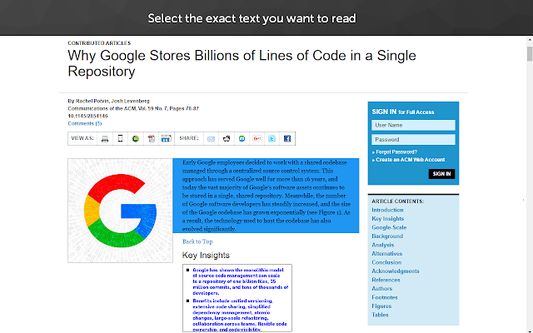
- Use the selection mode to choose exactly which text they want to select for reading.
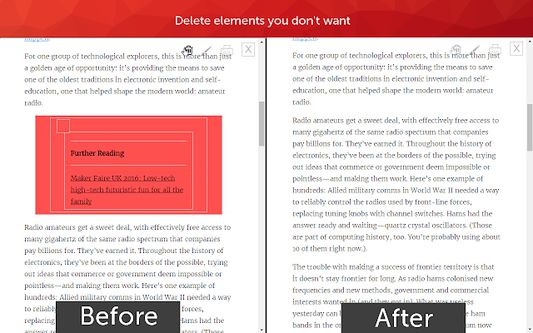
- Use the deletion mode to remove any unwanted content after selection.
- Edit incorrect meta information generated.
- Control which options the reader uses.
- Go straight to the next chapter from the reader view.
Just Read Premium has even more features!
- Permanently save the reader version of pages.
- Share the reader version of pages with others.
- Link directly to a section of the page within the shared reader view.
- Highlight and annotate pages.
- Add comments.
- Use a custom scrollbar.
- Auto-scroll the article.
- Apply domain-specific selectors, which give ultimate control to the content auto-selection.
Just Read collects zero data from users by default. If you sign up for an account, only your email address is stored. No analytics are sent to anyone else. Any data that is stored is safely secured and private.
Just Read is open source and can be found on GitHub here https://github.com/ZachSaucier/Just-Read
Please read the README in the GitHub link above for more details!
With one click (or less!), you can remove distractions like:
- The page's styling
- Ads
- Popups
- Comments
And read the article in a customizable, simplified format - like a read mode but better!
Users can:
- Summarize the article using AI.
- Use the default white and dark themes.
- Modify their theme using a graphical editor or CSS.
- Use a theme someone else has made (found at https://goo.gl/Z59SM4 ).
- Use their very own custom styling.
- Auto-run the reader format on specific sites.
- Auto-run summarization.
- Use a keyboard shortcut to run the reader.
- Print the custom-styled version of the article.
- Use the selection mode to choose exactly which text they want to select for reading.
- Use the deletion mode to remove any unwanted content after selection.
- Edit incorrect meta information generated.
- Control which options the reader uses.
- Go straight to the next chapter from the reader view.
Just Read Premium has even more features!
- Permanently save the reader version of pages.
- Share the reader version of pages with others.
- Link directly to a section of the page within the shared reader view.
- Highlight and annotate pages.
- Add comments.
- Use a custom scrollbar.
- Auto-scroll the article.
- Apply domain-specific selectors, which give ultimate control to the content auto-selection.
Just Read collects zero data from users by default. If you sign up for an account, only your email address is stored. No analytics are sent to anyone else. Any data that is stored is safely secured and private.
Just Read is open source and can be found on GitHub here https://github.com/ZachSaucier/Just-Read
Please read the README in the GitHub link above for more details!
Met 4,8 gewaardeerd door 27 beoordelaars
Toestemmingen en gegevens
Vereiste machtigingen:
- Browsertabbladen benaderen
- Uw gegevens voor justread.link benaderen
- Uw gegevens voor www.justread.link benaderen
Optionele machtigingen:
- Uw gegevens voor alle websites benaderen
Meer informatie
- Versie
- 7.1.2
- Grootte
- 1,1 MB
- Laatst bijgewerkt
- 17 dagen geleden (5 sep. 2026)
- Verwante categorieën
- Licentie
- Alle rechten voorbehouden
- Privacybeleid
- Het privacybeleid voor deze add-on lezen
- Eindgebruikerslicentieovereenkomst
- De licentieovereenkomst voor deze add-on lezen
- Versiegeschiedenis
- Toevoegen aan collectie