
Try in Dev Spaces 제작자: Red Hat OpenShift Dev Spaces
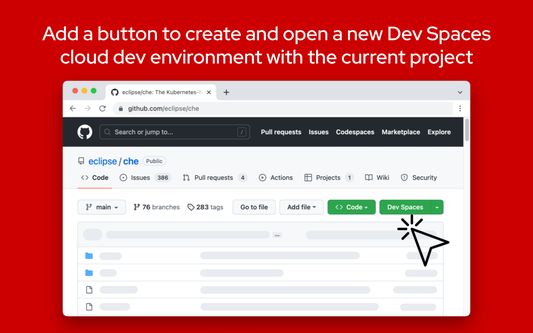
The Try in Dev Spaces add-on provides a "Dev Spaces" button for GitHub repository pages, allowing you to create a cloud development environment for your Red Hat OpenShift Dev Spaces instance right from GitHub.
사용자 2명사용자 2명
확장 메타 데이터
스크린샷
정보
NOTE:
After installation, you must provide the add-on access to https://github.com to allow the "Dev Spaces" button to be added to GitHub.
Navigate to the "Permissions" tab for the add-on from the about:addons page to provide the permissions.
The Try in Dev Spaces add-on provides a "Dev Spaces" button for GitHub repository pages, allowing you to create a cloud development environment for your Red Hat OpenShift Dev Spaces installation right from GitHub.
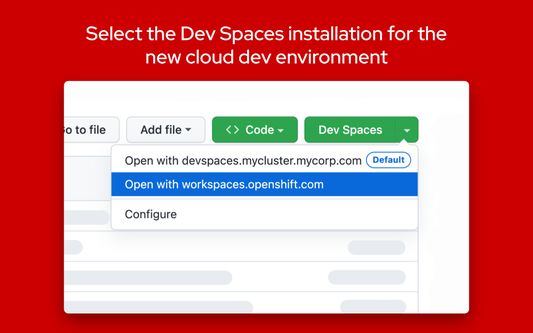
Additional Dev Spaces instances can be configured in the add-on's preferences.
By default, development environments will be created in the Red Hat Developer Sandbox. Usage of the Red Hat Developer Sandbox is subject to the Red Hat Privacy Statement.
What's new for version 1.1.1:
Adds the "Dev Spaces" button in the new GitHub UI.
What's new for version 1.1.0:
GitHub Enterprise support is now available. To configure the add-on to work with GitHub Enterprise:
1. Type "about:addons" in the address bar
2. Click on the "Try in Dev Spaces" add-on under "Manage Your Extensions"
3. Click on the "Preferences" tab to open the preferences UI
4. Click on the "GitHub Enterprise domains" tab
5. Enter your GitHub Enterprise domain (ex. https://github.example.com)
6. Accept the permission prompt after it appears on the top right of the browser. The permission is required to allow the extension to insert the "Dev Spaces" button within the GitHub webpage.
7. Navigate to a GitHub project within your GitHub Enterprise instance to see the new "Dev Spaces" button.
This add-on is open source on GitHub.
After installation, you must provide the add-on access to https://github.com to allow the "Dev Spaces" button to be added to GitHub.
Navigate to the "Permissions" tab for the add-on from the about:addons page to provide the permissions.
The Try in Dev Spaces add-on provides a "Dev Spaces" button for GitHub repository pages, allowing you to create a cloud development environment for your Red Hat OpenShift Dev Spaces installation right from GitHub.
Additional Dev Spaces instances can be configured in the add-on's preferences.
By default, development environments will be created in the Red Hat Developer Sandbox. Usage of the Red Hat Developer Sandbox is subject to the Red Hat Privacy Statement.
What's new for version 1.1.1:
Adds the "Dev Spaces" button in the new GitHub UI.
What's new for version 1.1.0:
GitHub Enterprise support is now available. To configure the add-on to work with GitHub Enterprise:
1. Type "about:addons" in the address bar
2. Click on the "Try in Dev Spaces" add-on under "Manage Your Extensions"
3. Click on the "Preferences" tab to open the preferences UI
4. Click on the "GitHub Enterprise domains" tab
5. Enter your GitHub Enterprise domain (ex. https://github.example.com)
6. Accept the permission prompt after it appears on the top right of the browser. The permission is required to allow the extension to insert the "Dev Spaces" button within the GitHub webpage.
7. Navigate to a GitHub project within your GitHub Enterprise instance to see the new "Dev Spaces" button.
This add-on is open source on GitHub.
리뷰어 0명이 0점으로 평가함
권한 및 데이터
추가 정보
- 부가 기능 링크
- 버전
- 1.1.2
- 크기
- 2.57 MB
- 최근 업데이트
- 2년 전 (2024년 12월 19일)
- 관련 카테고리
- 라이선스
- MIT 라이선스
- 개인정보처리방침
- 이 부가 기능에 대한 개인정보처리방침 읽기
- 버전 목록
- 모음집에 추가
If you have any questions, concerns, issues or feature requests, please file an issue.