Slack App-in-Tab Reborn ์ ์์: Axel Leroy
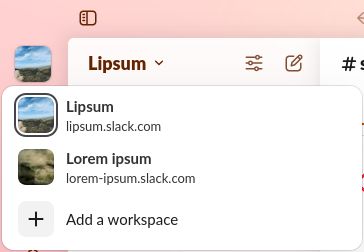
Open the Slack app with its multi-workspace sidebar in a simple browser tab, freeing you from using the Slack app!
์ฌ์ฉ์ ์์์ฌ์ฉ์ ์์
ํ์ฅ ๋ฉํ ๋ฐ์ดํฐ
์คํฌ๋ฆฐ์ท
์ ๋ณด
Slack App-in-Tab Reborn is a fork of "Slack App-in-Tab" which has unfortunately stopped working. This version keeps the same functionality as the original.
How to use
1. Install the extension
2. Visit https://app.slack.com and log into any of your workspaces
3. That's it, all your workspaces appear in the sidebar, just like in the Slack App
How does it work?
Slack App-in-Tab Reborn changes how Firefox presents itself to Slack so it believes you are browsing from a Chromebook. Since Chromebooks can't run the Slack app, it then shows the workspace switcher as it does in the app.
How to use
1. Install the extension
2. Visit https://app.slack.com and log into any of your workspaces
3. That's it, all your workspaces appear in the sidebar, just like in the Slack App
How does it work?
Slack App-in-Tab Reborn changes how Firefox presents itself to Slack so it believes you are browsing from a Chromebook. Since Chromebooks can't run the Slack app, it then shows the workspace switcher as it does in the app.
Access to slack.com is required in order to change the User-Agent (the way Firefox presents itself to Slack)
0๋ช
์ด 0์ ์ผ๋ก ํ๊ฐํจ
๊ถํ ๋ฐ ๋ฐ์ดํฐ
ํ์ ๊ถํ:
- ๋ธ๋ผ์ฐ์ ํญ์ ์ ๊ทผ
- slack.com ๋๋ฉ์ธ์ ์ฌ์ดํธ์์ ์ฌ์ฉ์์ ๋ฐ์ดํฐ์ ์ ๊ทผ
๋ฐ์ดํฐ ์์ง:
- ๊ฐ๋ฐ์๊ฐ ์ด ํ์ฅ ๊ธฐ๋ฅ์ ๋ฐ์ดํฐ ์์ง์ด ํ์ํ์ง ์๋ค๊ณ ํฉ๋๋ค.
์ถ๊ฐ ์ ๋ณด
- ๋ถ๊ฐ ๊ธฐ๋ฅ ๋งํฌ
- ๋ฒ์
- 2025.11.22
- ํฌ๊ธฐ
- 24.24 KB
- ๋ง์ง๋ง ์ ๋ฐ์ดํธ
- ํ ๋ฌ ์ (2025๋ 11์ 22์ผ)
- ๊ด๋ จ ์นดํ ๊ณ ๋ฆฌ
- ๋ผ์ด์ ์ค
- Mozilla Public License 2.0
- ๋ฒ์ ๋ชฉ๋ก
- ๋ชจ์์ง์ ์ถ๊ฐ