Firefox 브라우저 부가 기능
확장 기능
테마
더보기…
Firefox용
사전 및 언어 팩
다른 브라우저 사이트
Android 부가 기능
로그인
검색
검색
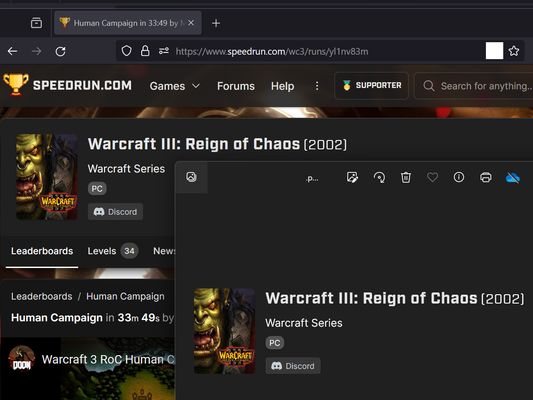
screenshot any element
제작자:
vacantthinker
webpage screenshot support: screenshot full page pick one element to screenshot
실험적
실험적
5 (리뷰 1개)
5 (리뷰 1개)
사용자 16명
사용자 16명
Firefox를 다운로드하고 확장 기능을 받으세요
파일 다운로드
확장 메타 데이터
스크린샷
정보
how to use? screenshot full page
right context menu: "screenshot full page"
how to use? pick one element to screenshot
click browser action: "pick one element to screenshot"
move your mouse on element (that you want to screenshot)
click it. (it will auto capture, then downloading as png file.)
as you know: some website cannot capture !
eg: mozilla
"Firefox_min_version": "102.0"
1명이 5점으로 평가함
로그인하여 이 확장 기능의 평점을 남겨주세요
아직 평점이 없습니다
별점 저장됨
5
1
4
0
3
0
2
0
1
0
권한 및 데이터
필수 권한:
알림 표시
브라우저 탭에 접근
모든 웹사이트에서 사용자의 데이터에 접근
추가 정보
버전
2024.1.23.2
크기
12.86 KB
마지막 업데이트
2년 전 (2024년 1월 22일)
관련 카테고리
사진 및 동영상
탭
라이선스
Mozilla Public License 2.0
버전 목록
모든 버전 보기
태그
download
social media
모음집에 추가
모음집 선택…
새 모음집 만들기
이 부가 기능 신고