
PrsPrsCopy 제작자: PrsPrsBK
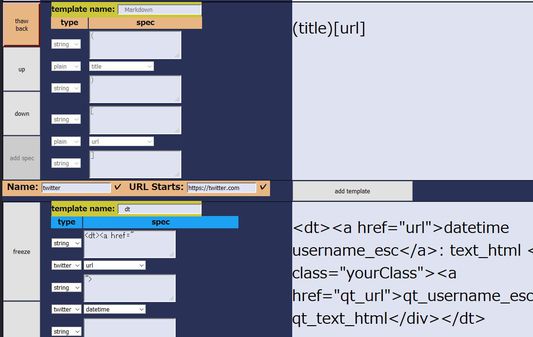
Princess Princess Copy. Copy Utility only for text. When no range selected on page, Alt-c copy with template composedof url, title, or so. Also, we can copy from Toolbar icon. We can edit templates in options page.
사용자 없음사용자 없음
확장 메타 데이터
스크린샷

정보
For each 'Alt-c' key, copy text to clipboard. Text is constructed with one of the templates for URL-matched website.
And after Alt-c key, choice of template is shift to next. Next Alt-c means 'copying with other template and shift'.
Toolbar icon tell 'copy is fired' and 'next index of template'.
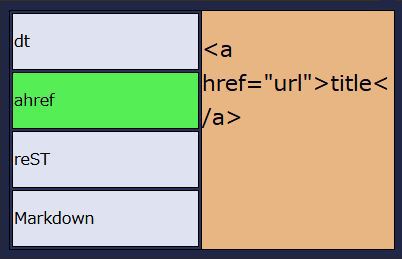
Also, clicking toolbar icon shows the list of template, and clicking template-name button go 'start copying'.
Q & A
* Plan to implement CSS Selector?
No. In short, I don't empower any evil or not-fun or far from interesting behaviors descrived below.
To be honest, I want to use it by myself, because it's very powerful and convenient.
But if implemented, there will be some bad behavior, involving e.g. 'foo: nth-child(100000)'.
It may result in something-overflow, and lead to the slowdown or crush of addon process, or browser.
And if so, does it lead to execution of malware?
I don't know what will happen and would like to prevent such things.
And simply, I don't help kids-like net watchers to collect SNS user-id or so.
* Preview within the popup menu?
Under considering. It maybe nice.
* Plan to 'Add to the end of clipboard'?
Under considering. I maybe want to use it, when copying from the same twitter time line.
But it does not happen so many times that I decide to 'implement right now anyway'.
Candidate key is Shift-Alt-c.
* Why Alt-c? Not Ctrl-c?
If it uses Ctrl-c, it will be obstacle for user who want to copy from location bar.
Addon can not know whether the focus is within location bar or not.
So when user try to copy from location bar, addon always works, and would send templated-copy to clipboard.
So I choiced another, resemble one.
* How to handle indent level?
Within each templete, we can add the indent to the head of string.
But generally, having other tools to adjust indent is better.
Other tools means text editor, formatter or so.
Maybe it's not fun to elaborate on this addon's settings.
Let's combine with and delegate to tools.
* Why not Google Chrome?
2019-02-26 Update: published.
https://chrome.google.com/webstore/detail/prsprscopy/hghdhiodkbbogfnbhknleobjjpadlmcc
And after Alt-c key, choice of template is shift to next. Next Alt-c means 'copying with other template and shift'.
Toolbar icon tell 'copy is fired' and 'next index of template'.
Also, clicking toolbar icon shows the list of template, and clicking template-name button go 'start copying'.
Q & A
* Plan to implement CSS Selector?
No. In short, I don't empower any evil or not-fun or far from interesting behaviors descrived below.
To be honest, I want to use it by myself, because it's very powerful and convenient.
But if implemented, there will be some bad behavior, involving e.g. 'foo: nth-child(100000)'.
It may result in something-overflow, and lead to the slowdown or crush of addon process, or browser.
And if so, does it lead to execution of malware?
I don't know what will happen and would like to prevent such things.
And simply, I don't help kids-like net watchers to collect SNS user-id or so.
* Preview within the popup menu?
Under considering. It maybe nice.
* Plan to 'Add to the end of clipboard'?
Under considering. I maybe want to use it, when copying from the same twitter time line.
But it does not happen so many times that I decide to 'implement right now anyway'.
Candidate key is Shift-Alt-c.
* Why Alt-c? Not Ctrl-c?
If it uses Ctrl-c, it will be obstacle for user who want to copy from location bar.
Addon can not know whether the focus is within location bar or not.
So when user try to copy from location bar, addon always works, and would send templated-copy to clipboard.
So I choiced another, resemble one.
* How to handle indent level?
Within each templete, we can add the indent to the head of string.
But generally, having other tools to adjust indent is better.
Other tools means text editor, formatter or so.
Maybe it's not fun to elaborate on this addon's settings.
Let's combine with and delegate to tools.
* Why not Google Chrome?
2019-02-26 Update: published.
https://chrome.google.com/webstore/detail/prsprscopy/hghdhiodkbbogfnbhknleobjjpadlmcc
리뷰어 0명이 0점으로 평가함
권한 및 데이터
추가 정보
- 부가 기능 링크
- 버전
- 0.10.3
- 크기
- 27.14 KB
- 최근 업데이트
- 7년 전 (2019년 10월 7일)
- 관련 카테고리
- 라이선스
- MIT 라이선스
- 버전 목록
- 모음집에 추가