
Midnight Lizard 제작자: Pavel Agarkov
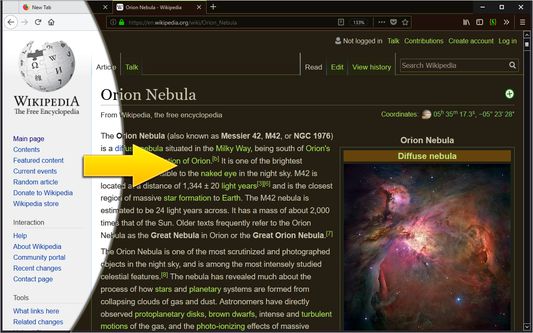
가독성을 높이기 위해 페이지 색상, 밝기, 대비를 변경합니다. 모든 페이지에 야간 모드를 적용합니다.
Android용 Firefox에서 이 확장 기능을 열려면 QR 코드를 스캔하세요

확장 메타 데이터
스크린샷




정보
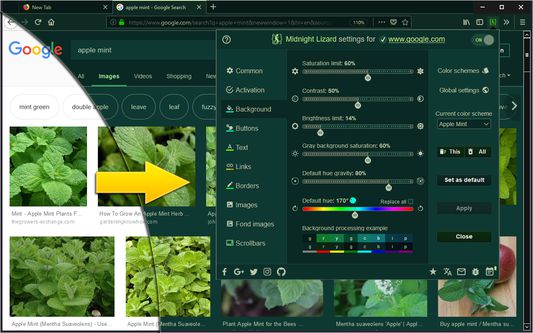
Midnight Lizard color schemes work across all websites. The extension offers many predefined color schemes to choose from, or you’re free to explore and install more at midnight-lizard.org
✔ Choose between dark, light, grayscale or colorful color schemes
✔ Modify existing or create new color schemes
✔ Use different color schemes on each website
✔ Adjust brightness, saturation, contrast and hues
✔ Improve accessibility and readability
✔ Increase contrast to make text easier to read
✔ Apply blue light filter to shift all colors towards red light
✔ Keep original images and hues without inversion
✔ Schedule automatic activation and deactivation
✔ Use keyboard shortcuts to toggle extension
⮚ on current website: Alt+Shift+L
⮚ globally: Alt+Shift+M
✔ Use with local HTML files
✔ Shade bright colors and images
✔ Change any colour you want
✔ Dynamically change browser theme (disabled by default)
✔ Sync your settings
✔ Configure background, text, buttons, links, borders and images
✔ Apply globally, per-website or with url match patterns
✔ Switch between websites blacklist and whitelist modes
✔ Use Simplified mode to improve performance on heavy websites
✔ Contribute to our open source project on GitHub.com/Midnight-Lizard
✔ Donate to our OpenCollective.com/Midnight-Lizard
Please use additional extensions in order to replace default New Tab page - extensions cannot style it. Also extensions don't work on New Tab page, Firefox Add-ons store and all Firefox system pages due to security concerns.
Please take a look at this tutorial: HOW TO improve Midnight Lizard performance
✔ Choose between dark, light, grayscale or colorful color schemes
✔ Modify existing or create new color schemes
✔ Use different color schemes on each website
✔ Adjust brightness, saturation, contrast and hues
✔ Improve accessibility and readability
✔ Increase contrast to make text easier to read
✔ Apply blue light filter to shift all colors towards red light
✔ Keep original images and hues without inversion
✔ Schedule automatic activation and deactivation
✔ Use keyboard shortcuts to toggle extension
⮚ on current website: Alt+Shift+L
⮚ globally: Alt+Shift+M
✔ Use with local HTML files
✔ Shade bright colors and images
✔ Change any colour you want
✔ Dynamically change browser theme (disabled by default)
✔ Sync your settings
✔ Configure background, text, buttons, links, borders and images
✔ Apply globally, per-website or with url match patterns
✔ Switch between websites blacklist and whitelist modes
✔ Use Simplified mode to improve performance on heavy websites
✔ Contribute to our open source project on GitHub.com/Midnight-Lizard
✔ Donate to our OpenCollective.com/Midnight-Lizard
Please use additional extensions in order to replace default New Tab page - extensions cannot style it. Also extensions don't work on New Tab page, Firefox Add-ons store and all Firefox system pages due to security concerns.
Please take a look at this tutorial: HOW TO improve Midnight Lizard performance
리뷰어 629명이 4.3점으로 평가함
권한 및 데이터
추가 정보