
Lightning Tab Groups 제작자: gchristnsn
Tab group manager for keyboard ninjas. Quickly switch between tab groups using keyboard shortcuts.
사용자 1명사용자 1명
확장 메타 데이터
스크린샷
정보
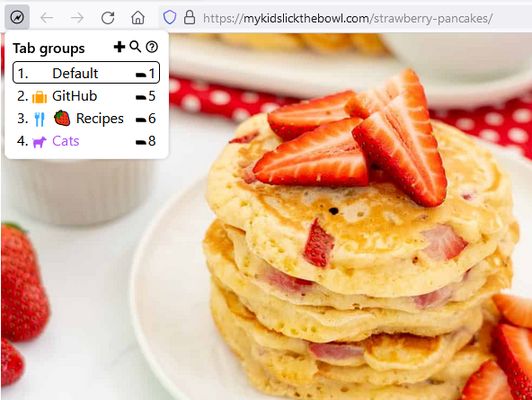
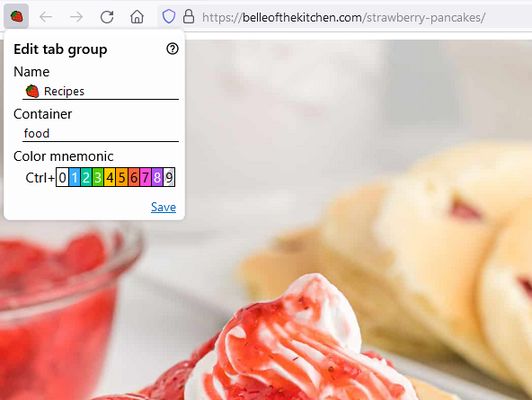
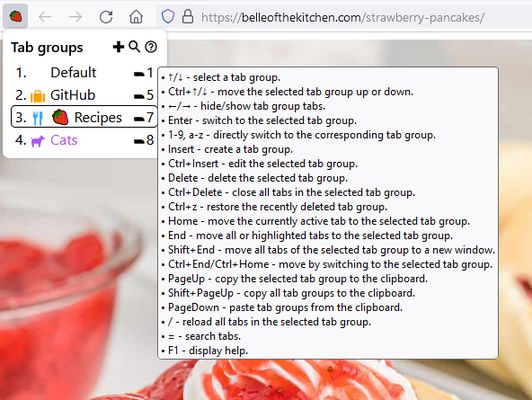
Lightning Tab Groups is a lightweight Firefox tab group manager based on tab hiding. It is designed to be operated primarily from the keyboard and allows the use of visual mnemonics for the active tab group. The users can quickly switch between tab groups by applying keyboard shortcuts while the extension popup window is open. See the online help for a more detailed description of the add-on features.
Key Features
Q&A
Q: Is it possible to back up tab groups?
A: Currently, it is only possible to copy all existing tab groups to the clipboard in JSON format with the Ctrl+PageUp keyboard shortcut. The tab groups intended to be disposable containers that separate tabs by context. If you need a long-term link or page archive storage, please consider using Scrapyard where you can save links in different shelves (collections).
Q: Is there a panorama?
A: Currently, there is no panorama, but it is possible to directly move tabs between tab groups. Please see the corresponding section of the user manual.
Key Features
- Switching between tab groups with keyboard shortcuts.
- Use of color tab group mnemonics.
- Use of emoji as a tab group mnemonic.
- Ability to close or reload all tabs in the tab group.
- Ability to copy and paste tab groups between browser instances.
- iShell integration.
Q&A
Q: Is it possible to back up tab groups?
A: Currently, it is only possible to copy all existing tab groups to the clipboard in JSON format with the Ctrl+PageUp keyboard shortcut. The tab groups intended to be disposable containers that separate tabs by context. If you need a long-term link or page archive storage, please consider using Scrapyard where you can save links in different shelves (collections).
Q: Is there a panorama?
A: Currently, there is no panorama, but it is possible to directly move tabs between tab groups. Please see the corresponding section of the user manual.
리뷰어 1명이 5점으로 평가함
권한 및 데이터
필수 권한:
- 클립보드에서 데이터 가져오기
- 클립보드에 데이터 넣기
- 알림 표시
- 최근에 닫힌 탭에 접근
- 브라우저 탭 보이고 숨기기
- 브라우저 탭에 접근
- 모든 웹사이트에서 사용자의 데이터에 접근
추가 정보
- 부가 기능 링크
- 버전
- 0.2
- 크기
- 201.16 KB
- 최근 업데이트
- 13일 전 (2026년 10월 11일)
- 관련 카테고리
- 버전 목록
- 모음집에 추가