LeechBlock NG 제작: James Anderson
LeechBlock NG is a simple productivity tool designed to block those time-wasting sites that can suck the life out of your working day. All you need to do is specify which sites to block and when to block them.
확장 메타 데이터
LeechBlock NG (Next Generation) is a simple free productivity tool designed to block those time-wasting sites that can suck the life out of your working day. (You know: the ones that rhyme with 'Blue Cube', 'Space Hook', 'Sticky Media', 'Quitter', and the like.) All you need to do is specify which sites to block and when to block them.
You can specify up to 30 sets of sites to block, with different times and days for each set. You can block sites within fixed time periods (e.g., between 9am and 5pm), after a time limit (e.g., allow up to 10 minutes in every hour), or with a combination of time periods and time limit (e.g., allow up to 10 minutes in every hour between 9am and 5pm).
Additional features:
Version history: https://www.proginosko.com/leechblock/version-history/
Usage examples: https://www.proginosko.com/leechblock/examples/
Permissions explained: https://www.proginosko.com/leechblock/faq/permissions/
Frequently asked questions: https://www.proginosko.com/leechblock/faq/
Community support: https://www.tapatalk.com/groups/leechblock/
You can specify up to 30 sets of sites to block, with different times and days for each set. You can block sites within fixed time periods (e.g., between 9am and 5pm), after a time limit (e.g., allow up to 10 minutes in every hour), or with a combination of time periods and time limit (e.g., allow up to 10 minutes in every hour between 9am and 5pm).
Additional features:
- Lockdown: Block sites immediately for a specified duration.
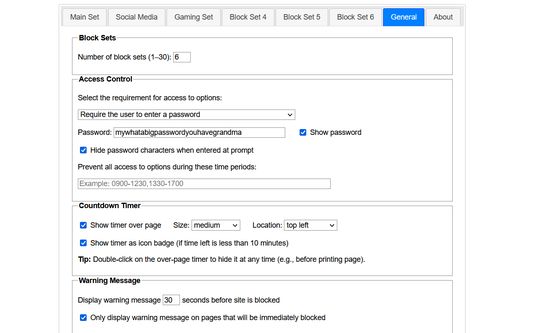
- Access control: Set a password or random access code for the options page, to slow you down in moments of weakness!
- Delaying: Set a countdown to delay access to sites instead of completely blocking them.
- Wildcards: Block a range of sites (e.g., *.somesite.com).
- Exceptions: Whitelist sites you don't want to be blocked (e.g., +allowedsite.com).
Version history: https://www.proginosko.com/leechblock/version-history/
Usage examples: https://www.proginosko.com/leechblock/examples/
Permissions explained: https://www.proginosko.com/leechblock/faq/permissions/
Frequently asked questions: https://www.proginosko.com/leechblock/faq/
Community support: https://www.tapatalk.com/groups/leechblock/
Please check the FAQ page, examples page, and community support forum before emailing support queries to the developer. Thanks!
이 부가 기능을 신고하기
이 부가 기능이 Mozilla의 부가 기능 정책이나 안전, 개인정보 관련 문제로 위협한다고 생각되시면, 이 양식을 이용하여 Mozilla에 이 문제를 보고해 주십시오.
이 양식을 버그 신고나 기능 추가 요청용으로 사용하지 마십시오. 이 보고서는 Mozilla에 전송되며 개발자에게 전달되지 않습니다.
이 확장 기능의 개발자가 여러분이 작은 기여로 지속적인 개발을 지원해 줄 것을 요청합니다.
다음 권한 필요:
- 파일을 다운로드하고 브라우저의 다운로드 기록을 읽고 수정
- 브라우저 탭에 접근
- 탐색중에 브라우저 활동에 접근
- 모든 웹사이트에서 사용자의 데이터에 접근
이 부가 기능이 요청하는 것:
- 모든 웹사이트에서 사용자의 데이터에 접근
- 부가 기능 링크
- 버전
- 1.0.6.2
- 크기
- 369.75 KB
- 마지막 업데이트
- 24일 전 (2020년 8월 31일)
- 라이선스
- Mozilla Public License, version 2.0
- 버전 목록
Version 1.0.6.2 (31 Aug 2020)
- Fixed bug affecting time limit blocking.
- 아직 평점이 없습니다
- 아직 평점이 없습니다
- 아직 평점이 없습니다
- 아직 평점이 없습니다
- 아직 평점이 없습니다
- 아직 평점이 없습니다