
CaptchaSonic: Solve BLS Captcha 제작자: captchaSonic
Effortlessly Solve BLS CAPTCHAs with CaptchaSonic – The Fastest AI-Powered Solution!
확장 메타 데이터
스크린샷


정보
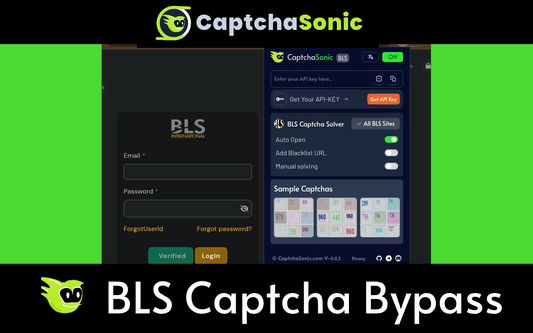
CaptchaSonic: BLS CAPTCHA Solver Extension for Firefox
Ai based BLS Captcha Solver extension designed specifically to help solve BLS Captcha's and bypass them with machine learning. Helps peoples disabilities and accessibility challenges bypass BLS CAPTCHAs during their daily web browsing.
Official CaptchaSonic browser extension - best and fastest browser BLS captcha solver (based on AI)
Features:
- Solve unlimited BLS Captchas
- No interruptions while browsing
- Uses latest standards and extension service worker for requests
- Small extension size and runs smooth
How to use:
1) Simply install CaptchaSonic BLS Captcha Solver extension
2) Simply paste your APIKEY from my.captchasonic.com on the popup
3) keep browsing, extension detects BLS Captcha on any page and automatically solve the challenges.
4) Upgrade plan for premium usage limit at my.captchasonic.com
How to solve BLS Captcha with CaptchaSonic and Puppeteer/ Playwright/ Selenium:
a) Extract "CaptchaSonic BLS Captcha Browser Extension.zip".
b) Navigate to extracted folder and look for "/assets/defaultConfig.json".
c) Edit "defaultConfig.json", paste APIKEY, save.
d) Then open the Firefox
e) Visit to the Extensions management page and enable Developer mode.
f) Remove existing BLS CaptchaSonic Extension. If previously installed
g) Click "Load unpacked", and select the folder you just extracted.
Motivation:
BLS Captcha challenges are a significant burden on various cultural, literacy and other factors and backgrounds where it's complexity, availability of internet impacts the web experience significantly.
- Also for Edge, Brave, Opera, Vivaldi, Firefox and variants: https://github.com/Captcha-Sonic
- Visit the extension's privacy policy for more information: https://captchasonic.com/privacy
- GitHub for issues & feature requests. https://github.com/Captcha-Sonic/CaptchaSonic-Extension
Permission Declarations:
- tabs : determine which actions are from which tabs
- storage : use to store configuration
Contact Support:
- Github: https://github.captchasonic.com
- Telegram: https://telegram.captchasonic.com
- Discord: https://discord.captchasonic.com
- Dashboard: https://my.captchasonic.com
- HomePage: https://captchasonic.com
- Developer API: https://captchasonic.com/products
Ai based BLS Captcha Solver extension designed specifically to help solve BLS Captcha's and bypass them with machine learning. Helps peoples disabilities and accessibility challenges bypass BLS CAPTCHAs during their daily web browsing.
Official CaptchaSonic browser extension - best and fastest browser BLS captcha solver (based on AI)
Features:
- Solve unlimited BLS Captchas
- No interruptions while browsing
- Uses latest standards and extension service worker for requests
- Small extension size and runs smooth
How to use:
1) Simply install CaptchaSonic BLS Captcha Solver extension
2) Simply paste your APIKEY from my.captchasonic.com on the popup
3) keep browsing, extension detects BLS Captcha on any page and automatically solve the challenges.
4) Upgrade plan for premium usage limit at my.captchasonic.com
How to solve BLS Captcha with CaptchaSonic and Puppeteer/ Playwright/ Selenium:
a) Extract "CaptchaSonic BLS Captcha Browser Extension.zip".
b) Navigate to extracted folder and look for "/assets/defaultConfig.json".
c) Edit "defaultConfig.json", paste APIKEY, save.
d) Then open the Firefox
e) Visit to the Extensions management page and enable Developer mode.
f) Remove existing BLS CaptchaSonic Extension. If previously installed
g) Click "Load unpacked", and select the folder you just extracted.
Motivation:
BLS Captcha challenges are a significant burden on various cultural, literacy and other factors and backgrounds where it's complexity, availability of internet impacts the web experience significantly.
- Also for Edge, Brave, Opera, Vivaldi, Firefox and variants: https://github.com/Captcha-Sonic
- Visit the extension's privacy policy for more information: https://captchasonic.com/privacy
- GitHub for issues & feature requests. https://github.com/Captcha-Sonic/CaptchaSonic-Extension
Permission Declarations:
- tabs : determine which actions are from which tabs
- storage : use to store configuration
Contact Support:
- Github: https://github.captchasonic.com
- Telegram: https://telegram.captchasonic.com
- Discord: https://discord.captchasonic.com
- Dashboard: https://my.captchasonic.com
- HomePage: https://captchasonic.com
- Developer API: https://captchasonic.com/products
리뷰어 0명이 0점으로 평가함
권한 및 데이터
필수 권한:
- 클립보드에서 데이터 가져오기
- 브라우저 탭에 접근
- 모든 웹사이트에서 사용자의 데이터에 접근
데이터 수집:
- 개발자는 이 확장 기능이 데이터 수집을 요구하지 않는다고 밝히고 있습니다.
추가 정보
- 부가 기능 링크
- 버전
- 0.1.5
- 크기
- 763.63 KB
- 최근 업데이트
- 4달 전 (2026년 7월 7일)
- 관련 카테고리
- 라이선스
- All Rights Reserved
- 개인정보처리방침
- 이 부가 기능에 대한 개인정보처리방침 읽기
- 버전 목록
- 모음집에 추가