xPath Finder sɣur Tomasz Rembacz
Plugin to get the elements xPath.
3 823 yiseqdacen3 823 yiseqdacen
Asiɣzef aɣefisefka
Tuṭṭfiwin n wegdil
Ɣef usiɣzef agi
Usage
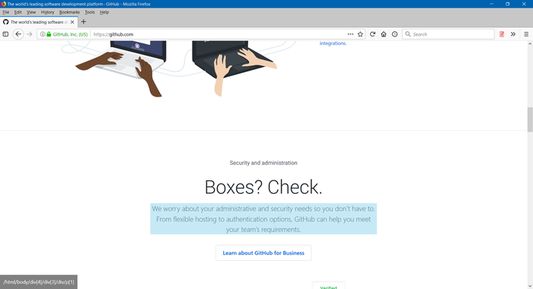
1. Click on the plugin icon, cursor will be changed to the crosshair
2. Hover over the desired element (elements are highlighted on hover)
3. Click on the element and his xPath will display in the panel at the bottom of the page
Options:
- turn on/off inspector,
- turn on/off auto copy to clipboard,
- choose between short ID's or normal path,
- change xpath box position
1. Click on the plugin icon, cursor will be changed to the crosshair
2. Hover over the desired element (elements are highlighted on hover)
3. Click on the element and his xPath will display in the panel at the bottom of the page
Options:
- turn on/off inspector,
- turn on/off auto copy to clipboard,
- choose between short ID's or normal path,
- change xpath box position
Rated 4,2 by 46 reviewers
Tisirag akked yisefka
Ugar n telɣut
- TigIseɣwan n uzegrir
- Lqem
- 1.0.2
- Teɣzi
- 20,47 KB
- Aleqqem aneggaru
- för 6 år sedan (11 jun 2020)
- Taggayin i ilan assaɣ
- Turagt
- Turagt IT
- Amazray n Lqem
- Rnu ar tegrumma