Clean the mess! sɣur Tomas Hartman
Clean the mess! a simple addon that is designed to help you with maintaining order among opened websites. First and main purpose of Clean the mess is to help you find and mercilessly close tabs you don't need. Have your tabs in order! Clean the mess!
9 yiseqdacen9 yiseqdacen
Asiɣzef aɣefisefka
Tuṭṭfiwin n wegdil
Ɣef usiɣzef agi
Hundreds of opened tabs? Dozens of useless duplicate tabs with opened emails, google searches, your favourite social networks and articles you wanted to read a month ago? Let's clean the mess!
Clean the mess! a simple addon that is designed to help you with maintaining order among opened websites. Unlike some other extensions, first and main purpose of Clean the mess is to help you find and mercilessly close tabs you don't need, not just reorder them.
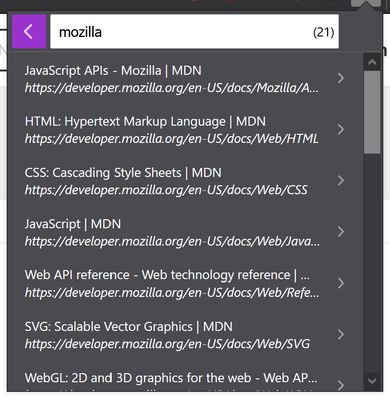
With its integrated search feature, Clean the mess! could also be used as a fast and simple tab manager, that lets you control your tabs and always find those you opened a week, a month or a year ago. And of course close those you don't find up to date anymore.
What are Clean the mess's main features?
... And some more.
Enjoy, comment, report bugs!
Clean the mess! a simple addon that is designed to help you with maintaining order among opened websites. Unlike some other extensions, first and main purpose of Clean the mess is to help you find and mercilessly close tabs you don't need, not just reorder them.
With its integrated search feature, Clean the mess! could also be used as a fast and simple tab manager, that lets you control your tabs and always find those you opened a week, a month or a year ago. And of course close those you don't find up to date anymore.
What are Clean the mess's main features?
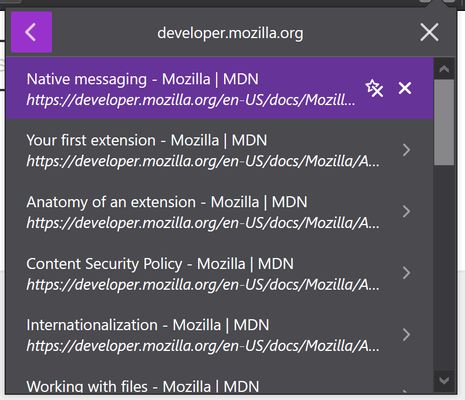
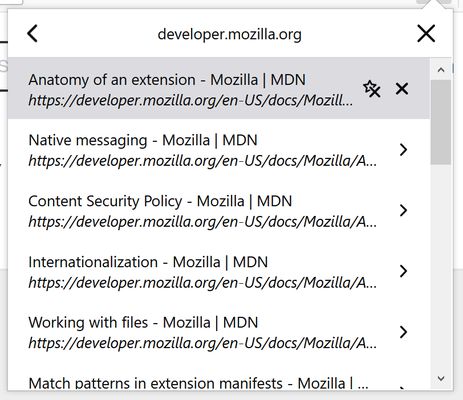
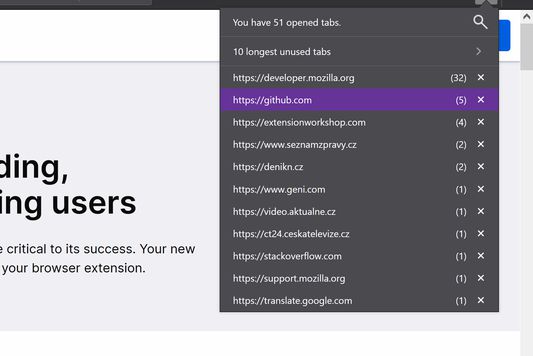
- group opened websites by their domain names
- show number of opened websites
- close opened websites one by one or all tabs with the same domain
- search among opened websites
- bookmark & close opened websites at one click
- light and darkmode support
- lightweight, simple and fast
- opens with hotkey: ctrl + alt + t or ⌘⌥T
... And some more.
Enjoy, comment, report bugs!
Rated 4,8 by 6 reviewers
Tisirag akked yisefka
Ugar n telɣut
- TigIseɣwan n uzegrir
- Lqem
- 2.1.0
- Teɣzi
- 127,95 KB
- Aleqqem aneggaru
- 2 vite më parë (30 Sht 2023)
- Taggayin i ilan assaɣ
- Amazray n Lqem
- Rnu ar tegrumma