Additivos del navigator Firefox
  • Extensiones
  • Themas
    • pro Firefox
    • Dictionarios e pacchettos de lingua
    • Altere sitos de navigatores
    • Additivos pro Android
Aperir session
Vista preliminar de REtoUN

REtoUN per DBSH

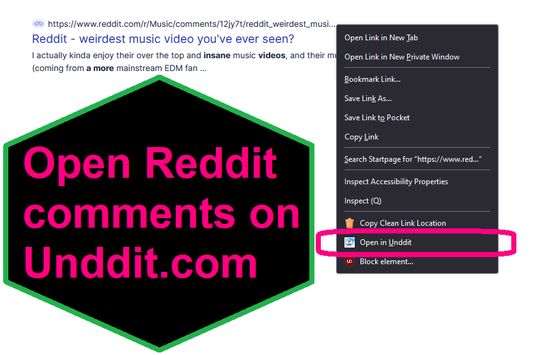
EXTENSION IS DEPRECATED - SEE ABOUT THIS EXTENSION BELOW FOR MORE DETAIL A simple extension that adds an option to the context menu to open links to Reddit comments on unddit.com instead, in a new tab.

0 (0 revisiones)0 (0 revisiones)
2 Usatores2 Usatores
Discarga Firefox installa le extension
Discargar file

Metadatos del extension

Capturas de schermo
A proposito de iste extension
EXTENSION IS DEPRECATED. NOTES: https://www.unddit.com is gone, and its existence was necessary for this extension to function. I am leaving this extension published for educational purposes (someone may want to use the source for a similar use case where an option in the context menu links to a re-written URL)

This is for those who prefer to read Reddit comments on https://www.unddit.com - maybe you prefer to see deleted comments, or maybe you think "continue this thread" is a crime against UI.
To use, right-click on a link to a Reddit post, and choose Open in Unddit from the context menu. If the link to the Reddit post is https://www.reddit.com/r/news/comments/130kndv for example, using REtoUN will open https://www.unddit.com/r/news/comments/130kndv instead, in a new tab.
Commentos del disveloppatores
Note that in Firefox, content on https://www.unddit.com requires turning off Enhanced Tracking Protection to load. This behavior is not at all related to this extension.

Developer is not affiliated with Unddit.com, but is a huge fan of the project.

To view this extension's source code:
1. In a Firefox instance that already has this extension installed, type about:profiles in the Firefox address bar, then press Enter
2. Under the profile labeled This is the profile in use and it cannot be deleted, click on the Open Directory button (appears as Open Folder on Windows) next to Root Directory
3. In the file explorer window that opens, go into the extensions directory (the extensions folder)
4. Copy the file {d40ec1bd-9875-4dbd-a1f7-cba6e2d9d281}.xpi and paste it somewhere else, such as your Desktop
5. Rename the file you just pasted, changing the extension to .zip - so {d40ec1bd-9875-4dbd-a1f7-cba6e2d9d281}.xpi becomes {d40ec1bd-9875-4dbd-a1f7-cba6e2d9d281}.zip
6. Unzip the file {d40ec1bd-9875-4dbd-a1f7-cba6e2d9d281}.zip. The extracted files are the source, especially the .json and .js files.
Evalutate 0 per 0 recensentes
Aperi session pro evalutar iste extension
Il ha non ha ancora evalutationes

Evalutation de stellas salvate

5
0
4
0
3
0
2
0
1
0
Ancora nulle recensiones
Permissiones e datos

Permissiones necessari:

  • Accede al schedas del navigator
Saper plus
Plus de informationes
Version
1.0
Dimension
26,31 KB
Ultime actualisation
3 năm trước (27 Thg 04 2023)
Categorias associate
  • Feeds de novas, novas e blog
  • Confidentialitate & securitate
  • Social & communication
Licentia
Solo GNU General Public License v3.0
Politica de confidentialitate
Lege le politica de confidentialitate pro iste additivo
Historia de versiones
  • Vide tote le versiones
Adder al collection
Reporta iste additivo
Ir al pagina principal de Mozilla

Additivos

  • A proposito
  • Blog del additivos de Firefox
  • Laboratorio de extensiones
  • Centro de disveloppatores
  • Politicas pro disveloppatores
  • Blog del communitate
  • Foro
  • Reportar un defecto
  • Guida al revision

Navigatores

  • Desktop
  • Mobile
  • Enterprise

Productos

  • Browsers
  • VPN
  • Relay
  • Monitor
  • Pocket
  • Bluesky (@firefox.com)
  • Instagram (Firefox)
  • YouTube (firefoxchannel)
  • Confidentialitate
  • Cookies
  • Legal

Excepte ubi alteremente indicate, le contento de iste sito es publicate sub licentia Creative Commons Attribution Share-Alike v3.0 o qualcunque version plus recente.