Convert Case per Convert Case Ltd
Convert text in your browser between UPPER CASE, lower case and more.
783 Usatores783 Usatores
Metadatos del extension
Capturas de schermo
A proposito de iste extension
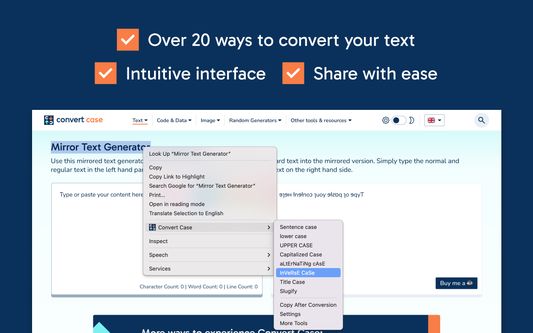
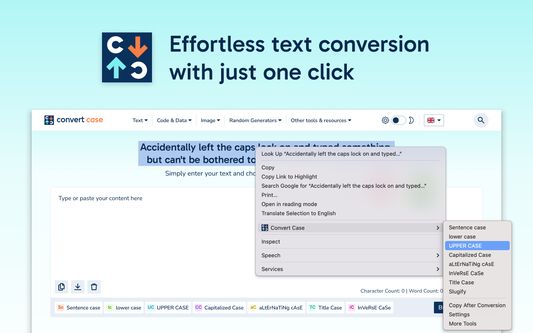
Select text anywhere in your browser, right-click, and convert it in place. Transform between UPPER CASE, lower case, Sentence case, Title Case, and more without leaving the page.
Enable Copy After Conversion in the context menu to automatically copy your converted text to the clipboard.
Features
- In-place text conversion via right-click context menu
- Keyboard shortcuts for quick access (Alt+U, Alt+L, Alt+C, Alt+A) or configure your own
- Automatic copy after conversion option
- Title Case conversion with configurable options
- Slugify for URL-friendly text
- Works with Google Docs (use Shift+right-click or a keyboard shortcut), Reddit, Disqus, WYSIWYG editors, and iframe-based content.
Changelog
- 1.6.0 - Support for Google Docs
- 1.5.2 - Fixed conversions not working on existing tabs after first install
- 1.5.1 - Added keyboard shortcuts link to context menu
- 1.5.0 - Additional keyboard shortcuts and refreshed info/settings UI
- 1.4.1 - Reliability updates
- 1.4.0 - Bug fixes and optimisation
- 1.3.0 - New icon
- 1.2.1 - Disqus and Slate Editor fixes
- 1.2.0 - Support for Disqus and more iframe-based content
- 1.1.0 - Support for Reddit and WYSIWYG editors
- 1.0.10 - Fixed automatic copy after conversion not working
- 1.0.9 - Settings page for title case options and keyboard shortcuts
- 1.0.8 - Reliability updates
- 1.0.7 - Title Case conversion and Slugify option
- 1.0.0 - Initial release
Enable Copy After Conversion in the context menu to automatically copy your converted text to the clipboard.
Features
- In-place text conversion via right-click context menu
- Keyboard shortcuts for quick access (Alt+U, Alt+L, Alt+C, Alt+A) or configure your own
- Automatic copy after conversion option
- Title Case conversion with configurable options
- Slugify for URL-friendly text
- Works with Google Docs (use Shift+right-click or a keyboard shortcut), Reddit, Disqus, WYSIWYG editors, and iframe-based content.
Changelog
- 1.6.0 - Support for Google Docs
- 1.5.2 - Fixed conversions not working on existing tabs after first install
- 1.5.1 - Added keyboard shortcuts link to context menu
- 1.5.0 - Additional keyboard shortcuts and refreshed info/settings UI
- 1.4.1 - Reliability updates
- 1.4.0 - Bug fixes and optimisation
- 1.3.0 - New icon
- 1.2.1 - Disqus and Slate Editor fixes
- 1.2.0 - Support for Disqus and more iframe-based content
- 1.1.0 - Support for Reddit and WYSIWYG editors
- 1.0.10 - Fixed automatic copy after conversion not working
- 1.0.9 - Settings page for title case options and keyboard shortcuts
- 1.0.8 - Reliability updates
- 1.0.7 - Title Case conversion and Slugify option
- 1.0.0 - Initial release
Evalutate 4,6 per 15 recensentes
Permissiones e datos
Permissiones necessari:
- Accede al schedas del navigator
- Acceder a tu datos pro tote le sitos web
Plus de informationes
- Ligamines del additivo
- Version
- 1.6.0
- Dimension
- 41,51 KB
- Ultime actualisation
- há 4 dias (18 de mar de 2026)
- Categorias associate
- Licentia
- Tote le derectos es reservate
- Historia de versiones
- Adder al collection
Le disveloppator de iste extension te demanda adjuta pro supportar su continuation del disveloppamento per un micre donation.