
Export Memrise Progress Autor: neoncube
Export your Memrise community course's progress.
47 korisnika47 korisnika
Metapodaci proširenja
Snimke ekrana
Informacije o ovom proširenju
This extension lets you save your Memrise community course's progress, so that you can import it into another site, such as mylittlewordland.com
To download your progress:
1. Go to https://community-courses.memrise.com
2. Open a course. You should now be on the course's overview page.
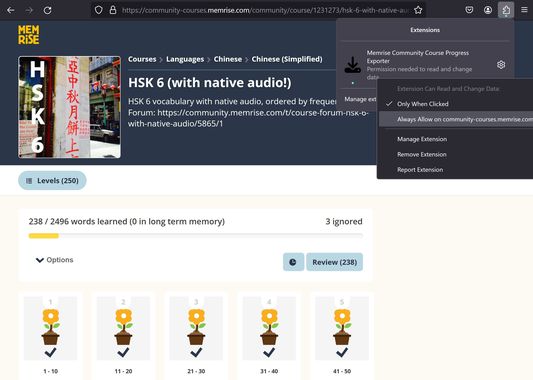
3. Click the Firefox extensions icon, right click the Memrise Community Course Progress Exporter extension, and select "Always Allow on community-courses.memrise.com" (See screenshot).
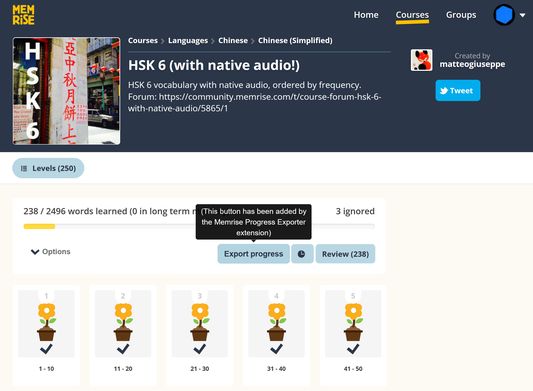
4. Click the blue "Export progress" button.
To download your progress:
1. Go to https://community-courses.memrise.com
2. Open a course. You should now be on the course's overview page.
3. Click the Firefox extensions icon, right click the Memrise Community Course Progress Exporter extension, and select "Always Allow on community-courses.memrise.com" (See screenshot).
4. Click the blue "Export progress" button.
Ocjena 0 od 0 recenzenta
Dozvole i podaci
Potrebne dozvole:
- Pristup tvojim podacima za community-courses.memrise.com
- Pristup tvojim podacima za app.memrise.com
Opcionalne dozvole:
- Pristup tvojim podacima za community-courses.memrise.com
- Pristup tvojim podacima za app.memrise.com
Daljnje informacije
- Poveznice dodatka
- Verzija
- 1.13
- Veličina
- 24,21 KB
- Zadnje aktualiziranje
- prije 5 mjeseci (29. svi. 2026)
- Povezane kategorije
- Licenca
- Sva prava pridržana
- Povijest verzija
- Dodaj u zbirku