
Toggl Track: Productivity & Time Tracker par Toggl
Puts a timer into any web tool and allows quick real time productivity tracking with all the data stored on your Toggl Track account. Time tracking has never been easier!
9 712 utilisateurs·trices9 712 utilisateurs·trices
Métadonnées de l’extension
Captures d’écran

À propos de cette extension
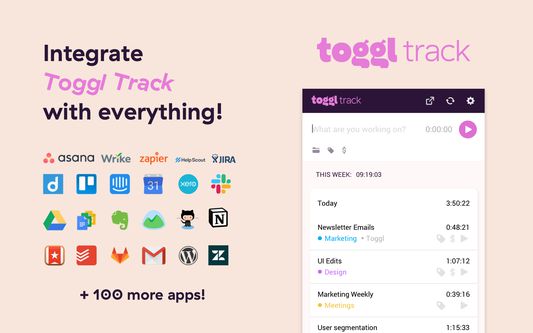
Whether you use Salesforce, Producteev, Slack, Trello, Todoist, Asana, Basecamp, Google Drive or one of the 90+ integrated tools, start tracking time without opening a new tab. Toggl Track timer can now also fill your Pomodoro needs through automated reminders.
If you were looking for Toggl Button, you're in the right place -> we've just rebranded as Toggl Track, but the functionality of the extension remains the same (and we also switched colors a bit as well).
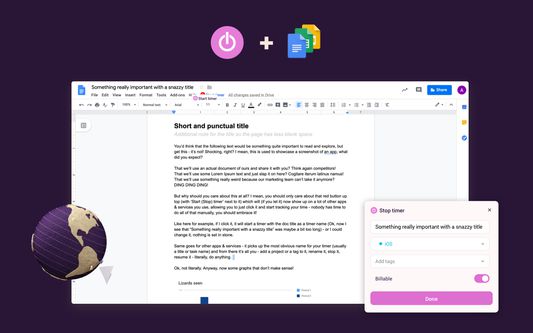
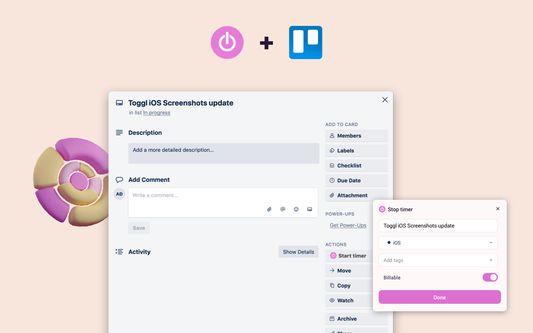
Toggl Track extension is already available in: Toggl Plan, Pivotal Tracker, Github, Asana, Unfuddle, Gitlab, Trello, Worksection, Redbooth, Podio, Basecamp, JIRA, Producteev, Bitbucket, Stifer, Google Docs, Redmine, YouTrack, CapsuleCRM, Xero, Zendesk, Any.do, Todoist, Trac, Wunderlist, Toodledo, Teamwork.com, Google Mail, Taiga, Habitica, Axosoft, Countersoft Gemini, Drupal, Esa, Help Scout, Flow, Sprintly, Google Calendar, TestRail, Bugzilla, Breeze, BamBam, GQueue, Wrike, Assembla, Waffle, Codeable, Salesforce, Salesforce Lightning, Draftin, FogBugz, Google Keep, Gingko, Google Inbox, Wordpress, Kanbanery, Planbox, Zoho Books, Slack, Doit.im, Sunrise Calendar, Cloudes, eProject.me, Freshdesk, Newsletter2Go, Gogs, DevDocs, LiquidPlanner, SourceLair, Remember The Milk, Evernote, MantisHub, TargetProcess, VisualStudioOnline (TFS), SmartBoard, Phabricator, OpenProject, SherpaDesk, miniCRM, AgenoCRM, Zube, Rindle, TickTick, Bitrix24, Exana.io, Workfront, OnlyOffice, MeisterTask, Overv.io, Clubhouse.io, Desk.
Toggl Track extension also has advanced features like:
* Pomodoro timer
* Idle detection
* Tracking reminder
Toggl Track extension is open source and we welcome all your contributions, check out our Github repo - https://github.com/toggl/toggl-button
You can check out the change log here - http://toggl.github.io/toggl-button
Introduction article is available at: https://support.toggl.com/en/articles/2206984-toggl-track-button-browser-extension
Privacy
The extension sends your Toggl Track account details and the time entries you track (including descriptions picked up from the page you start a timer on) to Toggl. This is required for it to work.
Usage statistics (via PostHog) and error reports (via Sentry) are optional and off by default. Usage statistics include your Toggl account ID, extension version, browser and operating system details, and which features and integrations you use. Error reports include the error message and stack trace, your Toggl user ID, extension version, and browser and operating system details. Neither ever includes page URLs, page content or time entry details. Both can be turned off at any time in the extension settings under Telemetry.
The data collected in the add-on is also covered by the policies in our Privacy Policy: https://toggl.com/legal/privacy
Toggl Track Overview
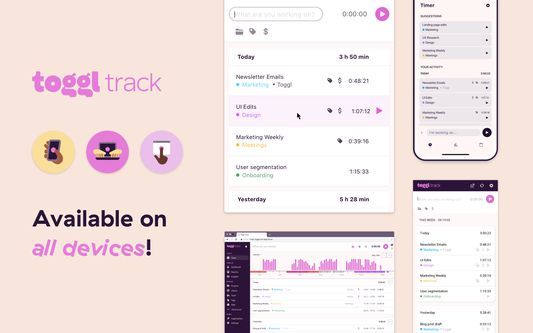
Toggl Track is the leading online time management tool for teams and solo users. It allows users to track the time spent on various projects and analyze productivity. You can use Toggl Track on the web, as a desktop widget or on your mobile – all your data gets synced in real time.
Toggl Track is the ultimate simple online timer. Whether you need to track your work, time online and offline activities or just need a simple stopwatch from time to time, add Toggl Track extension to your browser and see the benefits for yourself.
Join over 3 million productive Togglers!
If you were looking for Toggl Button, you're in the right place -> we've just rebranded as Toggl Track, but the functionality of the extension remains the same (and we also switched colors a bit as well).
Toggl Track extension is already available in: Toggl Plan, Pivotal Tracker, Github, Asana, Unfuddle, Gitlab, Trello, Worksection, Redbooth, Podio, Basecamp, JIRA, Producteev, Bitbucket, Stifer, Google Docs, Redmine, YouTrack, CapsuleCRM, Xero, Zendesk, Any.do, Todoist, Trac, Wunderlist, Toodledo, Teamwork.com, Google Mail, Taiga, Habitica, Axosoft, Countersoft Gemini, Drupal, Esa, Help Scout, Flow, Sprintly, Google Calendar, TestRail, Bugzilla, Breeze, BamBam, GQueue, Wrike, Assembla, Waffle, Codeable, Salesforce, Salesforce Lightning, Draftin, FogBugz, Google Keep, Gingko, Google Inbox, Wordpress, Kanbanery, Planbox, Zoho Books, Slack, Doit.im, Sunrise Calendar, Cloudes, eProject.me, Freshdesk, Newsletter2Go, Gogs, DevDocs, LiquidPlanner, SourceLair, Remember The Milk, Evernote, MantisHub, TargetProcess, VisualStudioOnline (TFS), SmartBoard, Phabricator, OpenProject, SherpaDesk, miniCRM, AgenoCRM, Zube, Rindle, TickTick, Bitrix24, Exana.io, Workfront, OnlyOffice, MeisterTask, Overv.io, Clubhouse.io, Desk.
- Click "+ Add to Firefox".
- Log in to Toggl Track from the extension menu
- You will quickly start noticing the Toggl Track extension in your favorite productivity tools
- Start timer inside one of the supported web tools and the task’s name and project will be added to your Toggl Track time entry.
- Tracking your time will help boost productivity in no time
Toggl Track extension also has advanced features like:
* Pomodoro timer
* Idle detection
* Tracking reminder
Toggl Track extension is open source and we welcome all your contributions, check out our Github repo - https://github.com/toggl/toggl-button
You can check out the change log here - http://toggl.github.io/toggl-button
Introduction article is available at: https://support.toggl.com/en/articles/2206984-toggl-track-button-browser-extension
Privacy
The extension sends your Toggl Track account details and the time entries you track (including descriptions picked up from the page you start a timer on) to Toggl. This is required for it to work.
Usage statistics (via PostHog) and error reports (via Sentry) are optional and off by default. Usage statistics include your Toggl account ID, extension version, browser and operating system details, and which features and integrations you use. Error reports include the error message and stack trace, your Toggl user ID, extension version, and browser and operating system details. Neither ever includes page URLs, page content or time entry details. Both can be turned off at any time in the extension settings under Telemetry.
The data collected in the add-on is also covered by the policies in our Privacy Policy: https://toggl.com/legal/privacy
Toggl Track Overview
Toggl Track is the leading online time management tool for teams and solo users. It allows users to track the time spent on various projects and analyze productivity. You can use Toggl Track on the web, as a desktop widget or on your mobile – all your data gets synced in real time.
Toggl Track is the ultimate simple online timer. Whether you need to track your work, time online and offline activities or just need a simple stopwatch from time to time, add Toggl Track extension to your browser and see the benefits for yourself.
Join over 3 million productive Togglers!
Noté 3,9 par 159 personnes
Autorisations et données
Autorisations nécessaires :
- Vous afficher des notifications
Autorisations facultatives :
- Accéder aux onglets du navigateur
- Accéder à vos données pour tous les sites web
Collecte de données nécessaire, selon le développeur :
- Données personnelles
- Contenu des sites web
Collecte de données facultative, selon le développeur :
- Données techniques et d’interaction
Plus d’informations
- Version
- 4.11.22
- Taille
- 4,03 Mo
- Dernière mise à jour
- il y a un mois (10 sept. 2026)
- Catégories associées
- Licence
- Licence MIT
- Politique de confidentialité
- Lire la politique de confidentialité de ce module
- Historique des versions
- Ajouter à la collection
Bugs can be reported straight to github repo or by contacting our support at support@toggl.com