Media Queue par Zac Whalley
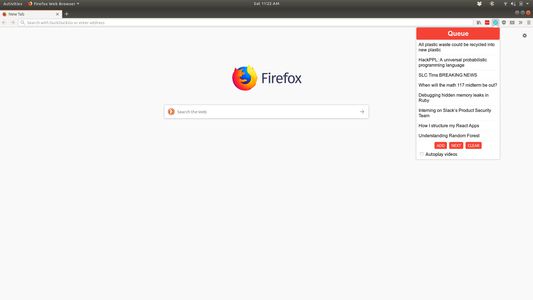
Adds a browser action icon to the toolbar. Click on the icon to add links to a queue.
ExpérimentalExpérimental
2 utilisateurs·trices2 utilisateurs·trices
MĂ©tadonnĂ©es de lâextension
Captures dâĂ©cran
Ă propos de cette extension
A Firefox extension for adding a queue to the browser. Links can be added to the queue which are removed after viewing.
Use
View the current queue by opening the popup
Add links in one of two ways:
1. Open the popup and click 'Add' on a page you want to save to the queue
2. Right click a link and select 'Add to media queue' in the context menu
Clear the queue with the 'Clear' button
Navigate to the next video with the 'Next' button, or keyboard shortcuts
Commands
Ctrl+Shift+Q or Command+Shift+Q: Navigate to next item in queue
Ctrl+Shift+1 or Command+Shift+1: Open popup to view queue / use UI controls
Use
View the current queue by opening the popup
Add links in one of two ways:
1. Open the popup and click 'Add' on a page you want to save to the queue
2. Right click a link and select 'Add to media queue' in the context menu
Clear the queue with the 'Clear' button
Navigate to the next video with the 'Next' button, or keyboard shortcuts
Commands
Ctrl+Shift+Q or Command+Shift+Q: Navigate to next item in queue
Ctrl+Shift+1 or Command+Shift+1: Open popup to view queue / use UI controls
Noté 0 par 1 personne
Autorisations et données
Autorisations nécessaires :
- Accéder aux onglets du navigateur
- Accéder à vos données pour www.youtube.com
Plus dâinformations
- Version
- 1.1
- Taille
- 49,93Â Ko
- DerniĂšre mise Ă jour
- il y a 6 ans (19 oct. 2019)
- Catégories associées
- Historique des versions
- Ajouter Ă la collection