Learn the shortcuts par Matthieu G.
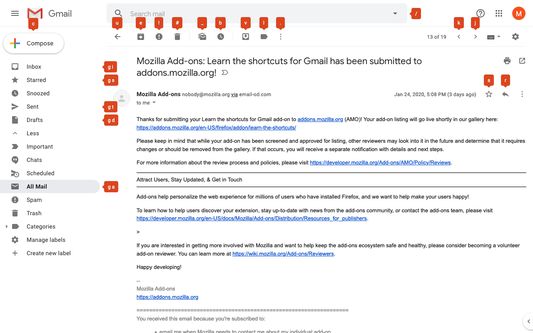
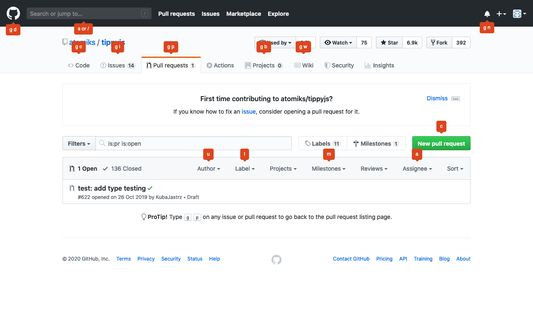
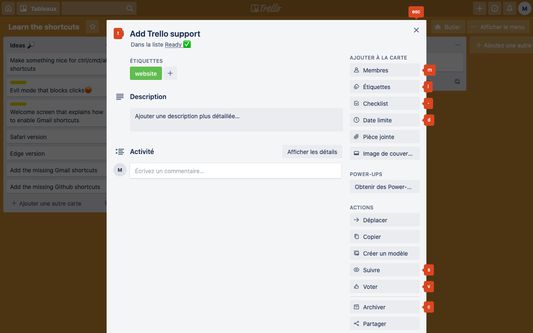
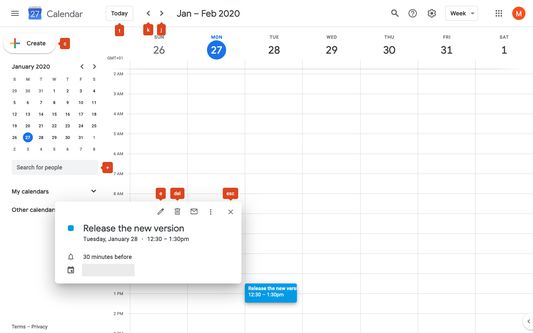
Learn the keyboard shortcuts in Gmail, Trello, Google Agenda, Github painlessly! - Press and hold "alt" to see all the available shortcuts - See shortcuts when hovering over buttons
1 utilisateur·trice1 utilisateur·trice
MĂ©tadonnĂ©es de lâextension
Captures dâĂ©cran
Ă propos de cette extension
Did you know you can use keyboard shortcuts to do almost anything on some websites?
Learn them with this extension and work faster!
For now, it support Gmail, Trello, Github and Google Agenda
Features:
- Press and hold alt to see all the available shortcuts
- When you hover over a button, you'll see the keyboard shortcut you can use
Configuration for Gmail and Google Agenda:
In order to use keyboard shortcuts in Gmail or in Google Agenda, they have to be enabled. If that's not already the case for you, go to Settings > General > Keyboard shortcuts and check the corresponding option
Learn them with this extension and work faster!
For now, it support Gmail, Trello, Github and Google Agenda
Features:
- Press and hold alt to see all the available shortcuts
- When you hover over a button, you'll see the keyboard shortcut you can use
Configuration for Gmail and Google Agenda:
In order to use keyboard shortcuts in Gmail or in Google Agenda, they have to be enabled. If that's not already the case for you, go to Settings > General > Keyboard shortcuts and check the corresponding option
Noté 0 par 1 personne
Autorisations et données
Autorisations nécessaires :
- Accéder à vos données pour mail.google.com
- Accéder à vos données pour github.com
- Accéder à vos données pour trello.com
- Accéder à vos données pour calendar.google.com
Plus dâinformations
- Liens du module
- Version
- 0.6.2
- Taille
- 62,28Â Ko
- DerniĂšre mise Ă jour
- il y a 6 ans (26 mars 2020)
- Catégories associées
- Licence
- Licence MIT
- Historique des versions
- Ajouter Ă la collection