Modules pour le navigateur Firefox
  • Extensions
  • ThĂšmes
    • pour Firefox
    • Dictionnaires et paquetages linguistiques
    • Sites pour les autres navigateurs
    • Modules pour Android
Connexion
Aperçu de HTML Tag Changer

HTML Tag Changer par Kai Grunert

Select HTML elements and change their tag names. You can select elements with a CSS selector and specify the intended new tag name. You can also hide or remove the elements. E.g. this can be useful to include specific elements in the Reader View.

0 (0 critiques)0 (0 critiques)
2 utilisateurs·trices2 utilisateurs·trices
TĂ©lĂ©charger Firefox et obtenir l’extension
Télécharger le fichier

MĂ©tadonnĂ©es de l’extension

Captures d’écran
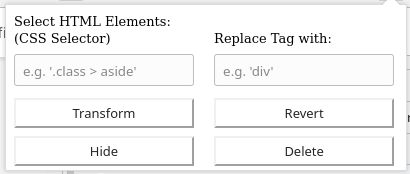
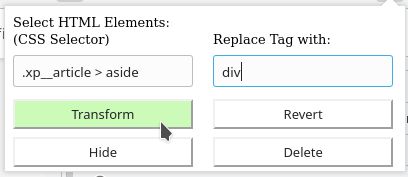
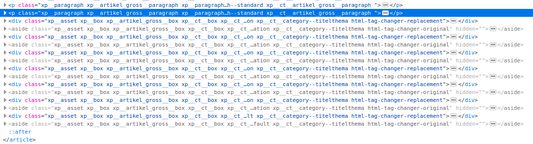
Default display if you open the add-onSelect the HTML elements with a CSS selector and type the new tag nameThe original source code before the transformationThe new source code after the transformation
À propos de cette extension
This browser add-on can change the HTML element tag names on a web page into another tag name. You can select the HTML elements that should be replaced with a CSS selector and state the new tag names.

Furthermore you can hide or delete the selected elements from the web page. The former is usually preferred, because you will be able to revert the changes afterwards. If you use delete, you need to reload the complete page to revert the changes.

Example: The Reader View of Firefox includes and presents only a selection of HTML elements like <p>. But if the web page contains important hint or content boxes in <aside> elements, you will not see them in the Reader View. You can use this add-on to change all <aside> elements in appropriate elements before you turn on the Reader.

There is a Revert button - if it doesn't work correctly, just reload the complete page.

Hints:
  • Due to a lack of API support, the event listeners for an element can not be copied into the new element
  • Pay attention to the structure of a web page: some elements (often inline elements) don't allow to include other elements. E.g. if you want to change all <aside> elements into <p> elements, this can lead to unpredictable behavior if the <aside> element contains further block elements, because <p> is not allowed to contain block elements.
  • If the replacement contains web components, this can also lead to some side effects

Details:

The add-on does not delete the original elements, but it hides them. Therefore the actions can be reverted.
Noté 0 par 1 personne
Connectez-vous pour noter cette extension
Il n’y a aucune note pour l’instant

Le nombre d’étoiles est enregistrĂ©

5
0
4
0
3
0
2
0
1
0
Aucune critique pour l’instant
Plus d’informations
Liens du module
  • Page d’accueil
  • Site d’assistance
Version
1.0
Taille
29,6 Ko
DerniĂšre mise Ă  jour
il y a 6 ans (2 mai 2020)
Catégories associées
  • DĂ©veloppement web
  • Apparence
Licence
Licence personnalisée
Historique des versions
  • Voir toutes les versions
Ajouter Ă  la collection
Signaler ce module
Aller à la page d’accueil de Mozilla

Modules complémentaires

  • À propos
  • Blog des modules complĂ©mentaires Firefox
  • Atelier sur les extensions
  • PĂŽle dĂ©veloppeur
  • Politiques Ă  destination des dĂ©veloppeurs
  • Blog de la communautĂ©
  • Forum
  • Signaler un problĂšme
  • Guide de revue

Navigateurs

  • Desktop
  • Mobile
  • Enterprise

Produits

  • Browsers
  • VPN
  • Relay
  • Monitor
  • Pocket
  • Bluesky (@firefox.com)
  • Instagram (Firefox)
  • YouTube (firefoxchannel)
  • ConfidentialitĂ©
  • Cookies
  • Mentions lĂ©gales

Sauf mention contraire, le contenu de ce site est disponible sous licence Creative Commons Attribution Share-Alike v3.0 ou toute version supérieure.