ChatGPT Chats Delete par RAON
Extensions to select ChatGPT chat and delete it in batches
47 utilisateurs·trices47 utilisateurs·trices
MĂ©tadonnĂ©es de lâextension
Captures dâĂ©cran
Ă propos de cette extension
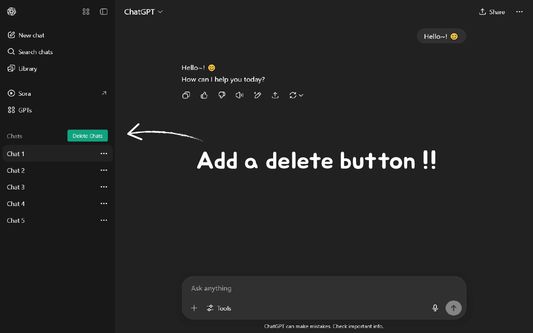
ChatGPT Chat Delete is a browser extension that helps ChatGPT users manage conversation records efficiently.
âš Key Features
Bulk chat deletion: Select multiple unnecessary chats at once and delete them all with one click
Select All: Options to select all conversations at once
Select individual: Selectively delete only the desired conversations
Click Shift: Select consecutive conversations with range selection
đ Multilingual Support
Korean
English
Japanese
Chinese
Spanish
German
(Please write the language you want to add: https://github.com/RAON28/ChatGPT-Chats-Delete-Extensions/discussions/categories/language-translation)
đđ Themes
Dark/Light mode: Auto-apply to ChatGPT theme
đ How to use
✠Click the "Delete Chats" button on the left sidebar
✠Select a Conversation
- Full selection: Click the "Select All" checkbox
- Select individual: Click the checkbox for the conversation you want
- Select range: Select successive conversations with Shift + Click
✠Enable deletion
- Click the "Delete" button
- Click "Delete" in the confirmation dialog box
âš Key Features
Bulk chat deletion: Select multiple unnecessary chats at once and delete them all with one click
Select All: Options to select all conversations at once
Select individual: Selectively delete only the desired conversations
Click Shift: Select consecutive conversations with range selection
đ Multilingual Support
Korean
English
Japanese
Chinese
Spanish
German
(Please write the language you want to add: https://github.com/RAON28/ChatGPT-Chats-Delete-Extensions/discussions/categories/language-translation)
đđ Themes
Dark/Light mode: Auto-apply to ChatGPT theme
đ How to use
✠Click the "Delete Chats" button on the left sidebar
✠Select a Conversation
- Full selection: Click the "Select All" checkbox
- Select individual: Click the checkbox for the conversation you want
- Select range: Select successive conversations with Shift + Click
✠Enable deletion
- Click the "Delete" button
- Click "Delete" in the confirmation dialog box
Noté 5 par 4 personnes
Autorisations et données
Autorisations nécessaires :
- Accéder à vos données pour chat.openai.com
- Accéder à vos données pour chatgpt.com
Plus dâinformations
- Version
- 1.2
- Taille
- 2,45Â Mo
- DerniĂšre mise Ă jour
- il y a un mois (7 nov. 2025)
- Catégories associées
- Historique des versions
- Ătiquettes
- Ajouter Ă la collection
Le dĂ©veloppeur de cette extension demande que vous lâaidiez Ă assurer la poursuite de son dĂ©veloppement en lui versant une petite contribution.