Modules pour le navigateur Firefox
Connexion
Aperçu de Lightshot (screenshot tool)

Lightshot (screenshot tool) par Serg at SkillBrains, Andrej at SkillBrains

Easy and convenient screenshot tool. Allows you to make screenshots of any selected area (video and flash too), edit and upload it to server.

4 (208 critiques)4 (208 critiques)
28 088 utilisateurs·trices28 088 utilisateurs·trices
Télécharger Firefox
Télécharger le fichier

Métadonnées de l’extension

Captures d’écran
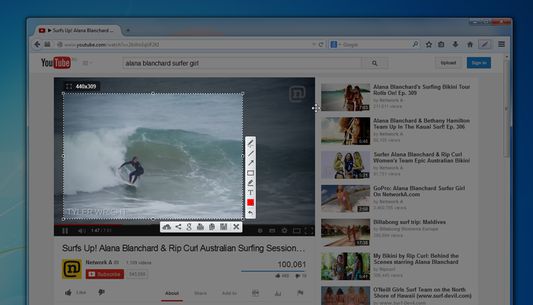
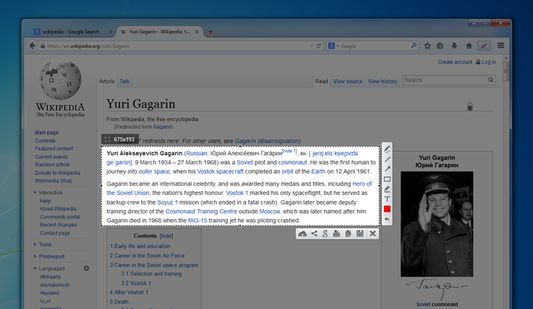
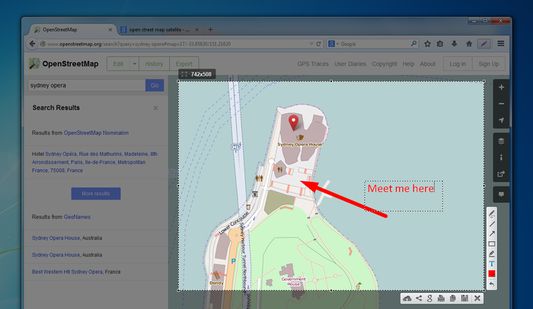
Lightshot toolbar buttonYou can take a screenshot of video/flash/javaSelect areaEdit your screenshots
À propos de cette extension
Lightshot is a tool allowing you to easily make screenshots of any selected area in a browser tab. You just hit Lightshot icon on the toolbar or status bar, then select area you want to make a screenshot from and click “Save” or “Upload to server". In case of uploading you instantly get link to a screenshot you’ve just uploaded.
It is possible to resize and move selection area right in a browser tab without opening any additional applications. That makes the process very simple and easy. You also can edit your screenshots (add text, draw lines and more other functions).
Commentaires du développeur
Test picture: http://prntscr.com/3hjkmh

We will be adding new interesting features to make the screenshoting better and easier.

Frequently asked questions about LightShot:

Q: Can I copy screenshot to the windows clipboard?
A: Yes, you can! Just select a region for shooting and press Ctrl+C.

Q: How can I make a screenshot faster?
A: You can press Ctrl before selecting a region and the addon will copy your screenshot to the clipboard as soon as you release the mouse button.

Q: Can your addon run on Linux or Mac?
A: No, but maybe one shiny day ;)

Q: What image formats do you support?
A: Currently it is .png, .bmp, and .jpg

Q: What server do you use to host uploaded screenshots?
A: Imageshack

Q: I found some issues in LightShot. How can it be solved?
A: Please make sure you are using the latest build, and if its still there contact us on support@skillbrains.com

Q: I have something to tell you about the LightShot how can I contact you?
A: The best way is to contact us by messaging us through Facebook page or sending e-mail.

Q: What hotkeys does LightShot have?
A: Check the hotkey list page on our site to get further information.
Noté 4 par 208 personnes
Connectez-vous pour noter cette extension
Il n’y a aucune note pour l’instant

Le nombre d’étoiles est enregistré

5
133
4
19
3
9
2
11
1
36
Lire les 208 critiques
Autorisations et données

Autorisations nécessaires :

  • Ajouter des données dans le presse-papiers
  • Télécharger des fichiers, et consulter et modifier l’historique des téléchargements du navigateur
  • Vous afficher des notifications
  • Accéder aux onglets du navigateur
  • Accéder à vos données pour tous les sites web
En savoir plus
Plus d’informations
Liens du module
  • Page d’accueil
  • Site d’assistance
  • E-mail d’assistance
Version
6.2.5resigned1
Taille
691,06 Ko
Dernière mise à jour
il y a 2 ans (25 avr. 2024)
Catégories associées
  • Photos, musique et vidéos
  • Social et communication
Licence
Custom License
Historique des versions
  • Voir toutes les versions
Ajouter à la collection
Signaler ce module
Aller à la page d’accueil de Mozilla

Modules complémentaires

  • À propos
  • Blog des modules complémentaires Firefox
  • Atelier sur les extensions
  • Pôle développeur
  • Politiques à destination des développeurs
  • Blog de la communauté
  • Forum
  • Signaler un problème
  • Guide de revue

Navigateurs

  • Desktop
  • Mobile
  • Enterprise

Produits

  • Browsers
  • VPN
  • Relay
  • Monitor
  • Pocket
  • Bluesky (@firefox.com)
  • Instagram (Firefox)
  • YouTube (firefoxchannel)
  • Confidentialité
  • Cookies
  • Mentions légales

Sauf mention contraire, le contenu de ce site est disponible sous licence Creative Commons Attribution Share-Alike v3.0 ou toute version supérieure.