Edit with Notepad++ par Joe Ertaba
Edit an HTML element and all its child nodes in Notepad++ Text editor with real-time updates
132 utilisateurs·trices132 utilisateurs·trices
Métadonnées de l’extension
Captures d’écran
À propos de cette extension
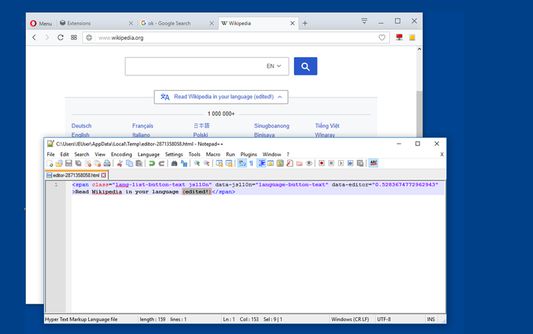
With this extension, the content of an HTML node element and all its child nodes can be edited in well-known Nodepad++ editor with real-time updates.
To start a new editing instance, click on the toolbar button once and drag the mouse button inside the page. You will get the inspection box similar to the built-in inspector. Left-click saves the content in a temporary directory and opens the Notepad++ editor. Once the content is changed press the save button for automatic update. On Chrome browser, you can also open a new instance using the developer tools. Switch to the inspect tab, select the desired element and in the right-panel, click on the "Edit with Notepad++" panel.
Note: You can edit multiple nodes simultaneously with this extension
Note: Files are stored in the OS temporary directory, so there is no need to delete them manually
For more info please visit:
http://add0n.com/edit-as-html.html
For bug reports use:
https://github.com/belaviyo/edit-as-html/issues
Video Tutorials:
Windows: https://youtu.be/xX-j-HQ8WJI
Linux and Mac: https://youtu.be/8r756Z3wQ8M
To start a new editing instance, click on the toolbar button once and drag the mouse button inside the page. You will get the inspection box similar to the built-in inspector. Left-click saves the content in a temporary directory and opens the Notepad++ editor. Once the content is changed press the save button for automatic update. On Chrome browser, you can also open a new instance using the developer tools. Switch to the inspect tab, select the desired element and in the right-panel, click on the "Edit with Notepad++" panel.
Note: You can edit multiple nodes simultaneously with this extension
Note: Files are stored in the OS temporary directory, so there is no need to delete them manually
For more info please visit:
http://add0n.com/edit-as-html.html
For bug reports use:
https://github.com/belaviyo/edit-as-html/issues
Video Tutorials:
Windows: https://youtu.be/xX-j-HQ8WJI
Linux and Mac: https://youtu.be/8r756Z3wQ8M
Noté 3,2 par 5 personnes
Autorisations et données
Autorisations nécessaires :
- Communiquer avec d’autres programmes que Firefox
- Télécharger des fichiers, et consulter et modifier l’historique des téléchargements du navigateur
- Vous afficher des notifications
- Accéder aux onglets du navigateur
- Accéder à vos données pour tous les sites web
Plus d’informations
- Liens du module
- Version
- 0.1.3
- Taille
- 44,92 Ko
- Dernière mise à jour
- il y a 6 ans (7 oct. 2019)
- Catégories associées
- Licence
- Mozilla Public License 2.0
- Politique de confidentialité
- Lire la politique de confidentialité de ce module
- Historique des versions
- Ajouter à la collection
Le développeur de cette extension demande que vous l’aidiez à assurer la poursuite de son développement en lui versant une petite contribution.