Firefox-selaimen lisäosat
  • Laajennukset
  • Teemat
    • Firefoxille
    • Oikolukusanastot ja kielipaketit
    • Muiden selainten sivustot
    • Lisäosia Androidille
Kirjaudu sisään
HTML Tag Changer esikatselu

HTML Tag Changer tekijä Kai Grunert

Select HTML elements and change their tag names. You can select elements with a CSS selector and specify the intended new tag name. You can also hide or remove the elements. E.g. this can be useful to include specific elements in the Reader View.

0 (0 reviews)0 (0 reviews)
2 käyttäjää2 käyttäjää
Lataa Firefox ja hanki laajennus
Lataa tiedosto

Laajennuksen metatiedot

Kuvakaappaukset
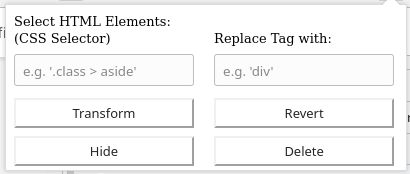
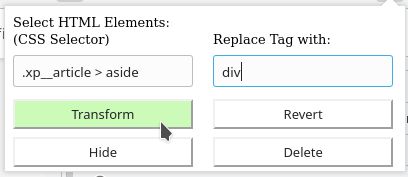
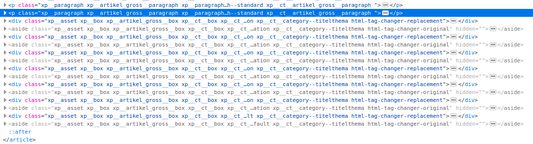
Default display if you open the add-onSelect the HTML elements with a CSS selector and type the new tag nameThe original source code before the transformationThe new source code after the transformation
Tietoja tästä laajennuksesta
This browser add-on can change the HTML element tag names on a web page into another tag name. You can select the HTML elements that should be replaced with a CSS selector and state the new tag names.

Furthermore you can hide or delete the selected elements from the web page. The former is usually preferred, because you will be able to revert the changes afterwards. If you use delete, you need to reload the complete page to revert the changes.

Example: The Reader View of Firefox includes and presents only a selection of HTML elements like <p>. But if the web page contains important hint or content boxes in <aside> elements, you will not see them in the Reader View. You can use this add-on to change all <aside> elements in appropriate elements before you turn on the Reader.

There is a Revert button - if it doesn't work correctly, just reload the complete page.

Hints:
  • Due to a lack of API support, the event listeners for an element can not be copied into the new element
  • Pay attention to the structure of a web page: some elements (often inline elements) don't allow to include other elements. E.g. if you want to change all <aside> elements into <p> elements, this can lead to unpredictable behavior if the <aside> element contains further block elements, because <p> is not allowed to contain block elements.
  • If the replacement contains web components, this can also lead to some side effects

Details:

The add-on does not delete the original elements, but it hides them. Therefore the actions can be reverted.
Arvio 0 0 arvostelijan toimesta
Kirjaudu sisään arvostellaksesi tämän laajennuksen
Ei vielä arvioita

Tähtiarvio tallennettu

5
0
4
0
3
0
2
0
1
0
Ei arvioita
Lisätietoja
Lisäosan linkit
  • Kotisivu
  • Tukisivu
Versio
1.0
Koko
29,6 kt
Viimeksi päivitetty
kuusi vuotta sitten (2. touko 2020)
Liittyvät luokat
  • Websivujen kehitys
  • Käyttöliittymän muokkaus
Lisenssi
Mukautettu lisenssi
Versiohistoria
  • Näytä kaikki versiot
Lisää kokoelmaan
Ilmoita tästä lisäosasta
Siirry Mozillan verkkosivustolle

Lisäosat

  • Tietoja
  • Firefox-lisäosien blogi
  • Laajennustyöpaja
  • Kehityskeskus
  • Kehittäjäkäytännöt
  • Yhteisön blogi
  • Keskustelualue
  • Ilmoita ongelmasta
  • Opas arviointiin

Selaimet

  • Desktop
  • Mobile
  • Enterprise

Tuotteet

  • Browsers
  • VPN
  • Relay
  • Monitor
  • Pocket
  • Bluesky (@firefox.com)
  • Instagram (Firefox)
  • YouTube (firefoxchannel)
  • Tietosuoja
  • Evästeet
  • Juridiset asiat

Jos ei erikseen mainita, tämän sivuston sisällön kattaa lisenssi Creative Commons Attribution Share-Alike License v3.0 tai mikä tahansa uudempi versio.