
HTML-Table Scraper tekijä TAULU.inc
Scrape HTML Table Data to Clipboard or Save-to-File in either CSV or TAB delimited with options
830 käyttäjää830 käyttäjää
Laajennuksen metatiedot
Kuvakaappaukset
Tietoja tästä laajennuksesta
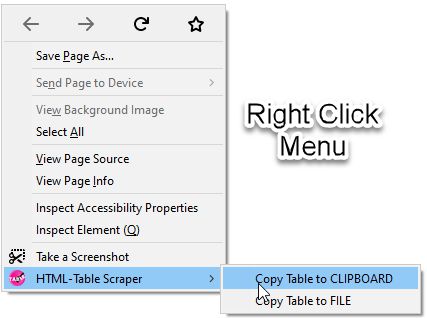
HTML-Table Scraper is a simple Extension that allows you to right click any HTML table and select to copy the data in that table to the Clipboard or Save-to-File in either CSV or Tab delimited.
Right Click Table to Select HTML-Table Scraper to Clipboard or File
Holding CTRL Down while Right Click will automatically Copy Table to Clipboard without selecting the context menu option. This is useful for website that block the context menu from showing up on right clicks.
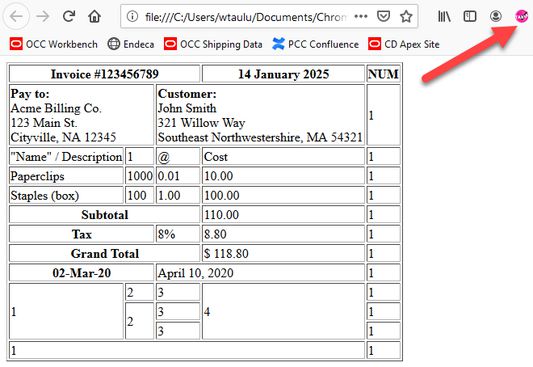
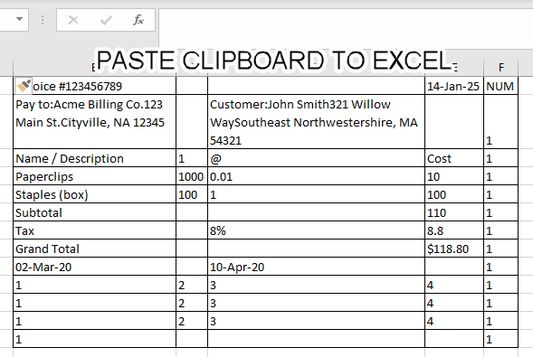
Scraper fully supports ColSpan and RowSpan
- ColSpan: Value will be placed in the first Column. Additional Columns in Span will be set to NULL for the value.
- RowSpan: Value will be repeated for each consecutive row in the RowSpan of the table
Automatic Formatting
- All cells are Trimmed of white-space
- All tabs are removed
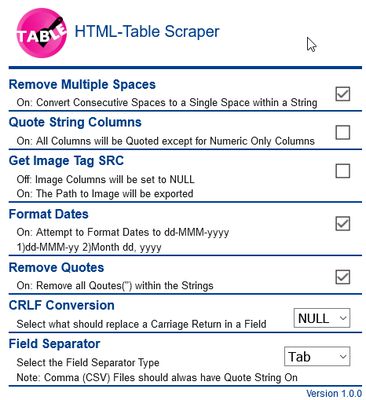
Available Options to Scrape the Data.
Delimited: CSV or TAB
CRLF Replacement: Replace Carriage Returns inside a string with a NULL or SPACE.
Quote Strings: Option to check each column to see if they are Numeric or String Columns: If selected, all String Columns will be placed inside double quotes with the exception of Numeric Columns.
Remove Quotes: Option to remove any double quotes found inside a string.
Remove Multiple Spaces: Option to Convert Consecutive Spaces to a Single Space within a String
Get Image SRC: Option to get the SRC link of the each image.
Format Dates: Option will attempt to format dates to dd-MMM-yyyy. Currently only looks for 1)dd-MMM-yy 2)Month dd, yyyy to convert to dd-MMM-yyyy
Right Click Table to Select HTML-Table Scraper to Clipboard or File
Holding CTRL Down while Right Click will automatically Copy Table to Clipboard without selecting the context menu option. This is useful for website that block the context menu from showing up on right clicks.
Scraper fully supports ColSpan and RowSpan
- ColSpan: Value will be placed in the first Column. Additional Columns in Span will be set to NULL for the value.
- RowSpan: Value will be repeated for each consecutive row in the RowSpan of the table
Automatic Formatting
- All cells are Trimmed of white-space
- All tabs are removed
Available Options to Scrape the Data.
Delimited: CSV or TAB
CRLF Replacement: Replace Carriage Returns inside a string with a NULL or SPACE.
Quote Strings: Option to check each column to see if they are Numeric or String Columns: If selected, all String Columns will be placed inside double quotes with the exception of Numeric Columns.
Remove Quotes: Option to remove any double quotes found inside a string.
Remove Multiple Spaces: Option to Convert Consecutive Spaces to a Single Space within a String
Get Image SRC: Option to get the SRC link of the each image.
Format Dates: Option will attempt to format dates to dd-MMM-yyyy. Currently only looks for 1)dd-MMM-yy 2)Month dd, yyyy to convert to dd-MMM-yyyy
Arvio 5 4 arvostelijan toimesta
Käyttöoikeudet ja data
Vaaditut käyttöoikeudet:
- Vie tietoja leikepöydälle
- Pääsy tietoihisi kaikilla verkkosivuilla
Valinnaiset käyttöoikeudet:
- Pääsy tietoihisi kaikilla verkkosivuilla
Lisätietoja
- Lisäosan linkit
- Versio
- 4.0.1
- Koko
- 64,51 kt
- Viimeksi päivitetty
- neljä kuukautta sitten (10. kesä 2026)
- Liittyvät luokat
- Versiohistoria
- Lisää kokoelmaan