xPath Finder Tomasz Rembacz توسط
Plugin to get the elements xPath.
۳٬۱۵۷ کاربر۳٬۱۵۷ کاربر
فرادادهٔ افزونه
تصاویر صفحه
دربارهٔ این افزونه
Usage
1. Click on the plugin icon, cursor will be changed to the crosshair
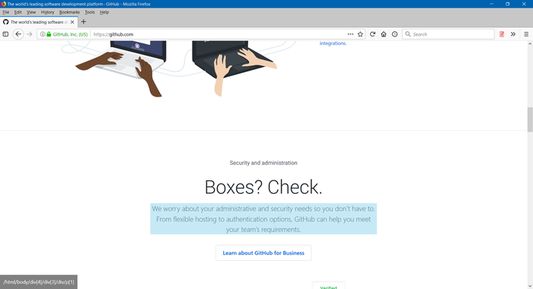
2. Hover over the desired element (elements are highlighted on hover)
3. Click on the element and his xPath will display in the panel at the bottom of the page
Options:
- turn on/off inspector,
- turn on/off auto copy to clipboard,
- choose between short ID's or normal path,
- change xpath box position
1. Click on the plugin icon, cursor will be changed to the crosshair
2. Hover over the desired element (elements are highlighted on hover)
3. Click on the element and his xPath will display in the panel at the bottom of the page
Options:
- turn on/off inspector,
- turn on/off auto copy to clipboard,
- choose between short ID's or normal path,
- change xpath box position
امتیاز ۴٫۲ توسط ۴۶ بررسیکننده
دسترسیها و دادهها
اطلاعات بیشتر
- پیوندهای افزونه
- نسخه
- 1.0.2
- اندازه
- ۲۰٫۴۷ کیلوبایت
- آخرین بهروزرسانی
- ۶ سال پیش (۱۱ ژوئن ۲۰۲۰)
- مجوز
- مجوز MIT
- تاریخچهٔ نسخهها
- افزودن به مجموعه