
Wordpress Admin Menu Search TechteachBytes توسط
Easily navigate your WordPress admin dashboard with our Search Bar extension.
۱ کاربر۱ کاربر
فرادادهٔ افزونه
تصاویر صفحه
دربارهٔ این افزونه
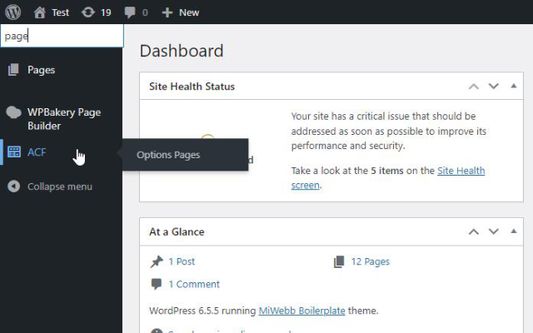
This extension adds a search bar to the WordPress admin menu, enabling you to quickly find menu items and sub-menu items. Perfect for administrators managing extensive WordPress sites, this tool ensures you can swiftly locate settings, plugins, and other essential menu items.
Key Features:
- Adds a search bar to the WordPress admin menu.
- Filters menu items and sub-menu items based on your search query.
- Displays all sub-menu items if the parent menu item matches the search query.
- Hides non-matching sub-menu items, simplifying your navigation experience.
How to Use:
1. Install the extension.
2. Open your WordPress admin dashboard.
3. Use the search bar at the top of the admin menu to quickly find the items you need.
Enhance your productivity by streamlining your WordPress admin navigation today!
Key Features:
- Adds a search bar to the WordPress admin menu.
- Filters menu items and sub-menu items based on your search query.
- Displays all sub-menu items if the parent menu item matches the search query.
- Hides non-matching sub-menu items, simplifying your navigation experience.
How to Use:
1. Install the extension.
2. Open your WordPress admin dashboard.
3. Use the search bar at the top of the admin menu to quickly find the items you need.
Enhance your productivity by streamlining your WordPress admin navigation today!
امتیاز ۰ توسط ۱ بررسیکننده
دسترسیها و دادهها
اطلاعات بیشتر
- پیوندهای افزونه
- نسخه
- 1.0.2
- اندازه
- ۲۴۵٫۳۶ کیلوبایت
- آخرین بهروزرسانی
- ۲ سال پیش (۶ اوت ۲۰۲۴)
- دستهبندیهای مرتبط
- تاریخچهٔ نسخهها
- برچسبها
- افزودن به مجموعه