
VVimpulation amedama41 توسط
Provides keyboard navigation like Vim.
۵ کاربر۵ کاربر
فرادادهٔ افزونه
تصاویر صفحه


دربارهٔ این افزونه
VVimpulation has six modes, which are normal, insert, hint, console, visual, and suspend.
Normal Mode
Normal mode is VVimpulation's default mode.
Some key commands in this mode can combine a count (e.g. 3<C-F> scrolls down by 3 pages).
Insert Mode
Insert mode is the mode to edit the contents of text field.
Note: VVimpulation never switchs insert mode automatically even if a text field is focused. Must use mode changing commands (e.g. press
Hint Mode
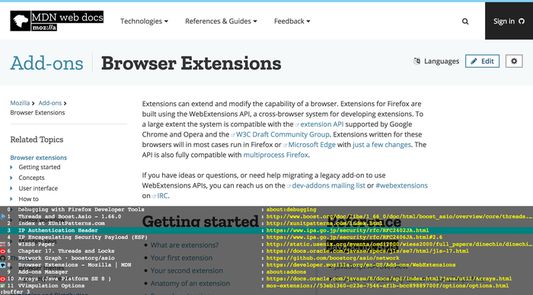
Hint mode is the mode to manipulate a target selected among candidate elements.
This mode has four hint types, link, focus, media, and code. Each type has different candidates.
In VVimpulation's hint mode, unlike the other Vimperator-like add-ons, select the target at first, and then decide an action for the target.
Console Mode
Console mode is the mode to invoke a console command (e.g. open, buffer, etc.).
Visual Mode
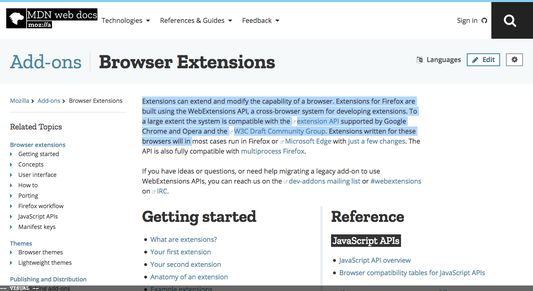
Visual mode is the mode to select a text in the current page, and manipulate the text, (e.g. copy, click, or delete the text).
Suspend Mode
Suspend mode is the mode to disable VVimpulation.
If you want to use shortcuts defined in the current page, use this mode.
Press
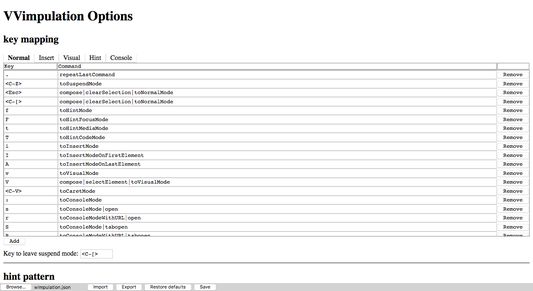
Normal mode basic key mapping:
Hint Mode's basic key mapping:
Normal Mode
Normal mode is VVimpulation's default mode.
Some key commands in this mode can combine a count (e.g. 3<C-F> scrolls down by 3 pages).
Insert Mode
Insert mode is the mode to edit the contents of text field.
Note: VVimpulation never switchs insert mode automatically even if a text field is focused. Must use mode changing commands (e.g. press
i key).Hint Mode
Hint mode is the mode to manipulate a target selected among candidate elements.
This mode has four hint types, link, focus, media, and code. Each type has different candidates.
In VVimpulation's hint mode, unlike the other Vimperator-like add-ons, select the target at first, and then decide an action for the target.
Console Mode
Console mode is the mode to invoke a console command (e.g. open, buffer, etc.).
Visual Mode
Visual mode is the mode to select a text in the current page, and manipulate the text, (e.g. copy, click, or delete the text).
Suspend Mode
Suspend mode is the mode to disable VVimpulation.
If you want to use shortcuts defined in the current page, use this mode.
Press
<C-[> to leave suspend mode.Normal mode basic key mapping:
j/k: Scroll down / up.<C-F>/<C-B>: Scroll a page down / up.gg/G: Go to the page top / bottom.l/h: Scroll right / left.J/K: Select the next / previous tab.<C-O>/<C-I>: Go back / forward in history.dd/dw: Close the current tab / window.u: Reopen the last closed tab.<C-L>/g<C-L>: Reload the current page with / without cache.o/O: Open in the current tab / in a new tab or click the focus element.c: Click the focus element.:: Open console.s/S: Open console with open / tabopen console command.r/R: Open console with open / tabopen console command and the current page URL.b/B: Open console with buffer / winbuffer console command.//?: Open forward / backward search console.f/F/t/T: Switch to link / focus / media / code hint mode.i: Switch to insert mode on the current focus editable element. If the focus element is not editable, Switch on the first editable element in the page.I/A: Switch to insert mode on the first / last editable element in the current page.v/<C-V>: Switch to visual / caret mode.<C-Z>: Switch to suspend mode..: Repeat the last key command.qfollowed by an alphabet : Start recording macro in the alphabet register.q: Stop recording macro.@followed by an alphabet : Replay the macro in the alphabet register.mfollowed by an alphabet : Mark the current scroll position in the alphabet mark (Local mark).`followed by an alphabet : Jump to the alphabet mark.
Hint Mode's basic key mapping:
- number : Select a hint target.
;/,: Select the next / previous hint target./: Start hint filter.zz: Switch hint overlap mode.o/O: Open in the current tab / in a new tab or click the hint target.c: Click the hint target.i: Focus the hint target. If the target is editable, switch the insert mode on the element._: Remove focus from the hint target.ye: Copy the hint target text.Y: Copy the hint target link value, or link, or text.s: Download the link of the hint target.v/<C-V>: Switch to visual / carent mode from the hint target.<Esc>/<C-[>: Switch to normal mode.
امتیاز ۴٫۱ توسط ۷ بررسیکننده
دسترسیها و دادهها
دسترسیهای الزامی:
- خواندن و تغییر نشانکها
- دریافت دادهها از کلیپبورد
- وارد کردن دادهها به کلیپبورد
- بارگیری پروندهها و خواندن و ویرایش تاریخچهٔ دانلود مرورگر
- خواندن متن تمام زبانههای باز
- دسترسی به تاریخچه مرور
- دسترسی به زبانههای اخیراً بسته شده
- دسترسی به زبانههای مرورگر
- دسترسی به فعالیت مرورگر در حین پیمایش
- دسترسی به دادههای شما در همهٔ وبسایتها
اطلاعات بیشتر
- پیوندهای افزونه
- نسخه
- 1.5
- اندازه
- ۱۰۶٫۹۸ کیلوبایت
- آخرین بهروزرسانی
- ۷ سال پیش (۲۳ ژوئن ۲۰۱۹)
- دستهبندیهای مرتبط
- مجوز
- مجوز MIT
- تاریخچهٔ نسخهها
- افزودن به مجموعه